
Use AI to update your CRM from call notes by separating fields into three groups. Let AI write factual activity data, ask it to suggest changes to important pipeline fields, and keep forecast and governance fields under human control.
After each call, the workflow should capture the transcript or notes, create a concise summary, extract relevant details, and present suggested updates for review. A weekly manager check then compares recent call evidence with the current pipeline, catching records that have started to drift.
The short answer: give each field a level of control
A clean CRM workflow begins with field-level rules. AI can handle facts that are directly observable in the call record, such as the call time, participants, duration, direction and outcome. It can also create a factual activity summary and a follow-up task when the next action is clear.
Pipeline fields need more care. AI can suggest that a deal may have moved from discovery to proposal, or that the buyer gave a later target date, but the rep should approve those changes before they are written. Forecast categories, margin thresholds and loss reasons should remain rep-owned because they affect management decisions and accountability.
This division keeps routine administration moving without allowing an uncertain interpretation to become official pipeline data. It also gives sales managers a clear answer when they ask which parts of the CRM are automated and which still require judgement.
Why call notes deserve a proper workflow
Sales teams lose useful information between the conversation and the next pipeline review. A detail about budget, a newly involved decision maker or a request for a formal proposal may remain in a transcript, a notebook or a private message instead of becoming usable CRM data.
Salesforce Research reports that sellers spend 40% of their working week actively selling, while manual data entry takes approximately 13% of a representative's time (Salesforce Research, 2026). A call-note workflow can reduce repetitive copying, provided it sends the right information to the right field.
The data quality risk runs in both directions. If reps leave fields blank, the CRM becomes difficult to trust. If an automation fills fields with guesses, the CRM can look complete while quietly recording the wrong information. Validity found that 76% of respondents said less than half of their organisation's CRM data was accurate and complete, and 37% reported direct revenue losses caused by poor CRM data quality (Validity, 2025).
The practical aim is controlled completeness. Every automated field should have a clear source, an allowed format, an owner and a way to correct it.
Build the workflow from call to CRM field
Start with the workflow, then choose the tools that fit it. A small sales team usually needs a call source, a transcription or notes input, an AI extraction step, a review point and a CRM write-back rule.
1. Capture the call record. Store the call date, participants, direction, duration and outcome. If a recording or transcript is used, confirm that the business has the required notice, consent and legal basis for the people involved. Privacy requirements vary by location and by the way audio is processed, so document the decision before switching recording on.
2. Create a bounded summary. Ask AI to summarise the customer's stated needs, concerns, questions, commitments and next steps. Give it a fixed structure and tell it to use “not stated” when the call contains no reliable evidence. Native CRM tools can create qualitative record summaries and timeline items, while structured property updates generally need explicit workflow logic or user approval (HubSpot, Summarize a record).
3. Extract candidate values. Ask for specific fields in a predictable format. For example, return the buyer's stated timeline, named stakeholders, confirmed next action, competitor references and evidence for any proposed stage change. Include the exact supporting phrase or a short call timestamp where possible.
4. Apply the field rule. Auto-fill low-risk factual fields. Send strategic fields to a review queue. Reject any attempt to update locked fields. This rule should live in the workflow rather than only in the AI prompt, because prompts can be misunderstood or changed.
5. Review and write with an audit trail. Show the rep three or four proposed changes immediately after the call. A useful review might say, “Suggested stage: Proposal. Evidence: buyer requested a formal pricing document. Suggested close date: 15 November. Evidence: buyer said procurement expects a decision by that date.” The rep accepts, edits or rejects each proposal, and the system records the reviewer and time of the change.
CRM platforms provide the building blocks for factual call logging. The HubSpot Calls API supports properties for call activities, while Salesforce documents conversation intelligence features for recording and analysing sales conversations (HubSpot Calls API; Salesforce Help). The exact implementation depends on the CRM, but the control pattern remains the same.
Use three tiers for field decisions
This framework gives sales reps and managers a simple operating rule. It also makes testing easier, because each field has expected behaviour before the workflow is built.
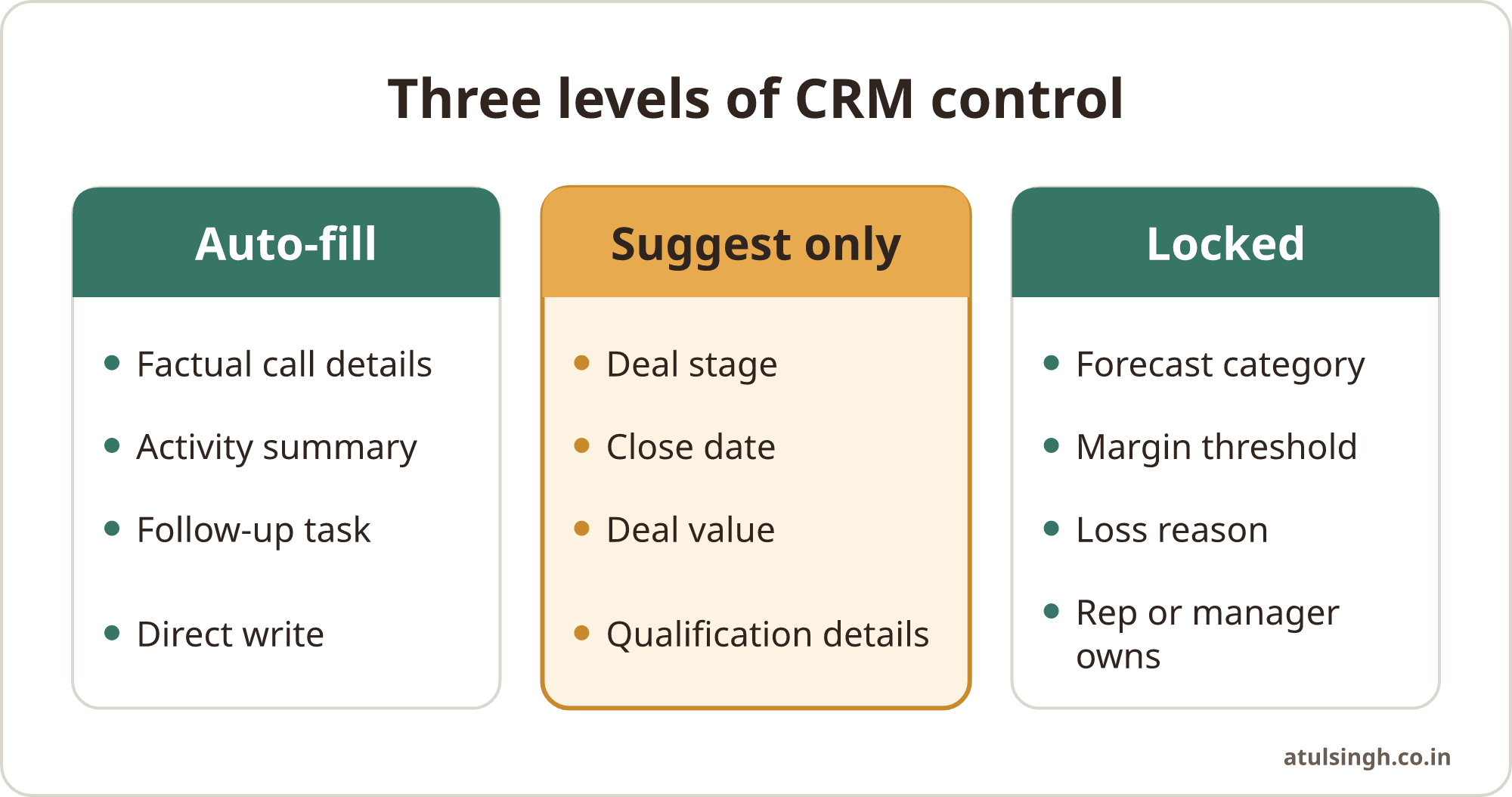
| Field tier | AI behaviour | Suitable fields | Human control |
|---|---|---|---|
| Auto-fill | Write when the evidence is direct and factual | Call date, participants, duration, direction, disposition, factual summary | Correct errors when found |
| Suggest only | Extract evidence and propose a value | Deal stage, close date, deal value, competitors, qualification details | Rep approves or rejects |
| Locked | Do not update | Forecast category, margin threshold, loss reason | Rep or manager owns the field |
Tier 1, auto-fill. These fields describe what happened to the call, rather than what the business believes will happen next. Call date and time, participant names, duration, inbound or outbound direction, connected or voicemail outcome, the raw AI summary and a clearly stated follow-up task are sensible candidates.
Tier 2, suggest only. These fields involve interpretation or commercial judgement. AI can identify evidence for a possible stage change, revised close date, amount mentioned by the buyer, competitor reference or qualification detail. The system should show the evidence and wait for approval.
Tier 3, locked. These fields guide governance and management reporting. Forecast overrides, margin thresholds and formal loss reasons should be changed by the responsible rep or manager. AI may point to relevant evidence in a summary, but it should not write the final value.
The completed call review workflow shows how qualification details, budget notes and next steps can be prepared for CRM review. The rep remains accountable for what the deal means, while the workflow records what was said and what action was agreed.
Examples across sales, marketing and support
Sales example. Say a rep finishes a discovery call. The workflow logs the time, attendees, duration and “connected” outcome. It summarises the buyer's stated problem and creates a task to send a security questionnaire. It then suggests adding an operations director as a stakeholder and moving the stage forward because the buyer requested a proposal. The rep reviews both suggestions before the CRM changes.
Marketing example. A marketing team may use sales call notes to identify recurring objections or requests for content. AI can group the themes and suggest a campaign tag, but a marketer should review the classification before it changes segmentation or triggers a customer communication. This prevents a tentative comment from becoming a durable view of the account.
Customer support example. After an escalation call, AI can record the participants, call outcome and a concise summary of the customer's reported issue. It can suggest an urgency or product area for review, while the support lead retains control of severity, service credits and commitments to the customer.
When the main issue is missing qualification information in recent opportunities, the sales call and transcript review workflow can support a manager's review queue.
Run a weekly CRM drift check
A post-call approval protects individual updates. A weekly drift check protects the pipeline as a whole. Once a week, run a report for deals with a call logged during the previous seven days and compare the summary with the relevant CRM fields.
Keep the review to a small set of discrepancy indicators:
- Stalled advancement: the summary says the prospect requested a formal pricing contract, but the stage remains Discovery.
- Phantom timing: the buyer said they will revisit the purchase next quarter, but the close date remains in the current month.
- Decision-maker mismatch: the call identifies a new executive stakeholder, but that person is absent from the opportunity contact roles.
The manager can correct the record, ask the rep for clarification, or mark the summary as insufficient evidence. Track the reason for corrections. A pattern of stale close dates may point to a process issue, while repeated wrong stakeholder matches may indicate poor contact data or unclear call attribution.
This check also catches silent overwrites. Compare recent summaries with manual notes and verified fields, and make sure the automation appends new information instead of replacing it without a record of the change. A CRM should show how a value changed, who approved it and which evidence supported the decision.
For teams dealing with inconsistent stages, blank required fields or unreliable close dates, the CRM clean-up and forecast workflow provides a useful starting point for repairing the underlying data before adding more automation.
Common mistakes, limits and where to start
Giving AI every field. A broad instruction such as “update the opportunity from the call” gives the system too much authority. Define an allowlist for auto-fill fields and a separate list for suggestions.
Treating tone as evidence. Politeness, enthusiasm or a request for information does not necessarily indicate buying intent. Ask AI to distinguish confirmed statements from possibilities, preferences and unanswered questions. A phrase such as “perhaps next month” should not be treated as a confirmed close date.
Overwriting useful notes. A short generated summary can lose detail from a rep's manual note. Preserve the original note, append the AI summary and use version history for structured values.
Skipping consent and data controls. Recording and processing calls can create privacy and contractual obligations. Confirm disclosure, lawful processing, retention, access permissions and any restrictions on sending audio or transcripts to external AI services.
Choose one call type, one team and five to eight fields. Begin with activity logging and a factual summary, then add two or three suggested pipeline fields after the team trusts the review step. Keep the workflow visible, document who owns each field and run the weekly drift report once the process is stable.
The goal is a CRM that reflects conversations accurately while keeping commercial judgement with the people responsible for the customer and the forecast. If the field rules, approval flow and checks need to be designed and connected to your CRM, a free 30-minute workflow review call can help you decide what, if anything, to automate.