
Use AI to follow up when a prospect gives you a useful signal, then make the message specific to that signal. A visit to a pricing page, a reply to one question, a proposal opening or a missed meeting can give you a reason to write. The system should help you interpret the event and prepare a relevant draft, while a person decides whether the message deserves to be sent.
Set stop rules before you automate anything. Stop when the prospect replies, books time, asks you to wait, opts out or reaches the agreed touch limit. If there is no meaningful activity, let the sequence pause instead of sending another artificial check-in.
The short answer: follow behaviour, not the calendar
A fixed sequence sends messages because a certain number of days has passed. A behaviour-led workflow sends a message because something changed. That difference affects both the quality of the conversation and the prospect's experience.
Start by defining the events that matter in your sales process. These might include a prospect replying to an email, attending a call, opening a proposal, visiting a relevant page, downloading a document or telling you a buying date. Treat each event as context, not as automatic permission to send.
AI can then summarise the event, compare it with previous conversations and suggest a useful next step. For example, it could draft a short note that answers the question raised on a discovery call, links the next step to the stated timeline and gives the prospect an easy way to decline or defer.
The seller still owns the judgement. A page visit may come from an intern, an existing customer or someone researching a competitor. A proposal opening may indicate internal sharing rather than buying intent. Review the signal, the recipient and the proposed message before the workflow sends anything with commercial or reputational consequences.
Why repetitive follow-up creates a sales problem
Prospects often want to research independently and involve a seller when they need context, fit or help with a decision. Gartner reported that 73% of surveyed B2B buyers actively avoid suppliers that send irrelevant outreach, while 61% prefer an overall rep-free buying experience (Gartner, 2025). Repeated messages with no connection to the buyer's actions can make your company easier to ignore.
A useful follow-up should reduce uncertainty. It might clarify how a service fits a particular team, answer an objection, explain an implementation detail or give the prospect a sensible next step. A message that simply asks whether the previous email was seen adds work without adding much value.
Gartner also reports that buyers increasingly use AI during purchase research and seek sales interaction for contextual intelligence, such as organisational fit. Buyers who achieve high value clarity are twice as likely to complete high-quality deals (Gartner, 2026). Your follow-up should therefore help the prospect understand their situation, rather than repeat product information they can find elsewhere.
High-volume cadence activity can also affect deliverability. Gong's engagement guidance links lower reply rates with excessive cadence-driven sending and recommends more targeted, context-informed touches (Gong, 2026). Gmail and Yahoo also expect senders to manage spam complaints and maintain sound sending practices (Gmail Help, 2024; Yahoo Sender Hub, 2024). A follow-up system that creates more unwanted mail can harm future delivery across the domain.
Build the workflow around signals and decisions
A small team can build this with a CRM, an email tool and an AI drafting step. Keep the design understandable enough for a sales manager or founder to inspect and change.
1. Record the original context. Store the prospect's role, company situation, stated problem, buying timeframe, questions, objections and agreed next step. A follow-up becomes easier to personalise when this information is available in one place.
2. Define meaningful signals. Choose events that can change the next action. A reply, meeting attendance, proposal review, pricing-page visit or documented company event may qualify. A generic page view or email open usually needs more caution because it carries little context.
3. Map each signal to one useful action. If a prospect asks about onboarding, prepare an onboarding explanation. If they share a target date, suggest a practical planning step. If they miss a meeting, acknowledge it and offer a simple rescheduling option. If they say the timing is wrong, record the timing and pause until the agreed period.
4. Ask AI for a draft with boundaries. Give it the relevant CRM notes, the latest activity, the recipient's role, the approved offer and the desired call to action. Tell it to avoid invented facts, pressure, false familiarity and repeated wording. Require it to say when the available context is too weak for a useful message.
5. Add human review thresholds. A seller should approve messages involving pricing, legal or security questions, sensitive customer situations, senior stakeholders or ambiguous intent. Lower-risk reminders can use a shorter review process, but the owner should still be able to inspect the trigger and draft.
6. Stop or pause after the next event. A reply should remove the person from the automated follow-up path. A booking should move them to the meeting workflow. A request to reconnect later should create a dated task based on the prospect's wording. No activity should leave the record dormant, rather than creating an endless sequence.
HubSpot's documentation describes intent-signal workflows that enrol or pause contacts based on activity recorded in the CRM timeline (HubSpot, 2026). The same principle can be implemented with simpler tools if the trigger, action and stop condition are visible to the team.
A practical signal-to-message process
The process below gives the team a repeatable operating model. It keeps AI close to the evidence and gives a person control over the send decision.
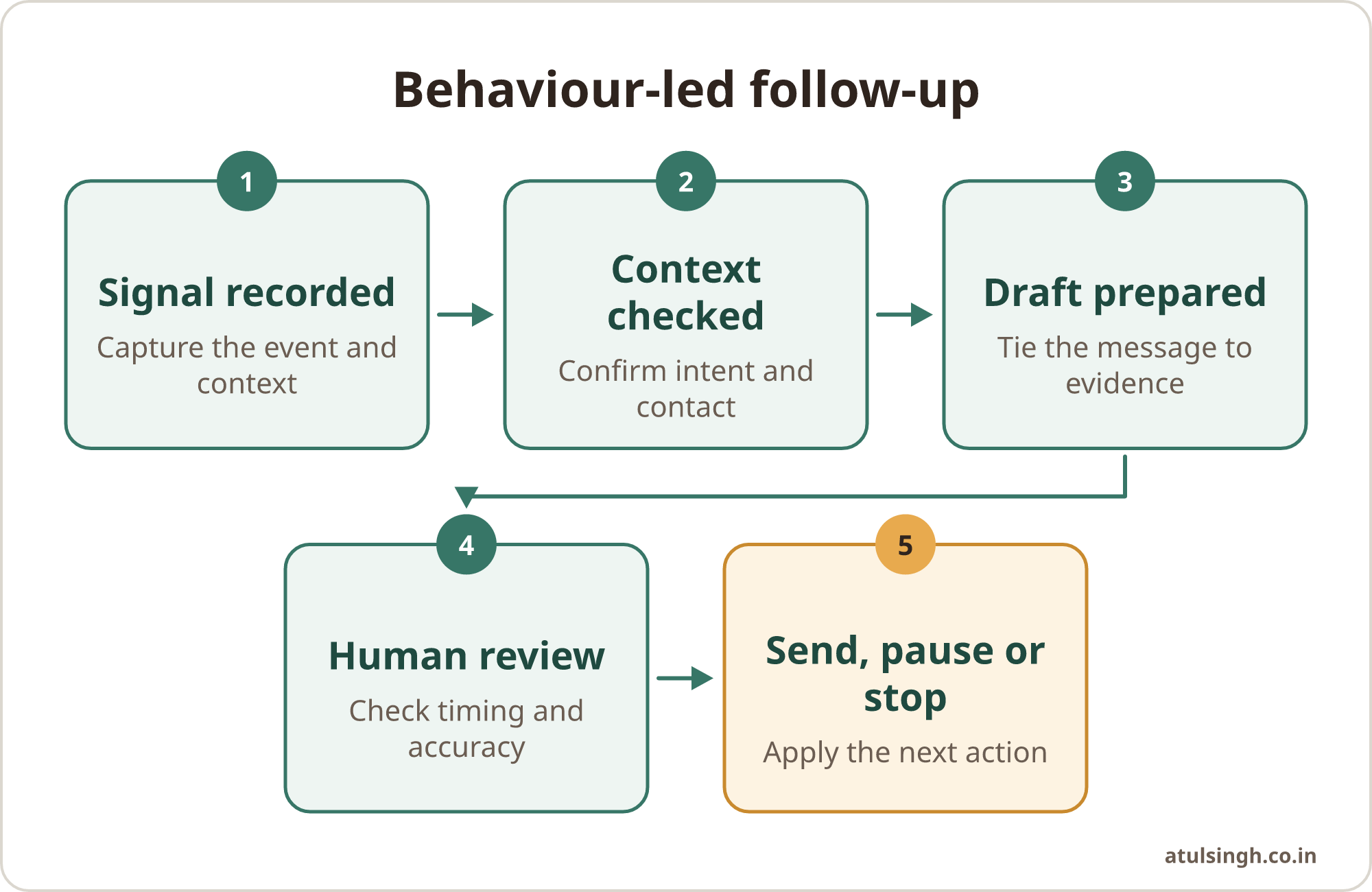
Signal recorded
      |
Context checked
      |
Draft prepared
      |
Human review
      |
Send, pause or stop
Signal recorded: Capture what happened and when. Include the page, document, conversation or meeting that created the signal.
Context checked: Confirm that the person is the right contact and that the activity means something in the current deal. Remove signals that could be accidental or unrelated.
Draft prepared: Ask AI to write one message tied to the event. The draft should explain why you are contacting the prospect now and offer a small, relevant next step.
Human review: Check accuracy, tone, timing and recipient. Remove claims that the source material does not support. Make sure the call to action suits the prospect's stated stage.
Send, pause or stop: Send only when there is a clear reason. Pause when more information is needed. Stop when the prospect replies, opts out, books time, asks you to wait or reaches the workflow limit.
A useful drafting prompt can require five inputs: latest signal, previous conversation, buyer concern, approved evidence and stop condition. A prompt such as the four-part sales follow-up email can help sellers structure the draft around a fresh angle, a clear ask and a respectful out clause.
What this looks like in real sales situations
After a discovery call: Say a prospect asks whether implementation can fit around an existing support team. AI can turn the call notes into a draft that answers that question, identifies the information still needed and suggests a short review. The seller checks that the implementation details are accurate before sending.
After a proposal is opened: Treat the event as a reason to inspect the deal, not as a reason to send an automatic nudge. If the proposal contains a section connected to the prospect's stated concern, the seller might send a concise clarification. If there is no new context, the workflow can wait for a reply or a scheduled review.
After a missed meeting: The best message acknowledges the missed appointment without implying blame. Offer one or two reasonable options, then stop if there is no response after the defined limit. A dedicated workflow for following up after a sales no-show can keep this case separate from ordinary prospecting.
When a prospect says the timing is wrong: Record the reason and the date or event that would change the timing. AI can prepare a future reminder using that context, but the reminder should pause if the person replies, changes role or asks not to be contacted.
When a proposal goes quiet: Review the last agreed action, open questions and decision process before writing. A workflow for proposals that went quiet is useful when a founder or AE needs a structured way to reopen the conversation without pretending that silence means interest.
For post-call drafting, conversation intelligence can help turn specific questions, objections and timeline constraints into a proposed email. Gong describes this approach in its follow-up email guidance, with the seller reviewing the draft before sending (Gong Help, 2026).
A stop-rule checklist for your team
Write these rules into the workflow and the operating guide. A stop rule that exists only in a seller's memory will be applied inconsistently.
| Situation | Workflow action | Human check |
|---|---|---|
| Prospect replies | Exit the automated sequence | Respond to the actual request |
| Prospect books time | Move to meeting preparation | Confirm the meeting context |
| Prospect asks to wait | Pause until the agreed point | Use the prospect's timing |
| Prospect opts out | Suppress future commercial outreach | Confirm suppression is recorded |
| Signal looks ambiguous | Hold the draft | Check the account and contact |
| Touch limit is reached | Close the sequence | Choose whether a later route exists |
| No meaningful activity | Leave the record dormant | Review only when context changes |
Use a clear touch limit that matches your market, relationship and channel. The exact limit should be set by the team and reviewed against replies, meetings, complaints and unsubscribes. Avoid treating silence as consent to continue.
Every commercial email should also provide a clear way to stop receiving messages, and your process should honour that request promptly. Check the requirements that apply to your countries, audiences and sending setup before launching an automated workflow.
Common mistakes and sensible limits
Using every signal as buying intent: A page visit can be useful context, but it can also be accidental. Combine activity with role, account fit, previous conversation and deal stage before contacting someone.
Letting AI invent relevance: A fluent sentence can still be wrong. Supply approved evidence and instruct the system to leave a field blank when the record does not support a claim.
Sending after a reply: This creates one of the clearest signs that the workflow is disconnected from the relationship. Make reply detection and sequence exit a core test before launch.
Automating sensitive conversations: Pricing changes, complaints, security reviews, procurement questions and executive communications need human ownership. AI can organise the information and prepare a draft, while the responsible person decides what the company should say.
Measuring only activity: Count useful replies, qualified conversations, meetings that progress and opt-outs, alongside sends. A larger send count can hide weaker relevance and poorer delivery.
Creating a complicated system: Small teams need a few dependable triggers, clear owners and an easy way to edit the rules. Start with one workflow, such as post-call follow-up or proposal review, then improve it after the team has used it in normal work.
Gartner has also warned that future B2B buying experiences will continue to value human interaction, particularly for complex decisions (Gartner, 2025). Use automation to preserve attention for the conversations that require judgement, context and trust.
Where to start on Monday
Choose one follow-up situation with a clear starting event and a visible owner. Post-call follow-up is often a practical first case because the source material already exists in notes or a transcript, and the desired next step is usually easy to define.
Write down the trigger, the information AI may use, the draft format, the review owner, the send limit and every stop condition. Test the workflow with old records and deliberately include replies, opt-outs, ambiguous signals and stale opportunities.
Run it manually for a short period before allowing automatic sending. Review drafts that were useful, drafts that lacked context and cases where the workflow should have paused. Then simplify the rules so the team can run and maintain them without depending on the person who built the system.
If the workflow needs to connect your CRM, call records, email platform and review steps, AI sales outreach systems covers a done-for-you system build with handover to the team. The aim is a small, owned workflow that supports better judgement and stops when the prospect has given you enough information to decide what happens next.