Use AI to review your sales pipeline before the weekly forecast meeting. Give it the deal age, stage history, recent activity, next-step quality and close-date changes, then ask it to rank the opportunities that need human attention.
The useful output is a short review list, not a mysterious score. For each deal, AI should show the evidence behind the concern, explain what is missing, and suggest questions for the rep. You then decide whether to advance, rescue, requalify or close the opportunity.
Start with four signs of a stalled deal
A deal can look active in a CRM while its buying process has stopped. Begin the review with four signals that are easy to inspect and useful across most sales teams.
Deal age: Compare the time an opportunity has spent in its current stage with the normal movement expected for that stage. A long stage duration does not prove that a deal is lost, but it gives you a reason to inspect the latest evidence.
Missing next step: Look for a specific action, owner and date. “Follow up” is too vague to guide a manager. “Procurement review with the buyer and finance lead on Thursday” gives the team something that can be checked.
Close-date drift: Review how often the expected close date has moved and whether the new date has a clear buyer event behind it. Gong reports that pushing a close date out by three or more weeks is strongly associated with losing control of the deal and lower win rates (Gong, CRM Close Dates).
Weak or narrow engagement: Check who has attended meetings, replied to messages and taken action. A single contact who remains enthusiastic without involving other stakeholders may leave the opportunity exposed. Gong’s analysis of 20,858 transcribed B2B sales calls found that very enthusiastic responses with few objections can be a form of “happy ears”, where apparent interest does not reliably indicate buying intent (Gong, Why Deals Fail to Close).
These signals work best together. A deal with an old close date but a confirmed legal review may be healthy. A deal with recent email activity, no agreed meeting and repeated date changes needs closer inspection.
Build the weekly AI review
Set a fixed point before the forecast meeting, such as the previous afternoon. The system should collect the current pipeline, compare it with the previous review and produce a short list of deals that require a decision.
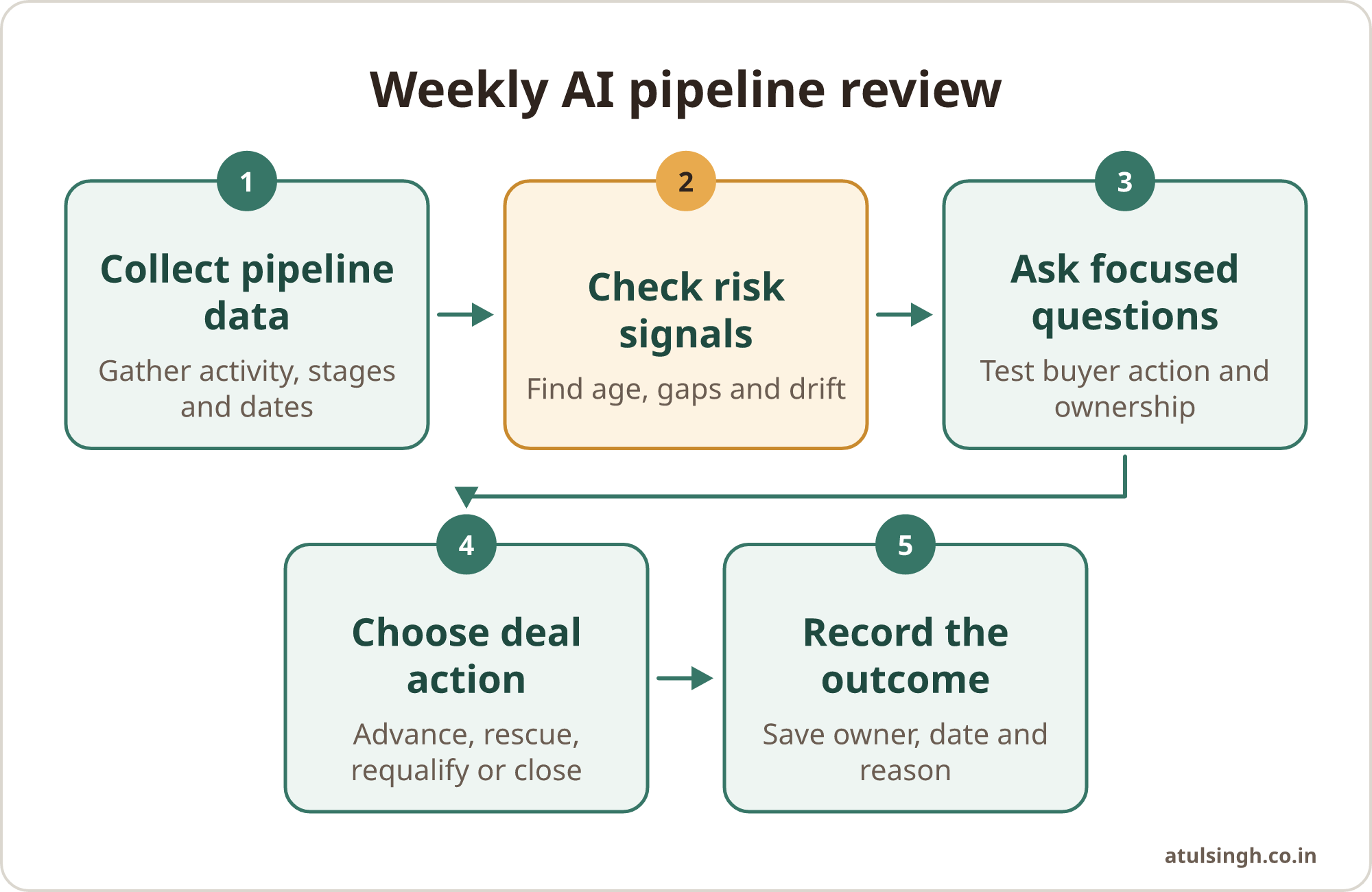
1. Define the review window. Decide how far back AI should inspect activity. This can include stage changes, meetings, call notes, emails, tasks, proposal views and close-date edits. Include the communication channels your team actually uses. If customer conversations happen in WhatsApp but the review only sees the CRM, the result will be incomplete.
2. Give AI clear rules. Ask it to flag deals with extended time in stage, no confirmed next step, repeated close-date changes, reduced engagement or only one active stakeholder. Ask for evidence, with the source and date of each observation. The instruction should also tell AI what to do when data is missing: mark the gap rather than filling it with an assumption.
3. Compare changes, not just snapshots. A single pipeline export tells you where deals are today. A weekly comparison shows which close dates slipped, which opportunities lost activity and which deals moved without supporting evidence. Tools such as Gong deal boards and Clari-style pipeline reviews are designed around this kind of structured inspection (Gong, Understanding Gong deals).
4. Produce an action list. Limit the output to deals that need a manager or rep decision. For each one, include the risk signal, supporting evidence, missing information, suggested rep question and recommended action. A manager should be able to review the list quickly and assign ownership during the meeting.
5. Record the outcome. After the meeting, capture the agreed next step, owner, date, revised close date and reason for any change. This gives the next review something reliable to compare. It also helps you identify whether the same blockage appears across several deals.
The process can run from a prompt, a CRM workflow, a spreadsheet export or a connected sales platform. Start with the workflow and the fields required for a sound decision. A sales pipeline deal auditor can help structure the review around evidence rather than rep confidence.
Ask questions that expose the real position
AI can identify patterns, but the rep and manager still need to test what those patterns mean. Use the review to ask precise questions rather than asking whether the deal is “still good”.
| Signal | Question for the rep | Evidence to request | Possible action |
|---|---|---|---|
| Long time in stage | What decision is the buyer making now? | Latest buyer action and agreed date | Advance, requalify or close |
| Missing next step | What will happen next, with whom and when? | Calendar event, email or task | Set a buyer-owned next step |
| Close date moved | What changed in the buying process? | Specific blocker and new event | Keep date, move it with reason or remove it |
| One active contact | Who else must approve, use or fund this? | Stakeholder names and involvement | Build a wider relationship map |
| Positive calls, little action | What has the buyer done since showing interest? | Reply, meeting, document or internal action | Test intent before investing more time |
| Proposal sent, no response | What decision was the proposal meant to support? | Buyer feedback and decision process | Reopen the conversation or close out |
Good questions focus on observable behaviour. “Do they like us?” usually produces an opinion. “What did they agree to do after the proposal?” produces something that can be checked.
Ask about the buyer’s process, too. Who owns the business problem? Who approves the spend? What event creates a reason to act? What happens if the decision slips? These answers help distinguish a genuine delay from a deal that was never qualified properly.
For an opportunity that has gone quiet, AI can draft a short review of the last meaningful interaction and suggest a re-engagement question. A stalled deal revival identifier is useful when the pipeline contains several old proposals and the team needs to decide which one deserves attention.
Turn review findings into decisions
A weekly review should end with a small number of clear outcomes. Avoid leaving every deal in the same stage with a note saying “follow up”.
Advance: The buyer has completed the required step, the next decision is known and the opportunity has a dated action with an owner.
Rescue: The problem still matters, but an important relationship or decision step is missing. Assign a specific action, such as involving procurement, confirming the business case or arranging a user review.
Requalify: The opportunity may still be relevant, but the value, authority, timing or buying process is unclear. Return it to an earlier stage or change the forecast category until evidence improves.
Close out: There is no current buyer action, no credible next step or no agreed reason to continue. Closing the record keeps future pipeline reviews focused and gives marketing or customer support a cleaner handover where appropriate.
Say a ten-person software agency has a proposal due to close on Friday. The CRM shows two recent emails, but the last buyer meeting was six weeks ago, the close date has moved twice and no finance contact is listed. AI can summarise those facts and suggest questions. The manager still decides whether the rep should call the buyer, arrange a finance review, move the date or close the opportunity.
The same pattern applies beyond new business. A marketing team can use the review to find campaign-generated opportunities that have received no sales response. A customer support team can flag expansion opportunities where a customer mentioned a new need but no account owner recorded a next step. The fields and permissions differ, while the inspection method remains similar.
Make the data trustworthy enough to use
AI pipeline reviews depend on the quality and coverage of the underlying records. CRM systems often contain incomplete notes, inconsistent stage definitions, duplicate contacts and tasks that were never completed. If the system cannot see important email, call or messaging activity, it may label an active deal as quiet.
Permissions and object relationships matter as well. HubSpot notes that AI deal prioritisation can use pipeline momentum and account-level changes to help identify deals that need attention (HubSpot, AI Deal Prioritization). In practice, a misaligned CRM structure or incomplete permissions can produce confident summaries that omit important context.
Run a manual check before trusting the workflow. Pick a small sample of open deals and compare the AI output with the CRM record, calendar, email history and call notes. Record what the system missed. Then adjust the data connections, field definitions or review instructions before expanding the process.
Keep a human approval step for forecasts, customer communications and sensitive account decisions. AI can recommend that a deal be requalified, but a manager should check the commercial context. It can draft a message, but the rep should review the wording and decide whether sending it fits the relationship.
A weekly pipeline health summary can turn stage changes into a repeatable meeting input. If the team needs a broader review of the meeting preparation workflow, use a pipeline review workflow that collects the relevant records before the team meeting.
Avoid the common implementation mistakes
Starting with a dashboard: A dashboard can display many signals while leaving the manager to interpret each one. Define the decisions first, then show only the evidence required for those decisions. Alerts in Slack or email can help when they are tied to an owner and a clear action, rather than adding another place to check.
Treating rep confidence as evidence: Forecast categories and deal notes contain useful context, but they are still judgements. Compare them with buyer actions, stakeholder coverage, meeting attendance, response patterns and dated next steps. One respected rep’s confidence should not override contradictory evidence.
Using one rule for every stage: A discovery deal and a procurement deal have different expected activities. Set stage-specific checks where possible, and allow the manager to see which rule caused the flag.
Writing vague next steps: AI will reproduce vague CRM habits unless the workflow requires an action, owner and date. Make those fields mandatory for deals included in the forecast.
Automating customer contact too early: Start with internal summaries and suggested questions. Add outbound drafting only after the team has checked whether the summaries are accurate and whether the tone suits the account.
Ignoring slipped reasons: When a close date changes, record a reason from a controlled list and allow a short explanation. Reviewing these reasons in forecast meetings can reveal recurring issues such as missing approval, weak urgency or late procurement involvement. A stalled deals review workflow can help organise that inspection before the weekly forecast.
Start with one weekly review
Choose one pipeline, one meeting and one review owner. Begin with four checks: time in stage, dated next step, close-date changes and stakeholder engagement. Ask AI to return the evidence, identify missing information and suggest two or three questions for each flagged deal.
For the first few weeks, compare the output with the manager’s judgement. Remove signals that create noise and add fields that explain real risk. Keep the final list short enough for the team to act on during the meeting.
Once the process is dependable, connect it to CRM updates, meeting preparation and internal alerts. The aim is a small system that the team understands and can run without specialist support. If the workflow needs to be mapped, connected and documented for your sales team, a done-for-you AI workflow review can help you decide what to automate and what should remain under human judgement.