
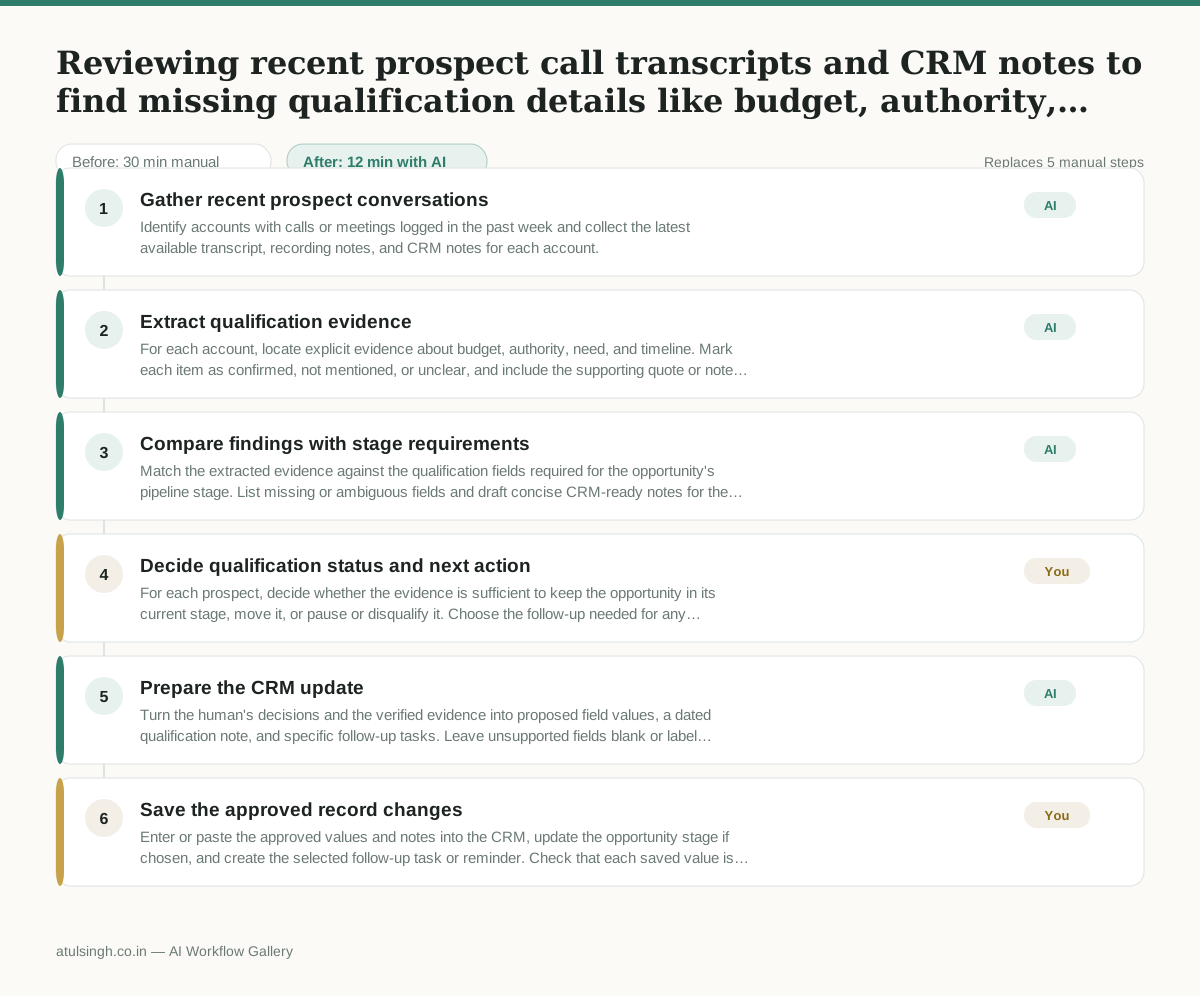
Reviewing recent prospect call transcripts and CRM notes to find missing qualification details like budget, authority, need, and timeline.
Reps forget to log critical qualification notes in the CRM right after calls, or leave fields blank, leading to inaccurate pipeline reviews and wasted time chasing unqualified leads.
- Before
- 30 min
- After
- 12 min
- Saved
- 18 min
How this used to go
- Open the CRM and filter for accounts with recent calls or meetings logged in the past week.
- Click into each individual account and open the most recent call recording, transcript, or meeting notes.
- Scan the text for mentions of budget, decision-making authority, specific pain points, and implementation timelines.
- Compare the findings against the required CRM qualification fields for that pipeline stage.
- Manually type or paste the missing details into the corresponding CRM fields and save the record.
Reading through lengthy transcripts of routine discovery calls just to find out whether a budget was actually mentioned.
The workflow, step by step
- AI
1. Gather recent prospect conversations
Identify accounts with calls or meetings logged in the past week and collect the latest available transcript, recording notes, and CRM notes for each account.
- AI
2. Extract qualification evidence
For each account, locate explicit evidence about budget, authority, need, and timeline. Mark each item as confirmed, not mentioned, or unclear, and include the supporting quote or note rather than inferring an answer.
- AI
3. Compare findings with stage requirements
Match the extracted evidence against the qualification fields required for the opportunity's pipeline stage. List missing or ambiguous fields and draft concise CRM-ready notes for the confirmed details.
- You
4. Decide qualification status and next action
For each prospect, decide whether the evidence is sufficient to keep the opportunity in its current stage, move it, or pause or disqualify it. Choose the follow-up needed for any missing or unclear field; do not treat an unmentioned item as confirmed.
- AI
5. Prepare the CRM update
Turn the human's decisions and the verified evidence into proposed field values, a dated qualification note, and specific follow-up tasks. Leave unsupported fields blank or label them as unknown.
- You
6. Save the approved record changes
Enter or paste the approved values and notes into the CRM, update the opportunity stage if chosen, and create the selected follow-up task or reminder. Check that each saved value is supported by the transcript or CRM notes.
What you end up with
Where this falls apart
- A transcript contains ambiguous phrasing about budget constraints, causing the model to incorrectly categorize an unconfirmed estimate as a confirmed budget figure.
- A call recording lacks a diarized transcript to distinguish speakers, leading the model to attribute qualification answers given by the seller to the prospect instead.
More for SDR / BDR
- Researching target accounts for cold outreach by checking recent news and job postings to write a personalized first email
- Find specific triggers in a company annual report for a personalized pitch
- Mapping the buying committee for a target enterprise account before initial outreach
- Write a first-touch outbound email to a target account based on recent public signals like news, job postings, or social media activity
Also in sales
- Research an incoming company and its decision makers before a first sales meeting
- Prep for a B2B demo call by checking recent company news, job postings, and tech stack changes to build relevant questions.
- Reviewing a new sales rep's practice pitch against the team's call criteria before letting them talk to real prospects
- reaching out to former colleagues and personal contacts to announce a new company or product launch without sounding like a spammy marketer