
Reviewing completed sales calls and chat transcripts to log qualification details, budget notes, and next steps into the CRM.
Reps forget details mentioned during fast-moving conversations, leading to incomplete CRM records, missing qualification criteria, and delayed follow-ups.
- Before
- 15 min
- After
- 8 min
- Saved
- 7 min
How this used to go
- Open the call recording or transcript in the meeting software.
- Replay sections of the audio or skim the transcript to find qualification details like budget, authority, need, and timeline.
- Open the CRM record for the contacted account.
- Manually type or paste notes from the conversation into the relevant CRM fields.
- Update the deal stage and schedule the next task or follow-up date.
Having to re-read long transcripts or listen back to recordings to catch specific answers given by prospects while trying to remember to log every required field.
The workflow, step by step
- You
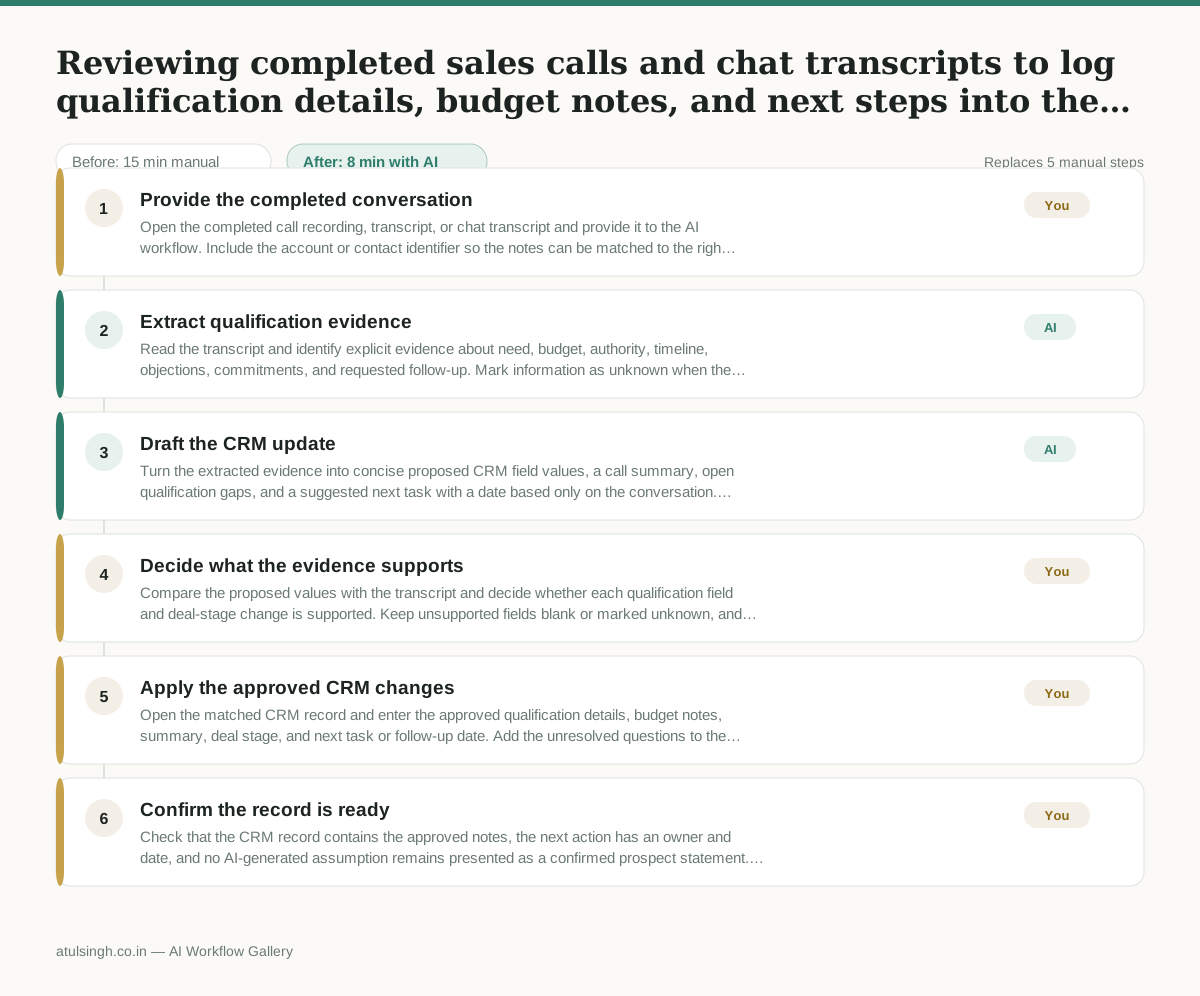
1. Provide the completed conversation
Open the completed call recording, transcript, or chat transcript and provide it to the AI workflow. Include the account or contact identifier so the notes can be matched to the right CRM record.
- AI
2. Extract qualification evidence
Read the transcript and identify explicit evidence about need, budget, authority, timeline, objections, commitments, and requested follow-up. Mark information as unknown when the conversation does not support it; do not infer budget, authority, or intent from silence.
- AI
3. Draft the CRM update
Turn the extracted evidence into concise proposed CRM field values, a call summary, open qualification gaps, and a suggested next task with a date based only on the conversation. Quote or point to the relevant transcript wording for details that could affect deal stage or qualification.
- You
4. Decide what the evidence supports
Compare the proposed values with the transcript and decide whether each qualification field and deal-stage change is supported. Keep unsupported fields blank or marked unknown, and choose a follow-up question instead of advancing the deal when a missing detail affects qualification.
- You
5. Apply the approved CRM changes
Open the matched CRM record and enter the approved qualification details, budget notes, summary, deal stage, and next task or follow-up date. Add the unresolved questions to the task so the next conversation has a clear purpose.
- You
6. Confirm the record is ready
Check that the CRM record contains the approved notes, the next action has an owner and date, and no AI-generated assumption remains presented as a confirmed prospect statement. Save the record.
What you end up with
Where this falls apart
- A conversation uses sarcasm, idioms, or industry-specific jargon that the model misinterprets, causing it to log incorrect qualification criteria into the CRM fields.
- A prospect shares critical budget or authority details over an unrecorded communication channel, causing the model to mark those fields as unknown due to missing transcript evidence.
More for SDR / BDR
- Researching target accounts for cold outreach by checking recent news and job postings to write a personalized first email
- Find specific triggers in a company annual report for a personalized pitch
- Mapping the buying committee for a target enterprise account before initial outreach
- Write a first-touch outbound email to a target account based on recent public signals like news, job postings, or social media activity
Also in sales
- Research an incoming company and its decision makers before a first sales meeting
- Prep for a B2B demo call by checking recent company news, job postings, and tech stack changes to build relevant questions.
- Reviewing a new sales rep's practice pitch against the team's call criteria before letting them talk to real prospects
- reaching out to former colleagues and personal contacts to announce a new company or product launch without sounding like a spammy marketer