
building next month's social calendar from the content roadmap
Turning a long-form content roadmap into structured social media posts takes hours of cross-referencing, reformatting, and scheduling. It is tedious to map themes across different platforms while trying to maintain a consistent posting cadence without missing key dates.
- Before
- 240 min
- After
- 90 min
- Saved
- 150 min
How this used to go
- Open the content roadmap and review the topics planned for the upcoming month.
- Map out a monthly posting schedule across chosen social media platforms.
- Draft individual post copy tailored to the character limits and tone of each specific platform.
- Locate or request accompanying images, links, or media assets for each post.
- Copy and paste everything into a social media scheduling tool or calendar spreadsheet.
Reformatting the same core piece of content into dozens of platform-specific variations while double-checking the calendar for gaps.
The workflow, step by step
- You
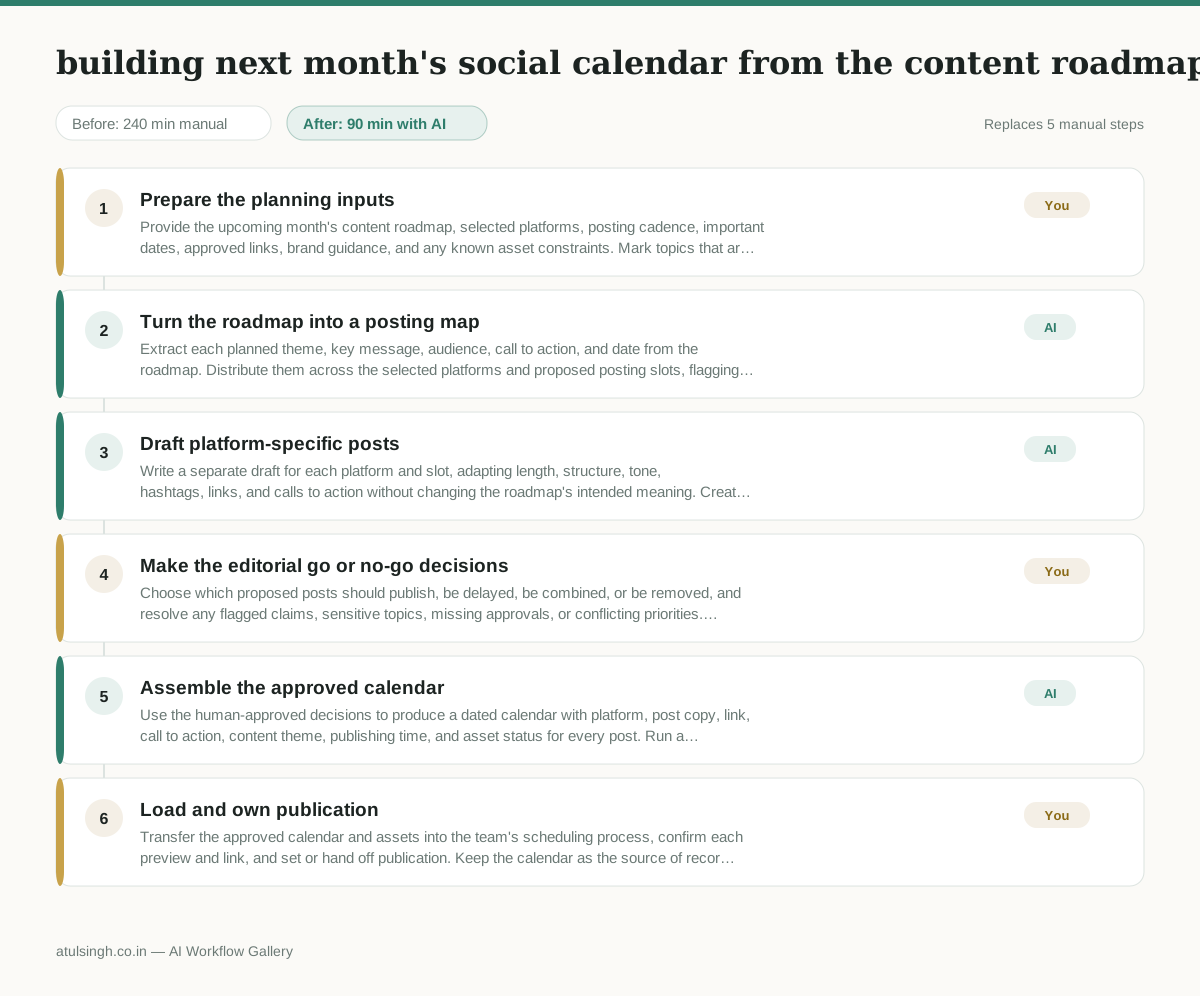
1. Prepare the planning inputs
Provide the upcoming month's content roadmap, selected platforms, posting cadence, important dates, approved links, brand guidance, and any known asset constraints. Mark topics that are mandatory, time-sensitive, or unsuitable for social promotion.
- AI
2. Turn the roadmap into a posting map
Extract each planned theme, key message, audience, call to action, and date from the roadmap. Distribute them across the selected platforms and proposed posting slots, flagging gaps, duplicate themes, missing dates, and topics that need human clarification.
- AI
3. Draft platform-specific posts
Write a separate draft for each platform and slot, adapting length, structure, tone, hashtags, links, and calls to action without changing the roadmap's intended meaning. Create an asset request beside any post that lacks an image, video, quote, or other required media.
- You
4. Make the editorial go or no-go decisions
Choose which proposed posts should publish, be delayed, be combined, or be removed, and resolve any flagged claims, sensitive topics, missing approvals, or conflicting priorities. Confirm the final calls to action and dates because AI cannot reliably judge business risk, legal sensitivity, or whether a message reflects current priorities.
- AI
5. Assemble the approved calendar
Use the human-approved decisions to produce a dated calendar with platform, post copy, link, call to action, content theme, publishing time, and asset status for every post. Run a consistency check for cadence gaps, duplicate copy, missing links, unresolved placeholders, and mismatched dates.
- You
6. Load and own publication
Transfer the approved calendar and assets into the team's scheduling process, confirm each preview and link, and set or hand off publication. Keep the calendar as the source of record and update it when assets, dates, or business priorities change.
What you end up with
Where this falls apart
- The input content roadmap lacks specific dates, themes, or core messaging, which causes the AI to invent irrelevant topics and incorrect publication timelines.
- The source roadmap contains ambiguous claims, regulatory nuances, or controversial stances, which causes the AI to generate misleading post copy that creates public relations or legal liability.
More for Social Media Manager
- Analyze competitor viral posts to draft three trend hooks, discarding off-brand angles
- pitching influencers and checking their engagement before sending messages
- Plan next month's organic social media posts and cut the weak ideas before anyone approves the schedule.
- Reviewing weekly social media numbers to figure out which post types missed the mark so we can plan next week's content.
Also in marketing
- Turn a recorded customer interview into a draft blog post
- Sorting incoming customer leads from web forms and assigning them to the right sales reps based on company size and location
- Turn a technical whitepaper into a three-part email nurture sequence before it launches
- Reviewing an existing ranking article, checking every claim and figure against current source data, and identifying outdated statements before republication