
Sorting through yesterday's inbound leads and deciding who to call or email first based on company size and how active they look.
Relying on a first-come, first-served approach or scanning lead forms manually means high-value accounts or people showing active buying signals often wait hours for a reply while reps spend time on low-fit prospects.
- Before
- 45 min
- After
- 15 min
- Saved
- 30 min
How this used to go
- Open the CRM lead queue and export the list of new inbound submissions from overnight.
- Check each company name against firmographic data providers or company websites to estimate employee count and revenue.
- Review form responses or tracking data to see if the contact visited high-intent pages like pricing or product demos.
- Cross-reference the domain against existing open opportunities or current accounts in the CRM.
- Assign a tier or priority score manually inside a spreadsheet or CRM custom field.
- Build the morning call and email list sorted by the manually assigned priority.
Spending the first hour of every workday on data entry and research instead of actual outreach.
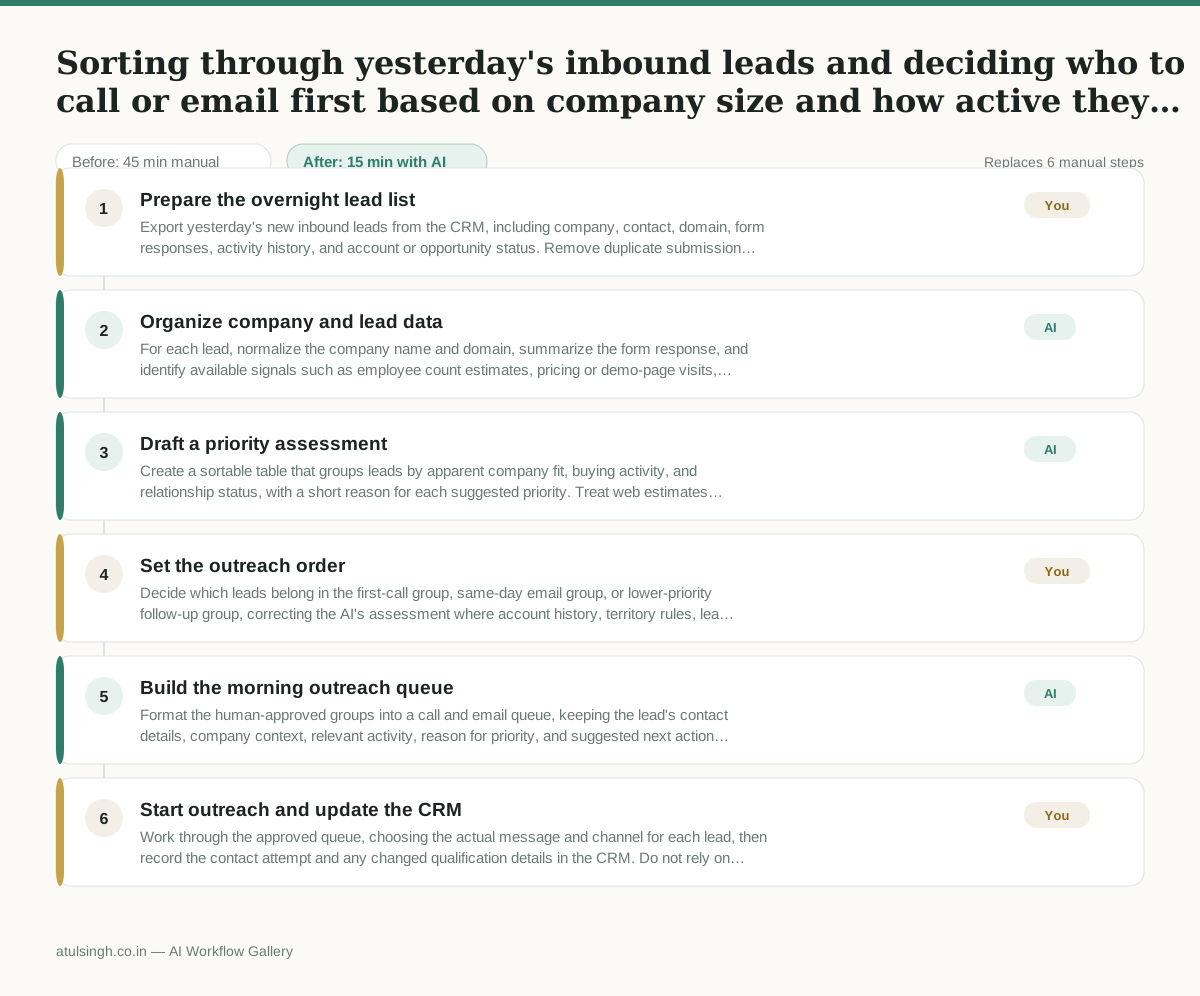
The workflow, step by step
- You
1. Prepare the overnight lead list
Export yesterday's new inbound leads from the CRM, including company, contact, domain, form responses, activity history, and account or opportunity status. Remove duplicate submissions before passing the list into the workflow.
- AI
2. Organize company and lead data
For each lead, normalize the company name and domain, summarize the form response, and identify available signals such as employee count estimates, pricing or demo-page visits, and recent CRM activity. Mark missing or conflicting data instead of filling it in as fact.
- AI
3. Draft a priority assessment
Create a sortable table that groups leads by apparent company fit, buying activity, and relationship status, with a short reason for each suggested priority. Treat web estimates and activity signals as directional because AI cannot reliably verify firmographic accuracy or buying intent from incomplete data.
- You
4. Set the outreach order
Decide which leads belong in the first-call group, same-day email group, or lower-priority follow-up group, correcting the AI's assessment where account history, territory rules, lead ownership, or business context changes the decision. This choice determines which prospects receive the earliest response.
- AI
5. Build the morning outreach queue
Format the human-approved groups into a call and email queue, keeping the lead's contact details, company context, relevant activity, reason for priority, and suggested next action together. Flag records that still need manual research before outreach.
- You
6. Start outreach and update the CRM
Work through the approved queue, choosing the actual message and channel for each lead, then record the contact attempt and any changed qualification details in the CRM. Do not rely on the AI's priority alone when a live conversation or new account information changes the situation.
What you end up with
Where this falls apart
- The firmographic data providers return incorrect employee counts or revenue estimates, which causes the model to misclassify low-fit prospects as high-priority accounts.
- An inbound lead uses a personal email address tied to a business domain the model cannot recognize, which results in the submission being grouped into lower-priority queues by mistake.
More for SDR / BDR
- Researching target accounts for cold outreach by checking recent news and job postings to write a personalized first email
- Find specific triggers in a company annual report for a personalized pitch
- Mapping the buying committee for a target enterprise account before initial outreach
- Write a first-touch outbound email to a target account based on recent public signals like news, job postings, or social media activity
Also in sales
- Research an incoming company and its decision makers before a first sales meeting
- Prep for a B2B demo call by checking recent company news, job postings, and tech stack changes to build relevant questions.
- Reviewing a new sales rep's practice pitch against the team's call criteria before letting them talk to real prospects
- reaching out to former colleagues and personal contacts to announce a new company or product launch without sounding like a spammy marketer