
Deciding whether to send another outreach email to a prospect after their company goes through a notable change like a funding round, leadership shift, or acquisition.
Relying on memory or manual calendar checks means relevant company updates are often missed, or messages are sent out of context because the timing does not align with the actual event.
- Before
- 15 min
- After
- 8 min
- Saved
- 7 min
How this used to go
- Check news alerts, funding databases, or LinkedIn notifications for target accounts.
- Cross-reference the company update against existing CRM records and past email threads.
- Review the prospect's previous engagement history and status in the sequence.
- Determine if the specific change warrants a new angle or if the account should remain paused.
- Draft a new message or update the existing sequence step to reflect the context of the change.
Manually cross-referencing news items with CRM history for dozens of accounts takes significant time and often results in missed windows.
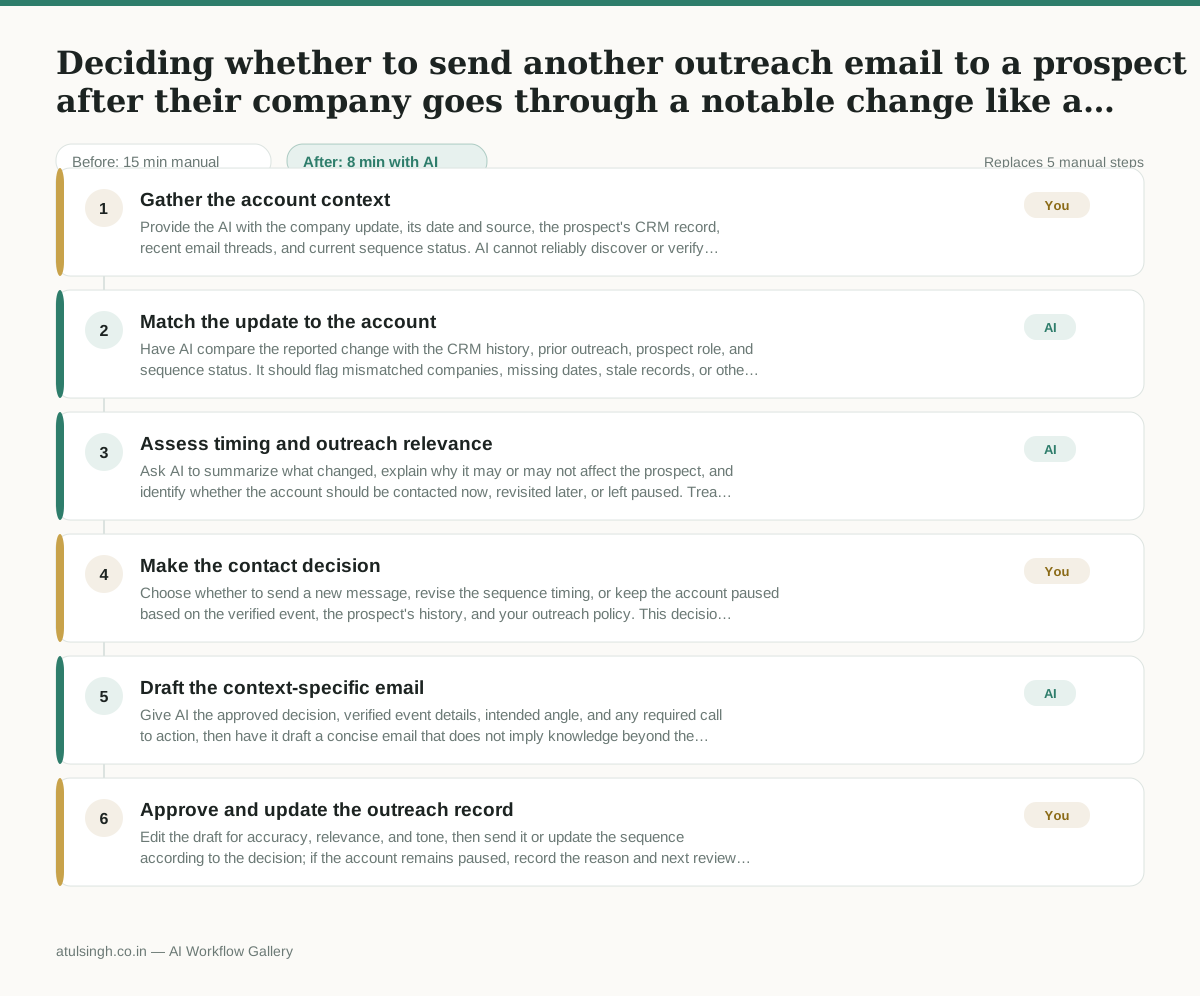
The workflow, step by step
- You
1. Gather the account context
Provide the AI with the company update, its date and source, the prospect's CRM record, recent email threads, and current sequence status. AI cannot reliably discover or verify every relevant update without accurate source material.
- AI
2. Match the update to the account
Have AI compare the reported change with the CRM history, prior outreach, prospect role, and sequence status. It should flag mismatched companies, missing dates, stale records, or other facts that need human verification.
- AI
3. Assess timing and outreach relevance
Ask AI to summarize what changed, explain why it may or may not affect the prospect, and identify whether the account should be contacted now, revisited later, or left paused. Treat this as a working analysis, not proof that the event creates buying intent.
- You
4. Make the contact decision
Choose whether to send a new message, revise the sequence timing, or keep the account paused based on the verified event, the prospect's history, and your outreach policy. This decision determines whether the prospect receives another email and what business context the message can reference.
- AI
5. Draft the context-specific email
Give AI the approved decision, verified event details, intended angle, and any required call to action, then have it draft a concise email that does not imply knowledge beyond the supplied facts. Remove unsupported assumptions and avoid treating the company change as evidence of interest.
- You
6. Approve and update the outreach record
Edit the draft for accuracy, relevance, and tone, then send it or update the sequence according to the decision; if the account remains paused, record the reason and next review date. The human remains responsible for the final send, timing, and CRM record.
What you end up with
Where this falls apart
- The input news alert or funding database record contains incorrect data, which causes the AI to analyze a false corporate event and produce an irrelevant outreach angle.
- The CRM history is incomplete or out of date, which causes the AI to misjudge the prospect's previous engagement status and recommend an inappropriate contact decision.
More for SDR / BDR
- Researching target accounts for cold outreach by checking recent news and job postings to write a personalized first email
- Find specific triggers in a company annual report for a personalized pitch
- Mapping the buying committee for a target enterprise account before initial outreach
- Write a first-touch outbound email to a target account based on recent public signals like news, job postings, or social media activity
Also in sales
- Research an incoming company and its decision makers before a first sales meeting
- Prep for a B2B demo call by checking recent company news, job postings, and tech stack changes to build relevant questions.
- Reviewing a new sales rep's practice pitch against the team's call criteria before letting them talk to real prospects
- reaching out to former colleagues and personal contacts to announce a new company or product launch without sounding like a spammy marketer