
Check every lead capture form on the website to make sure submissions reach the right sales reps before launching a new advertising campaign.
Broken form routing logic and mismatched hidden fields go unnoticed until a campaign launches, causing qualified prospect submissions to end up in unmonitored inboxes or assign to the wrong territories.
- Before
- 120 min
- After
- 45 min
- Saved
- 75 min
How this used to go
- Open every active landing page and contact page in a browser tab.
- Submit test entries into each form using distinct test email addresses and varied input criteria.
- Check the CRM to verify whether the test lead record was created with the correct contact details.
- Confirm that the lead was assigned to the correct sales representative or queue based on the routing rules.
- Check email notification logs to see if the assigned team member received the alert.
- Document any failures, misassigned owners, or failed notifications in a tracking spreadsheet.
Manually filling out every form over and over again to test different routing conditions, only to find out halfway through that field IDs changed and nothing synced properly.
The workflow, step by step
- AI
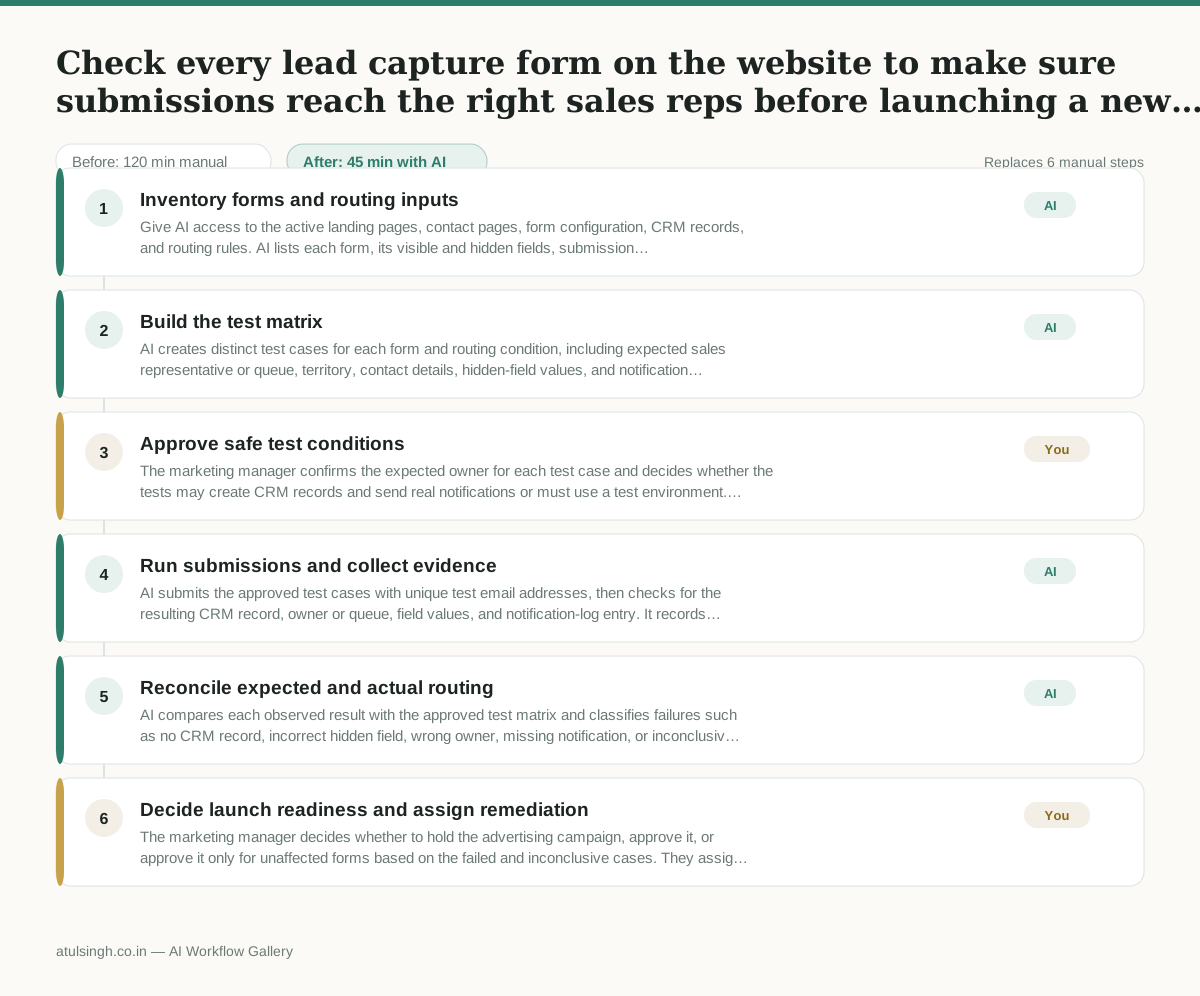
1. Inventory forms and routing inputs
Give AI access to the active landing pages, contact pages, form configuration, CRM records, and routing rules. AI lists each form, its visible and hidden fields, submission destination, and routing criteria, flagging missing or inconsistent field IDs.
- AI
2. Build the test matrix
AI creates distinct test cases for each form and routing condition, including expected sales representative or queue, territory, contact details, hidden-field values, and notification recipient. It marks cases that cannot be determined from the available rules for human clarification.
- You
3. Approve safe test conditions
The marketing manager confirms the expected owner for each test case and decides whether the tests may create CRM records and send real notifications or must use a test environment. This decision determines which cases AI is allowed to submit and prevents unapproved alerts or records.
- AI
4. Run submissions and collect evidence
AI submits the approved test cases with unique test email addresses, then checks for the resulting CRM record, owner or queue, field values, and notification-log entry. It records when access is missing or when a log only shows that an alert was generated rather than received.
- AI
5. Reconcile expected and actual routing
AI compares each observed result with the approved test matrix and classifies failures such as no CRM record, incorrect hidden field, wrong owner, missing notification, or inconclusive evidence. It groups failures by form and identifies the likely configuration or field-mapping area to inspect.
- You
6. Decide launch readiness and assign remediation
The marketing manager decides whether to hold the advertising campaign, approve it, or approve it only for unaffected forms based on the failed and inconclusive cases. They assign fixes to the appropriate website, CRM, or revenue-operations owner and record the required retest conditions.
What you end up with
Where this falls apart
- The CRM blocks automated test form submissions as spam, causing the workflow to report false routing failures for every tested form.
- Hidden field values depend on active browser session cookies that the AI cannot replicate, resulting in test submissions failing to pass the required tracking parameters.
More for Marketing Manager
- Write a campaign brief that the agency and the internal design team can both use without contradictory instructions
- Checking multiple promotional calendars across email, social, and paid ads to make sure campaigns do not overlap or contradict each other before the holiday sales push.
- Reviewing external market research reports and flagging unverified claims before presenting findings to the board.
- turning a detailed product spec sheet into a clear campaign brief for the design team without keeping all the technical jargon
Also in marketing
- Turn a recorded customer interview into a draft blog post
- Sorting incoming customer leads from web forms and assigning them to the right sales reps based on company size and location
- Turn a technical whitepaper into a three-part email nurture sequence before it launches
- Analyze competitor viral posts to draft three trend hooks, discarding off-brand angles