
following up on proposals that went quiet without annoying the prospect
Stalled deals sit in the CRM for weeks because writing a thoughtful, low-pressure check-in requires re-reading past transcripts and finding a relevant angle, which founders often postpone in favor of active pipeline work.
- Before
- 20 min
- After
- 10 min
- Saved
- 10 min
How this used to go
- Filter the CRM for proposals sent more than two weeks ago with no recent reply.
- Open the email thread and read through the original discovery notes to remember the prospect's stated bottleneck.
- Draft a follow-up message attempting to revive the conversation.
- Revise the draft to ensure it does not sound desperate or pushy.
- Send the email and set a reminder to check for a reply in another week.
Staring at a blank screen trying to figure out how to say 'are you still alive?' without sounding passive-aggressive.
The workflow, step by step
- You
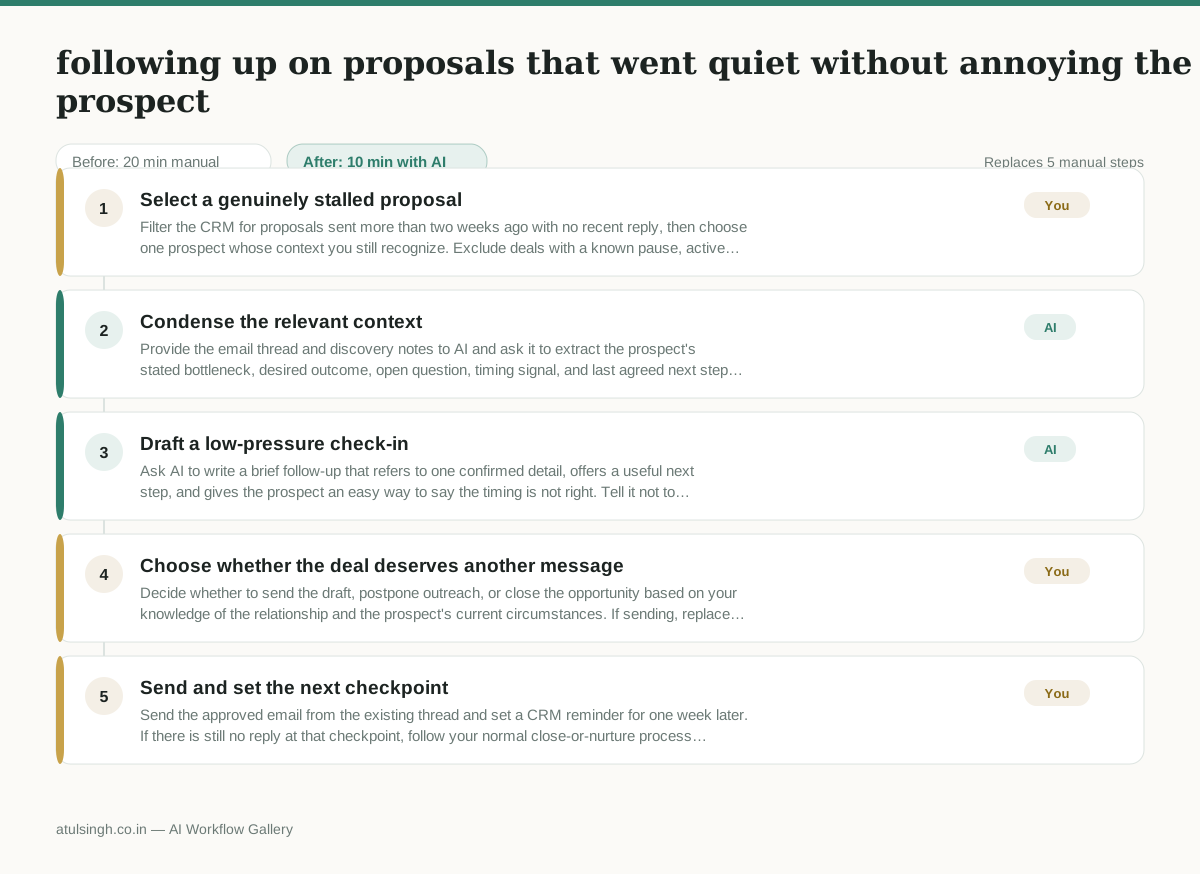
1. Select a genuinely stalled proposal
Filter the CRM for proposals sent more than two weeks ago with no recent reply, then choose one prospect whose context you still recognize. Exclude deals with a known pause, active negotiation, or unresolved support issue.
- AI
2. Condense the relevant context
Provide the email thread and discovery notes to AI and ask it to extract the prospect's stated bottleneck, desired outcome, open question, timing signal, and last agreed next step. Treat inferred priorities or timing as uncertain because AI cannot reliably know whether the prospect's situation has changed.
- AI
3. Draft a low-pressure check-in
Ask AI to write a brief follow-up that refers to one confirmed detail, offers a useful next step, and gives the prospect an easy way to say the timing is not right. Tell it not to invent progress, urgency, objections, or commitments.
- You
4. Choose whether the deal deserves another message
Decide whether to send the draft, postpone outreach, or close the opportunity based on your knowledge of the relationship and the prospect's current circumstances. If sending, replace any unsupported wording and choose the specific call to action; this decision determines whether the prospect receives another message or leaves the active pipeline.
- You
5. Send and set the next checkpoint
Send the approved email from the existing thread and set a CRM reminder for one week later. If there is still no reply at that checkpoint, follow your normal close-or-nurture process instead of repeatedly sending AI-generated follow-ups.
What you end up with
Where this falls apart
- The prospect's silence is due to an internal company crisis or leadership change, leading the AI to draft a check-in that reads as tone-deaf or overly casual.
- The underlying discovery notes contain conflicting or outdated information about the prospect's budget, causing the AI to reference an incorrect bottleneck.
More for Founder-led Sales
- reaching out to former colleagues and personal contacts to announce a new company or product launch without sounding like a spammy marketer
- Turn raw discovery call notes into a structured pilot proposal for a new client
- Reply to inbound beta signups to figure out if they are a real fit before getting on a call
- Outline a custom proof-of-concept project plan after an enterprise discovery call
Also in sales
- Research an incoming company and its decision makers before a first sales meeting
- Prep for a B2B demo call by checking recent company news, job postings, and tech stack changes to build relevant questions.
- Reviewing a new sales rep's practice pitch against the team's call criteria before letting them talk to real prospects
- Reviving deals that went quiet after sending a proposal by finding matching case studies and writing a follow-up message.