
Refresh old blog content with AI by selecting posts from Search Console data, identifying the search intent they are close to serving, editing the original page, adding useful internal links and reviewing every change before it goes live. Keep the existing URL unless there is a clear structural reason to change it.
A practical monthly routine has four stages: choose a post, diagnose the gap, improve the page and approve the work. AI can speed up analysis, drafting and checking, while a person remains responsible for accuracy, relevance, brand judgement and publication.
The monthly routine in brief
Set aside one recurring content session each month. Start with a small batch of posts that already receive impressions but are failing to earn enough clicks or satisfy the searcher clearly. A small team might select two to five articles, depending on how much subject-matter review each one needs.
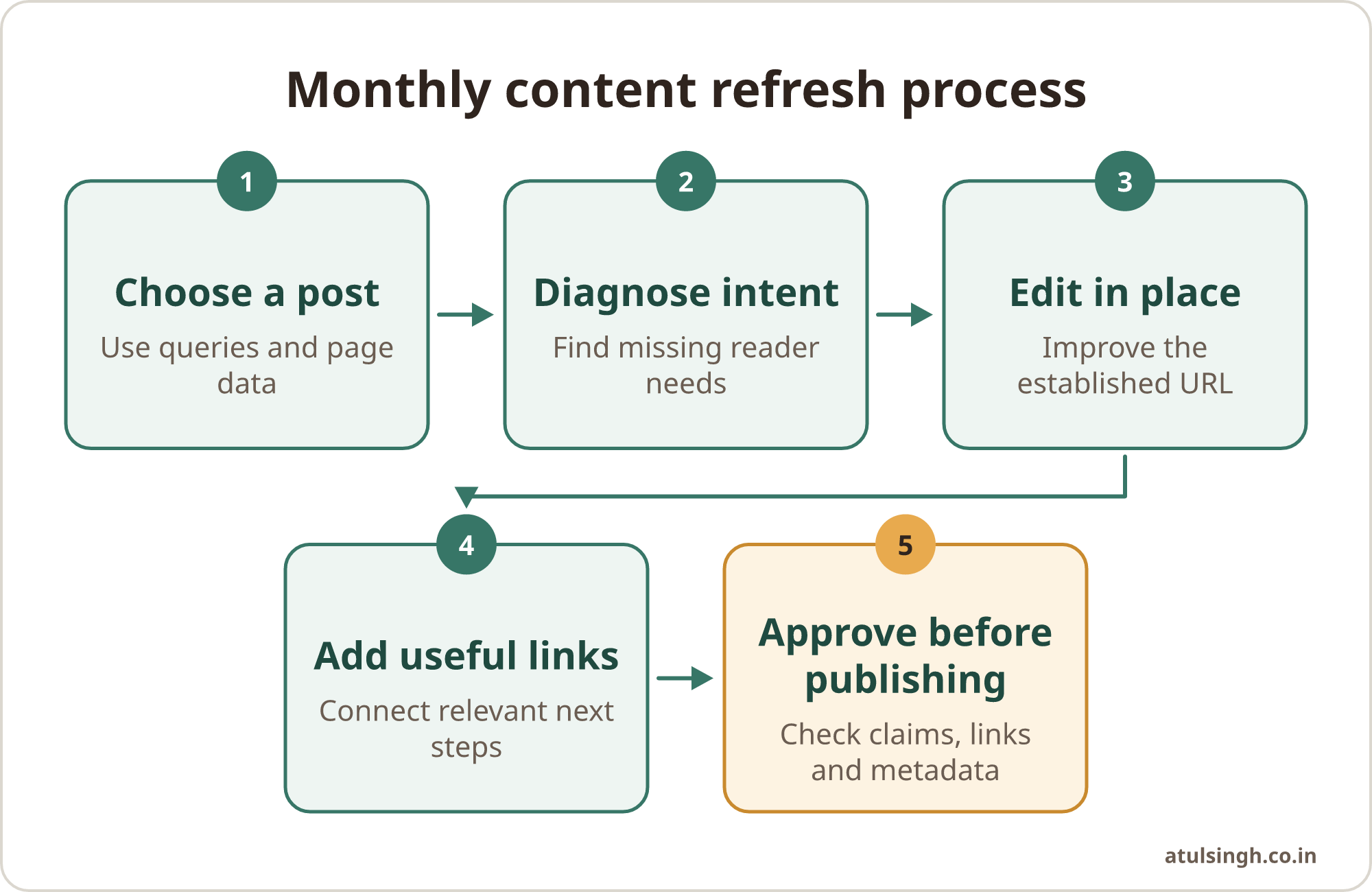
Use the same sequence each time:
- Pull recent page and query data from Search Console.
- Choose posts with a clear opportunity and no major technical issue.
- Ask AI to compare the page with the queries it is already appearing for.
- Edit the existing article around the missing intent and useful information.
- Add relevant internal links with descriptive anchor text.
- Review claims, links, metadata and tone before publishing.
- Record what changed and check performance in the next review.
This creates an owned process that a content marketer, editor or site owner can repeat. It also gives a decision maker a clear approval point before changes affect a public page.
Start with Search Console data
Search Console's Performance report provides page- and query-level information about clicks, impressions, click-through rate and average position (Google Search Central, Performance report). Export or review the last 90 days of data, then look for pages with meaningful impressions and weaker click-through rates.
Pay particular attention to queries where the page sits in striking distance, such as positions 8 to 20, while receiving impressions but few clicks. Search Console explains that average position records the topmost appearance of a URL across queries, so treat the metric as a useful diagnostic rather than a perfect description of every search result (Google Search Central, impressions, position and clicks).
Choose pages that meet most of these conditions:
- The page already matches the broad topic of the query.
- Several related queries point towards the same missing need.
- The article contains material that can be improved rather than replaced entirely.
- The URL has useful history, links or bookmarks worth preserving.
- There is no obvious technical reason for a different page to own the topic.
Before editing, check for keyword cannibalisation. Search the site for other pages that target the same subject, then decide which page should be the main resource. Adding every new query to an old article can make the site's topic structure less clear and cause internal competition.
A data-led content strategy is easier to maintain when the raw data, decisions and next actions live in one process. If your planning is spread across spreadsheets and chat threads, the monthly content planning workflow can help structure the work around audience questions and business priorities.
Diagnose the intent gap with AI
Give the AI assistant the page text, its target query, the relevant Search Console queries and your audience description. Ask it to group the queries by intent and identify what a searcher appears to want at each stage. Useful groups might include definition, comparison, process, troubleshooting, purchase evaluation and local or sector-specific needs.
Ask for observations before asking for rewritten copy. For example, the assistant can identify that a post ranking for “how to choose a CRM for a small business” explains features but gives no selection process, comparison criteria or implementation concerns. That diagnosis gives the editor something specific to verify and improve.
A useful prompt can include these instructions:
Review this existing article against the supplied Search Console queries. Group the queries by likely search intent. List information the article already covers, information it appears to omit and questions that require subject-matter verification. Suggest changes to the structure, but do not invent facts, sources, statistics or customer examples.
Treat the output as an editorial brief. Language models predict word sequences and can produce plausible but unverified claims, so every AI-generated suggestion needs manual fact-checking before publication (Google Search Central, generative AI content guidance).
The strongest refreshes add first-party value. That might come from a clear decision framework, an original checklist, a process your team can explain, an accurate product comparison or a practical explanation of trade-offs. A generic rewrite that repeats common web information gives readers little reason to trust or remember the page.
Edit the original page in place
Work on the established URL and preserve the page's useful structure where it still serves readers. Update the title, introduction, headings, examples, screenshots, links and conclusion where needed. Remove sections that no longer answer the question, then add the missing information in a logical order.
Editing in place helps preserve existing indexation, bookmarks and canonical signals. Changing a URL can introduce crawl delays and requires permanent redirects when the move is genuine, so retain the slug unless the site's architecture calls for consolidation (Google Search Central, site moves and migrations).
Use AI for bounded tasks rather than an unreviewed full rewrite. Good tasks include:
- Suggesting clearer headings from verified reader questions.
- Reordering sections so the direct answer appears earlier.
- Shortening repetitive introductions and transitions.
- Drafting a comparison structure for an editor to complete.
- Finding sentences that contain dates, figures or claims for checking.
- Producing alternative title tags and meta descriptions that match the page.
Keep the original authorial judgement in the final text. The editor should decide whether a suggestion is accurate, useful and appropriate for the audience. They should also check that the revised page still reflects the organisation's actual services, policies and capabilities.
For a deeper review of claims and figures, use a separate review step such as checking every content claim. Separating drafting from verification makes it easier to see which statements need evidence and who owns the decision.
Add links based on reader intent
Internal links should help a reader take the next sensible step. Start by listing the related pages that genuinely support the refreshed article. These may include a deeper educational post, a relevant service page, a practical workflow or a conversion page.
Then ask AI to suggest possible linking points, but write and approve the final anchor text yourself. Google recommends descriptive anchor text that sets expectations for the destination, while generic phrases such as “click here” provide little context (Google Search Central, SEO link best practices).
For example, a post about AI-assisted content operations might link to repeatable AI workflows when explaining how to turn a one-off experiment into a managed process. A post aimed at marketing teams could point to AI marketing workflows for pipeline when the reader needs a wider set of practical applications.
Keep the link relevant to the sentence. Avoid forcing several links into one paragraph or repeating the same exact phrase throughout the site. The destination should give the reader additional value, rather than simply receiving a link because it is commercially important.
A refresh can also create a sensible path beyond the article. Someone reading about content planning may need a way to turn the next post into an email, so a relevant blog-to-email workflow may be useful. The link belongs where that need naturally appears, with no interruption to the main explanation.
Use an approval gate before publishing
Every refreshed post should pass through a named review step. The reviewer can be a content manager, subject-matter expert or business owner, depending on the risk of the topic. Their role is to approve the page as a whole, not simply accept or reject AI output line by line.
Use this checklist before the article goes live:
| Review area | What to check |
|---|---|
| Search intent | Does the opening answer the query and do the sections cover the main need? |
| Accuracy | Are claims, figures, dates and examples supported or clearly framed? |
| Original value | Does the page add judgement, process, evidence or useful detail? |
| Links | Do internal links lead to relevant pages with descriptive anchors? |
| Cannibalisation | Is this still the right page for the chosen queries? |
| Metadata | Do the title tag and description accurately represent the article? |
| Brand fit | Is the language clear, consistent and suitable for the audience? |
| Publication | Has the original URL, canonical setting and page formatting been preserved? |
Ask the reviewer to remove invented case studies, quotes, statistics and regulatory claims. They should also check every source link and confirm that metadata does not promise information the page does not contain.
Avoid turning the routine into bulk publishing. Google's spam policies describe scaled content abuse as producing large volumes of pages with little added value, originality or human effort to manipulate search rankings (Google Search Central, spam policies). A smaller number of carefully reviewed improvements is easier to govern and more useful to readers.
Measure the next decision, not just the edit
Record the URL, the main queries, the reason for the refresh, the sections changed and the publication date. Keep a short note about any unresolved question, such as a claim awaiting a subject-matter answer or a related page that may need consolidation.
Review the page again after enough time has passed for the data to become useful. Compare impressions, clicks, click-through rate and average position with the previous period, while remembering that search performance can change for many reasons. The purpose of the review is to decide whether the page needs another focused improvement, a stronger internal link, a different format or no further change.
Do not judge the routine by the amount of text produced. Judge it by whether the page answers a real query more clearly, gives the reader a useful next step and remains accurate for the business. If the same type of gap appears repeatedly, update the content brief or editorial checklist so future posts address it earlier.
Where to start this month
Choose one existing article with strong impressions, a clear intent gap and a stable URL. Export its query data, ask AI for an intent diagnosis, make a small set of verified edits, add only relevant internal links and send the page through an approval gate.
Once the process works for one article, document the prompt, checklist, reviewer and storage location. That gives a small team a manageable system it can run without enterprise software or a large automation project.
If you want a second pair of eyes on where AI can fit into this content process, you can book a workflow review call to examine one workflow and identify practical next steps.