Evaluate an AI marketing tool by running a two-week trial on your own work before signing an annual contract. Test the tasks your team actually needs, then judge the output, data handling, integrations, total operating cost and ease of leaving.
Start with a workflow rather than a list of impressive features. Choose one repeatable marketing process, define what acceptable work looks like, involve the people who will use the tool and record what happens from input to approved output. A tool earns consideration when it improves a real workflow without creating new risks or administrative work.
The short answer: run a controlled two-week trial
A useful trial has a clear starting point and an agreed decision rule. Pick one workflow, such as turning customer research into campaign messages, qualifying inbound leads or producing a first draft of a nurture sequence. Keep your current process available as a comparison, and use a small set of real but appropriately classified inputs.
Measure time-to-output, revision effort, factual accuracy, consistency and the amount of human checking required. Ask the practitioner who does the work to record friction as it happens. A tool that produces an attractive first draft but needs extensive correction may have little practical value.
A two-week period gives the team enough time to test ordinary work, exceptions, handovers and one or two failures. It also exposes whether the workflow can be repeated by someone else. Adoption matters because a system that depends on one enthusiastic tester will struggle when the wider team needs to run it.
Use this AI marketing workflows guide to choose a trial that connects marketing activity to a measurable business process rather than a disconnected prompt experiment.
Why tool selection needs more care
AI tools can look capable during a demonstration because the vendor controls the prompt, data and example. Your team will face incomplete briefs, unusual customer questions, brand constraints, outdated documents and requests that need judgement. The gap between a polished demo and daily use is where many buying decisions fail.
A Gartner finding reported by NERVICO estimates that 30% of enterprise generative AI projects will be abandoned after the proof-of-concept phase before the end of 2025, partly because the chosen vendor does not fit the organisation's actual needs (NERVICO, 2025). A small business may have less procurement overhead, but it has less spare capacity for a poor fit.
Data handling deserves equal attention. The IBM 2025 Cost of a Data Breach Report, as reported by Walturn, found that breaches involving unsanctioned AI tools averaged USD 4.63 million per incident, USD 670,000 above the broader enterprise average (Walturn, 2026). These figures do not predict the cost for every business, but they show why staff should have clear rules before they start uploading customer or company information.
A buying decision therefore needs two owners. A decision maker should assess business value, risk and future dependency. The practitioner should test whether the tool fits the actual steps, permissions and judgement required in the workflow.
Step 1: define the workflow and quality bar
Write the current process down before opening a trial. Include the trigger, inputs, tools used, handoffs, approval points, exceptions and final destination. Record how long the work takes and where delays or repeated manual actions occur.
Then define the quality bar. For a campaign brief, this might include accurate product details, evidence-backed claims, a clear audience and a usable structure. For support content, it might include correct policy references, an appropriate tone and an escalation route for sensitive cases.
Separate tasks that can be automated from decisions that need human judgement. Drafting variations, sorting feedback or summarising a call may be suitable for assistance. Approving a regulated claim, responding to an angry customer or deciding whether a lead is commercially valuable needs a named reviewer.
A mandatory human review step should sit before customer-facing copy, creative assets or automated recommendations are published (Clearscope, 2026). Put the review in the workflow itself, rather than relying on a general instruction to be careful.
For example, say a ten-person agency wants help creating landing page copy from customer interviews. The trial can compare the current research and drafting process with an AI-assisted version. The reviewer can score whether each claim is traceable to source material, whether the language fits the client brief and how much editing is needed before approval.
Step 2: test output quality on real tasks
Prepare a small test set that represents normal work. Include clear inputs, messy inputs and edge cases. Avoid testing only the easiest examples because they tell you little about how the system behaves under pressure.
Score outputs against the quality bar rather than asking whether they look impressive. Useful criteria include factual accuracy, relevance, completeness, brand fit, originality where relevant and ease of editing. Keep examples of good, weak and unsafe outputs so the team can compare tools consistently.
Check whether the tool makes unsupported claims, invents sources or presents uncertain information with confidence. AI systems can produce hallucinations and experience model drift over time, so quality control needs to continue after purchase (Walturn, 2026). Ask the vendor how model changes are communicated and how performance can be monitored.
Measure the full route to approved work. A useful record includes the time spent preparing inputs, generating a result, checking it, correcting it, getting approval and moving it into the next system. This is more meaningful than generation speed on its own.
For a sales team, a trial might create account research summaries and first-draft outreach. A marketing manager can check whether the summaries use current information and whether the messages reflect the account's situation. For customer support, the test might classify incoming questions and suggest replies, while a human decides when the issue needs escalation.
Step 3: classify data and verify the data flow
Create four simple data categories before the trial: Public, Internal, Confidential and Restricted. Public website copy may be suitable for a low-risk test. Customer lists, unpublished strategy documents, personal data, contract details and credentials need stronger controls or should stay out of the trial.
Ask the vendor for written answers to specific questions. Will customer inputs be used to train a public model? Where is data stored? How long is it retained? Which subprocessors or model providers receive it? Can the data be deleted? What happens to uploaded files, prompts, outputs and usage logs when the account closes?
Procurement should assume that customer inputs may be used for model training unless the vendor explicitly states otherwise in writing (NERVICO, 2025). A reassuring sales conversation is not a substitute for contract language or a data processing agreement.
Review the entire data path, including connected systems. A primary vendor may route information through third-party model providers or subprocessors, so a clean-looking interface does not answer every privacy question. Staff also need a practical rule for what they can paste into the tool and what requires approval.
Third-party connections deserve their own check. Ina &Co Marketing reported that a security issue associated with the Salesloft Drift app in August 2025 affected more than 700 firms through stolen credentials for the third-party connection (Ina &Co Marketing, 2026). Verify permissions, authentication, access removal and audit logs before connecting a CRM, advertising account or customer database.
Step 4: test integrations and the real cost
An integration logo tells you that a connection exists. It does not confirm that the tool supports the records, triggers, actions or update speed your workflow needs. Check the exact object being read or changed, the direction of data flow, the permissions required, error handling and whether synchronisation is real-time or delayed (Clearscope, 2026).
Run the integration during the trial. Create a test record, change it, send it through the workflow and confirm what appears in the destination system. Test duplicate records, missing fields, failed runs and revoked access. If the workflow depends on a manual export, include that work in the time calculation.
Calculate total cost rather than subscription cost. Include implementation, data preparation, prompt or workflow design, review time, user training, support, usage charges, integration services and the cost of correcting errors. A $49 per month tool that requires manual CSV exports, CRM syncing and constant lead cleanup can create more operational drag than a $1,000 per month platform that consolidates the workflow natively (Factors.ai, 2026).
The figures in that comparison are an illustration of how operating effort changes the calculation. Apply the same logic to your business by estimating staff time and the value of delayed or incorrect work. Include likely usage growth and any separate charges for higher-volume models, storage, seats or API calls.
This small business AI tools guide can help when a team is comparing a focused tool with a broader platform. The right choice depends on the workflow, the data and the ability of the team to maintain it.
Step 5: test how easy it is to leave
Exit planning belongs in the trial, not after a failed implementation. Ask what can be exported in usable formats: source data, prompts, workflow definitions, knowledge bases, evaluation records, configuration, logs and outputs. Check whether exports are complete and whether another tool could use them without extensive manual rebuilding.
AI vendor lock-in can involve retraining models, rewriting custom integrations, rebuilding knowledge bases and losing months of optimisation data (Kong Inc., 2026). Record which parts of the workflow depend on the vendor's proprietary features and which parts your team owns.
Ask whether the tool supports open standards, multiple model providers or a fallback model. A single proprietary provider can expose the business to price changes and outages. A Zapier survey reported by Kong found that 81% of AI users were concerned about dependence on one vendor, while 47% said at least one key business function would malfunction if their primary AI vendor went offline (Kong Inc., 2026).
Test the fallback plan during the two-week period. Can a person complete the work manually? Can the team switch to another model? Are prompts, source documents and approval rules stored somewhere the business controls? A short written recovery procedure is useful even when the tool appears reliable.
A practical two-week evaluation plan
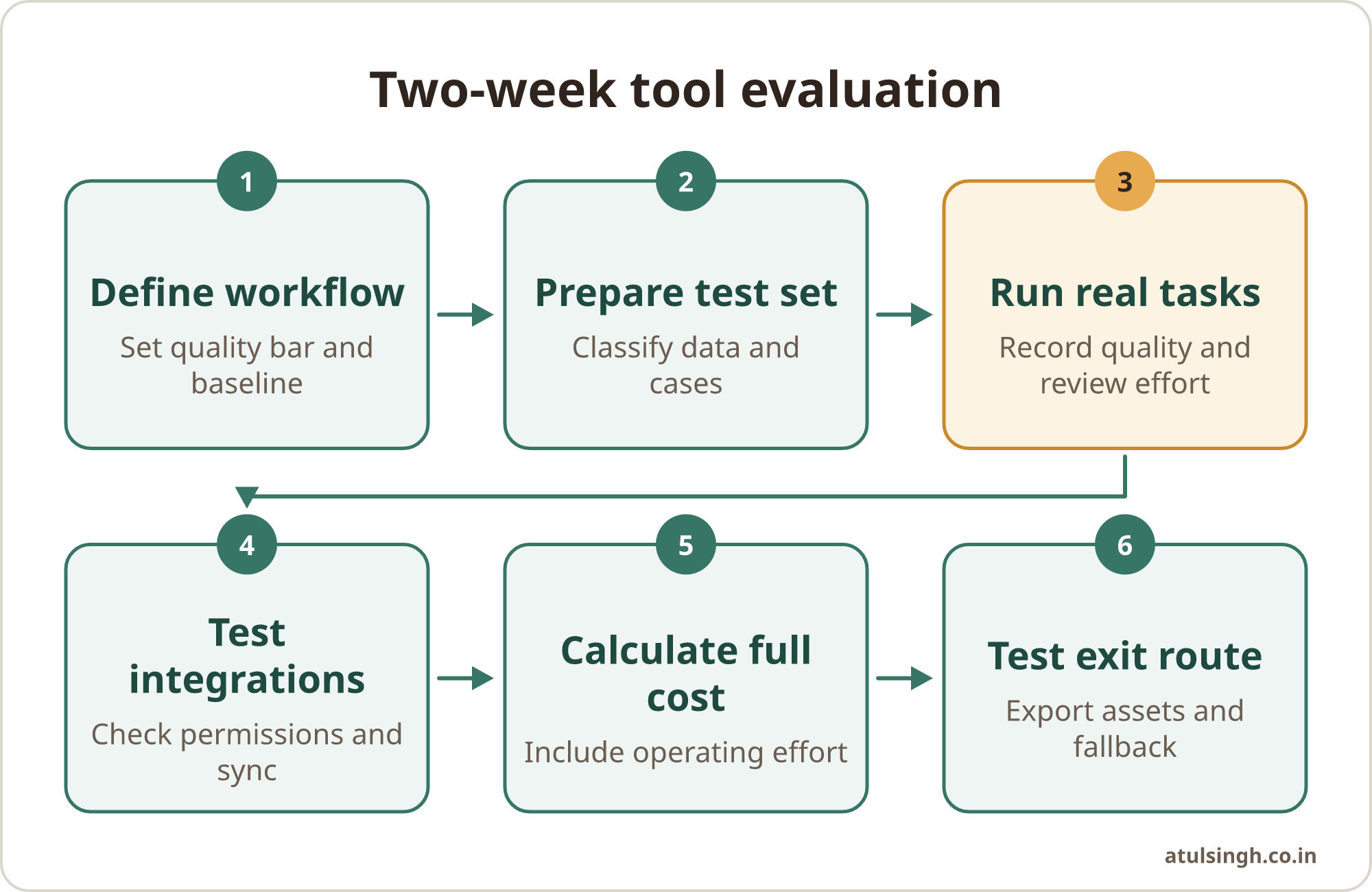
Use the table below as a working plan. Keep the same workflow and evaluation criteria throughout the trial so the final decision reflects evidence rather than the strongest demonstration.
| Trial stage | What to do | Evidence to record |
|---|---|---|
| Define | Choose one workflow and quality bar | Inputs, steps, reviewer, baseline time |
| Prepare | Classify data and create test cases | Approved data, normal cases, edge cases |
| Run | Complete real tasks with human review | Output scores, corrections, time-to-output |
| Connect | Test permissions, triggers and destinations | Records moved, failures, sync behaviour |
| Cost | Add subscription and operating effort | Staff time, usage, support and cleanup |
| Exit | Export assets and run the fallback | Export quality, manual route, dependencies |
At the end, hold a short review with the decision maker and the people who did the work. Decide whether to adopt, extend the trial with a specific question, choose another tool or stop. A vague result usually means the workflow or quality bar was too unclear.
For customer-review work, a controlled process can be especially useful. This customer reviews to marketing copy workflow shows the kind of task where source evidence, categorisation and human approval should remain visible.
Common mistakes and sensible limits
Choosing from a feature list. A long list of models, templates and integrations does not show that the tool fits your process. Test the exact task, with the same data and approval requirements the team will use after purchase.
Using only synthetic examples. Clean test inputs hide missing fields, ambiguous requests and unusual customer language. Include representative work, while removing or masking sensitive information where the vendor's controls are not yet verified.
Skipping the reviewer. Customer-facing output needs an accountable person. Define who checks accuracy, brand fit, privacy and escalation before anything is published or sent.
Ignoring maintenance. Prompts, source documents, permissions and evaluation examples need ownership. Ask who will update the workflow, review failures and train new users. A system works when the team can run it after it is built.
Treating the cheapest plan as the cheapest option. Manual exports, duplicate entry, slow approvals and cleanup can outweigh a lower licence fee. Track the work around the tool and include it in the decision.
Leaving without an exit record. Keep a copy of the workflow map, approved prompts, source material, evaluation set and review rules in a business-controlled location. This reduces disruption if the vendor changes its terms, model or availability.
Where to start
Choose one workflow with regular volume, a clear quality standard and a manageable risk level. A marketing manager might start with campaign brief creation, content repurposing or lead research. A founder-marketer might choose a process currently consuming several hours each week, provided customer data and sensitive decisions remain controlled.
Set the two-week trial date, name the reviewer, prepare the test set and write down the exit conditions before anyone begins. The decision should rest on useful approved work, safe data handling, reliable connections, full operating cost and a credible route away from the vendor.
If the workflow, evaluation criteria or data boundaries are difficult to define, a workflow review call can help you examine one process and decide where AI can realistically fit.