
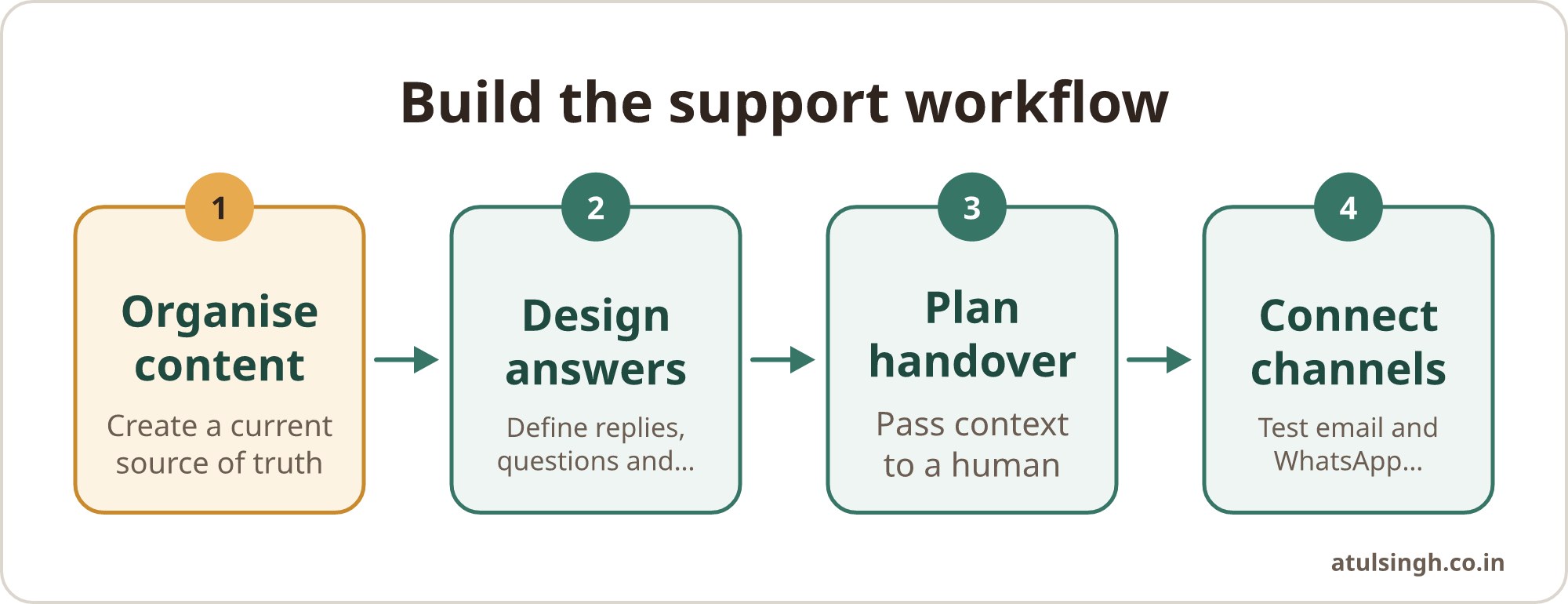
Set up an AI support assistant in four stages: prepare the content it can trust, design the answers and actions, define when a person takes over, then connect email and WhatsApp. This order gives a small support team a controlled system instead of a bot that improvises across every channel.
Start with a narrow set of support jobs. For example, the assistant might answer delivery questions, explain account steps, classify incoming tickets and collect the details needed for a human reply. Keep decisions involving refunds, complaints, security, legal matters or sensitive customer situations with a person.
The short answer: build the workflow before the bot
An AI support assistant needs more than a language model and a channel connection. It needs a source of truth, clear communication rules, access to approved actions, an escalation path and a way to review its work. The channel comes after these pieces are defined.
A sensible first version can support three to five common request types. It can find an answer in approved material, ask for missing information, create or update a ticket, and pass a complete summary to a support colleague. It should also say when it cannot verify an answer.
Think of the system as a set of layers. The knowledge base supplies the content, the answer design controls the conversation, the handover rules protect judgement, and the email or WhatsApp connection delivers the interaction. This layered approach is also reflected in current AI support setup guidance (Decagon, 2026).
The same workflow can serve email and WhatsApp, but the writing should change by channel. Email usually needs a formal tone and complete sentences. WhatsApp works better with shorter messages, line breaks and a more conversational style (Zendesk, communication guidelines).
Why the order matters for a small support team
AI support adoption is moving into everyday service operations. Salesforce research reported through Intercom found that 66% of service organisations ran AI agents in 2026, compared with 39% the previous year (Intercom, 2025). The useful question for a small team is how to introduce the capability without creating a second system that nobody owns.
Cost can also be part of the business case. Intercom reports AI resolutions at between $0.50 and $2.00 per interaction, compared with $6.00 to $12.00 for human agents, although the definition of a resolution and the quality of the outcome need careful checking (Intercom, 2025). A lower interaction cost does not justify sending poor answers to customers. Measure resolution quality, escalation quality and customer effort alongside cost.
WhatsApp brings extra operational requirements. Meta's updated WhatsApp Business Solution Terms, effective 15 January 2026, ban general-purpose AI chatbots while allowing structured customer service uses such as FAQs, ticket classification and order management (Alibaba Cloud, 2026). Design the assistant for defined support tasks rather than an open-ended assistant that answers any topic.
Consent also needs to be designed before launch. WhatsApp Business API messaging requires explicit opt-in, and importing numbers from a CRM or SMS list without specific WhatsApp consent can breach Meta's policies (Wetarseel AI, 2026). Keep the consent record, explain what messages the customer will receive and provide a straightforward way to stop them.
Step one: organise the content first
The first job is to create a usable source of truth. Gather help articles, product documentation, delivery rules, returns policies, pricing guidance, account instructions, troubleshooting steps and approved response examples. Remove old versions, contradictory instructions and documents that describe products you no longer offer.
Create an answer inventory. List the questions customers ask, the approved answer, the evidence behind it, the conditions that change the answer and the owner responsible for updates. This turns scattered documents into material an assistant can retrieve and use.
For each topic, record:
- The customer question in ordinary language.
- The short approved answer.
- Any eligibility rules or exceptions.
- The information the assistant must collect.
- The action it may take, if any.
- The point at which a human must review it.
- The date and owner for the next content review.
Avoid giving the assistant an entire shared drive without structure. A large collection of old documents makes it harder to identify the current policy and increases the chance of an incorrect answer. Content owners should be able to update one policy without asking a technical person to rebuild the whole system.
Say a ten-person agency receives repeated questions about campaign reporting, invoice dates and access to shared files. Its first knowledge set could cover those three areas, with an owner for each one. It can add technical troubleshooting and bespoke project questions after the team has tested the initial version.
This content layer should also include boundaries. Write down what the assistant must refuse, what it can explain, what it can collect and what needs a human decision. A weak knowledge base creates incorrect answers even when the model itself is capable of writing clearly.
If your support team needs a repeatable way to draft short replies while the system is being prepared, a concise customer support responder can help standardise tone without giving the assistant unsupervised access to customer conversations.
Step two: design answers and actions
Once the content is organised, define how the assistant should respond. The first message should confirm the customer's intent in plain language. For example, “You want to check whether your order has been dispatched.” This gives the customer a chance to correct the direction before the assistant takes action.
Keep the next question focused. Ask for the order number, email address or other required detail only when it is needed. Long forms inside a chat create friction, while short, ordered questions make it easier to see what information is still missing.
Use a response pattern for each support intent:
- Identify the request.
- Confirm the request in the customer's language.
- Give the approved answer or explain the next step.
- Ask for one missing detail, if required.
- Complete an allowed action or create a ticket.
- Offer human help when the rules require it.
Conversation design guidance recommends short replies, clear line breaks and readable bullets, especially when a customer is using a chat channel (Zendesk, conversation design). Email can contain more context, but it should still lead with the answer and make the next action clear.
Separate information from actions. An assistant may explain a returns policy, but issuing a refund could require a human approval or a verified system action. If the assistant can access an order system, define exactly which fields it can read and which actions it can perform. Log those actions so a support lead can review them.
Use confidence rules carefully. The assistant should ask a clarifying question when several intents are plausible, use a safe approved response when the policy is clear, and escalate when the answer depends on judgement or unavailable information. Do not make confidence a hidden technical score that the support team cannot understand. Write the rule in operational terms.
For example, “Escalate any request involving a disputed payment, account ownership, a threat of legal action or a safety concern” is easier to run than “Escalate when confidence is below 0.72”.
Step three: build the human handover
Handover is part of the customer experience, not an error state. Customers should know what happens next, whether a person is available and what information has already been captured. The human agent should receive the conversation history, the customer record, the request type, relevant policy and any attempted action.
Set escalation triggers before connecting a live channel. Useful triggers include a high-risk policy issue, repeated misunderstanding, an angry or distressed customer, a request for an exception, a failed system action and a customer who asks for a person. Include an option for the customer to request a human directly.
The handover summary should be compact and factual. It can contain:
- Customer name and verified contact details.
- The request and desired outcome.
- Key facts supplied by the customer.
- Order, account or ticket references.
- Policies already checked.
- Actions already taken.
- The unresolved question.
Do not make the customer repeat the same story after transfer. A workflow for writing an escalation summary can help the team pass verified technical details and reproduction steps to the right person.
Decide how the team will monitor escalations. A support lead should be able to inspect cases where the assistant handed over too early, failed to hand over, or gave an answer that caused a second contact. Review a small sample regularly and update the content or rules rather than simply telling agents to be more careful.
Keep ownership clear. Someone should own the knowledge base, someone should own channel and consent settings, and a named support lead should own escalation rules. In a small team, one person may hold more than one role, but the responsibilities still need to be written down.
Step four: connect email and WhatsApp carefully
Connect email after the workflow works in a test environment. Start with one shared inbox or one support category, route messages by intent, and keep a human approval step until the team trusts the answer quality. Email replies should use full sentences, relevant context and a clear subject or thread connection.
WhatsApp needs a more constrained design. Use it for structured support tasks such as order status, appointment details, FAQs and ticket collection. Keep messages short, use approved templates when the business initiates a conversation, and make the bot disclosure clear where required.
WhatsApp also has a 24-hour conversation window that affects free-form discussion and outbound messaging. Policy and pricing changes need to be checked during implementation because the window, templates, consent and message charges affect the operating model (Learnmind, 2026).
The channel connection should pass the same customer context into the support workspace. A customer who begins in WhatsApp and continues by email should not be treated as a new case if the team can safely match the records. Where identity cannot be verified, ask for the minimum information needed and avoid exposing account details.
Before launch, test ordinary and difficult cases. Try incomplete questions, spelling mistakes, duplicate requests, policy exceptions, angry messages, unsupported topics, requests for a human and missing order records. Test the assistant's refusal and handover language as carefully as its successful answers.
A practical setup checklist
Use this checklist in a planning meeting. It keeps the project small enough to own and specific enough to test.
| Area | Ready when |
|---|---|
| Content | Current policies and help articles have owners |
| Support jobs | The first intents and allowed actions are written down |
| Answer design | Replies, clarifying questions and refusal language are approved |
| Handover | Triggers and complete summaries reach the right person |
| One inbox or category is connected and tested | |
| Opt-in, templates and conversation rules are documented | |
| Privacy | Access, retention and identity checks are defined |
| Review | Someone checks conversations and updates content regularly |
A small team can launch with one or two high-volume, low-risk jobs. Keep a simple record of answer accuracy, escalations, repeat contacts, unresolved cases and customer complaints. These measures show whether the assistant is reducing routine work without hiding extra work in the handover queue.
Costs also need a clear definition. Some providers charge by resolution, some by conversation and some by interaction. Ask what counts as a resolution, including whether an abandoned chat can be counted, and compare the total operating cost with the quality of the service delivered.
Common mistakes and sensible limits
Starting with the channel. Buying a WhatsApp integration before defining content and handover creates a visible front end with weak support behind it. Prepare the workflow and test it with sample conversations first.
Letting the assistant answer everything. General conversation increases the chance of unsupported claims and makes policy boundaries harder to manage. Keep the first release focused on named support jobs.
Uploading outdated content. Old prices, delivery promises or product instructions can produce confident but incorrect answers. Set owners and review dates for every important policy.
Escalating without context. A transfer that contains only “customer needs help” makes the human agent start again. Pass the conversation, verified details, policy checks and unresolved question.
Ignoring consent and disclosure. Consent must be specific to WhatsApp, and customers should understand when they are interacting with an AI assistant. Learnmind states that EU law includes a chatbot disclosure duty from 2 August 2026, with stated penalties reaching up to EUR 15 million or 3% of worldwide turnover (Learnmind, 2026). Check the rules that apply to the markets and customers you serve.
Measuring only speed. Faster replies can still create more follow-up work if the answer is incomplete. Review correctness, customer effort, escalation quality and the time agents spend repairing AI-generated responses.
Where to start on Monday
Choose one support queue and collect its most common questions. Turn those questions into approved answer records, write the escalation triggers, and test the workflow with anonymised examples. Only then choose the email and WhatsApp connections that fit the process.
The system should be small enough for the team to understand and maintain. Automate routine answers and information collection, while keeping people responsible for exceptions, relationships, money and reputation. A support assistant earns its place when the team can operate it after implementation and improve it from real conversations.
If the workflow is clear but the build, integrations and handover need practical help, the AI chatbot development service covers custom support assistants trained on your own content. A workflow review call is another reasonable starting point when the team needs to decide what to automate first.