
Use AI to prepare a customer support reply inside the agent's usual workspace. The agent checks the facts, edits the wording and sends the final message. Start with routine questions, approved knowledge and a clear human review step.
Track how often agents change each draft before sending it. A rolling edit rate shows where the AI is reliable, where the knowledge base needs work and which ticket categories still need close human judgement.
The short answer: draft first, send second
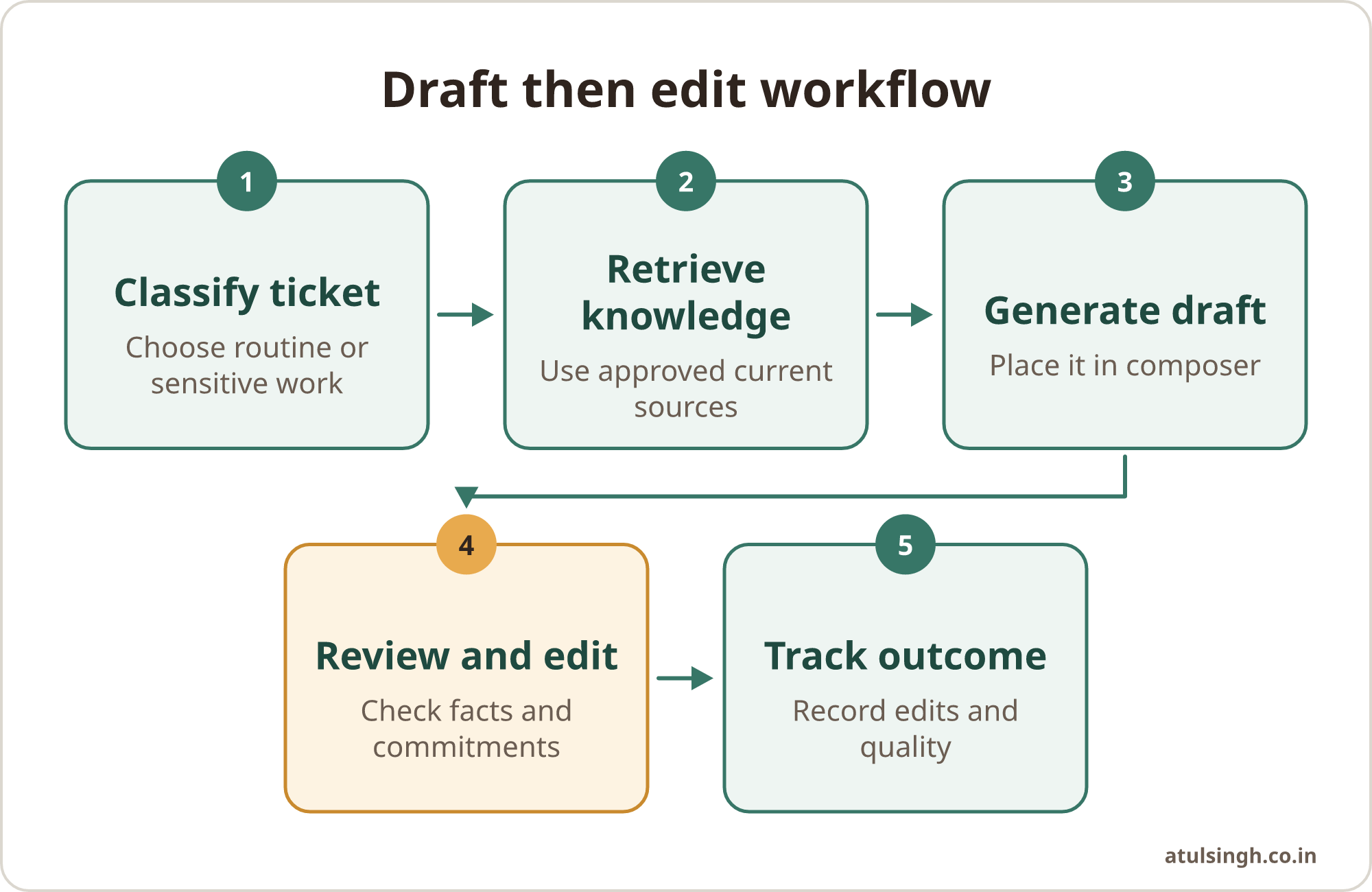
A useful workflow classifies the ticket, retrieves approved information, generates a draft, presents it for review and records the outcome. The AI should place its suggestion in the reply composer, where the agent can inspect it alongside the customer’s message and case history.
Give agents a short review checklist. They should confirm that the draft answers the actual question, uses the current policy, makes no unsupported promise, includes the correct next step and sounds appropriate for the customer’s situation.
Keep the first version narrow. Order updates, password reset instructions, delivery questions and basic product guidance are easier to ground than complaints, refunds, cancellations or legal issues. A support lead can expand the scope when the evidence supports it.
A standalone customer support response generator can help with occasional drafting. An integrated workflow is better for repeatable work because it can use ticket fields, approved documents and review data.
Why a review workflow matters
AI drafting can improve speed when agents spend time rewriting familiar explanations. In a study of 5,179 customer support agents, access to a generative AI conversational assistant increased productivity by an average of 14%, measured by resolved issues per hour (National Bureau of Economic Research, 2023).
The benefit was uneven across experience levels. Novice and lower-skilled workers experienced a 34% improvement in resolution rate, while experienced and highly skilled workers saw minimal productivity gains (National Bureau of Economic Research, 2023). This supports a practical rollout plan: use drafts to help newer agents follow good patterns, while giving experienced agents control over when suggestions are useful.
The same research found improved customer sentiment, increased employee retention and fewer customer requests for managerial escalation (National Bureau of Economic Research, 2023). These outcomes depend on the workflow around the model. A fast answer with the wrong refund rule creates more work and can damage trust.
A review step keeps responsibility clear. The agent remains the person who checks the response, corrects errors and decides whether it is suitable to send. AI can assist with wording, but it cannot judge every customer, policy or reputational risk correctly.
Build the draft-then-edit workflow
Define the approved categories. Start with areas where the answer is documented and the cost of a small delay is meaningful, such as delivery tracking, account access and basic setup instructions. Create a separate list for sensitive categories that require mandatory human review.
Prepare the source material. Gather current help centre articles, product instructions, refund rules, service terms, escalation guidance and strong previous replies. Remove duplicate or outdated documents. Give each source an owner and review date so the AI has a maintained library rather than a collection of old macros.
Set the draft instruction. Tell the system to use the ticket, customer history and approved sources. Ask it to state when information is missing, avoid inventing policy and leave a clear prompt for anything the agent must verify. Set a suitable tone and length for the support channel.
Place the draft in the composer. The agent should see the suggested reply before it reaches the customer. Salesforce describes a human-in-the-loop workflow in which replies are grounded in knowledge articles and case history, then explicitly reviewed, edited or regenerated by the agent (Salesforce Help, 2026).
Help Scout similarly keeps generated replies in a pre-send draft state. Its documented workflow requires human verification, revision and manual sending, with context drawn from internal knowledge and previous support threads (Help Scout Support, 2026). That separation gives the agent a clear decision point.
Record the edit outcome. Store whether the agent accepted the draft, made a light edit, made a substantial edit or discarded it. If the platform only offers acceptance and edit data, add a simple QA label for high-impact corrections.
Review the pattern regularly. Look at edit rate by ticket category, agent experience, channel and knowledge source. A high edit rate may point to weak documentation, a vague instruction, missing customer context or a category that should leave the AI workflow.
Track edits as a quality signal
Edit rate is the percentage of AI drafts changed by agents before sending. It is useful because it measures how much correction a draft needed, although it should sit beside quality checks and customer outcomes.
A low edit rate can mean the drafts are consistently useful. It can also mean agents are accepting suggestions too quickly. A high edit rate can indicate poor drafts, or it can reflect careful agents improving tone and clarity even when the facts are correct.
Use a rolling window so a single busy period does not drive a policy change. Zendesk documents operational metrics for agent acceptance rate and edit rate across rolling 30-day windows, allowing teams to see how often agents accept or modify AI recommendations (Zendesk Help, 2026).
Review the edits themselves. Group them into incorrect policy, missing context, wrong tone, unnecessary detail, unsafe promise and formatting. Each category suggests a different action. Incorrect policy needs a source update, missing context may need better ticket fields, and tone changes may need clearer style guidance.
Use this table as a starting operating rule:
| Signal | What to inspect | Sensible action |
|---|---|---|
| Low edits, strong QA | Factual accuracy and customer outcome | Keep the category in assisted drafting |
| Low edits, weak QA | Whether agents are rubber-stamping | Increase sampling and review prompts |
| High edits, factual corrections | Source articles and policy rules | Update or remove outdated material |
| High edits, wording changes | Tone, length and channel fit | Refine the instruction and examples |
| Frequent discards | Category complexity or missing context | Require manual drafting or escalation |
Do not use edit rate as an individual performance score without context. Agents may edit more because they handle complex cases or protect the brand voice carefully. Combine the measure with QA sampling, escalation rates and customer feedback.
A workflow for reviewing support replies against quality can help leads inspect the corrections behind the metric before using it in coaching or process changes.
Ground every draft in current knowledge
General model memory is a poor source for prices, eligibility rules, return terms or account procedures. Connect the drafting workflow to approved internal material and define what happens when the material does not answer the question.
Use retrieval by intent where possible. A delivery question should bring in delivery guidance, order information and relevant exceptions. It should not receive a broad collection of unrelated articles that increases the chance of a confident but unsuitable answer.
Give every important policy a clear owner. When a return period changes, update the source article before changing the prompt. Then test sample tickets that cover the old rule, the new rule and an edge case. This keeps the system aligned with operational changes.
Previous support conversations can provide useful examples, but they need review before becoming source material. A past reply may contain an exception, a temporary offer or a mistake. Treat closed tickets as examples to evaluate, not as automatic policy.
Support leads should also define a refusal pattern. For example, the draft can say that the available information does not confirm eligibility and ask the agent to verify the account. This is more useful than filling the gap with a guess.
If macros and saved replies are also in use, audit them regularly. A workflow for updating support macros can help remove old instructions before they feed future drafts.
Set review and escalation rules
Separate routine, sensitive and exceptional tickets. Routine tickets can receive an AI draft for normal agent review. Sensitive tickets should carry a mandatory review label, and exceptional tickets may bypass drafting altogether.
Sensitive examples include complaints involving harm, refunds outside policy, cancellations with financial consequences, threatened legal action, account security, personal data and vulnerable customers. The exact categories depend on the business, but the rule should be visible in the queue rather than left to individual memory.
Use a draft warning when the response contains a commitment. The agent should verify dates, amounts, eligibility, credits, replacements and delivery promises against the live case. The draft can suggest an answer, while the agent remains accountable for what the company tells the customer.
Article 50 of the EU AI Act says deployers of AI systems that interact directly with natural persons must inform users that they are interacting with an AI system, unless this is already obvious from the context (European Union, 2024). A human-reviewed draft may have different disclosure considerations from a customer-facing automated agent, so review the applicable requirements for the markets served.
Protect customer data throughout the workflow. Limit the fields sent to the model, check the provider’s data handling terms and prevent unnecessary personal information from entering prompts or logs. Access permissions should follow the support team’s existing rules.
Some teams may eventually consider automatic sending for narrow categories with stable results. Keep that decision separate from drafting. A low edit rate alone does not establish that a category is safe for zero-touch replies. Quality sampling, policy stability, customer impact and escalation risk all deserve review.
Run a practical pilot
Choose one queue and one routine intent. Write the approval rules, collect the relevant source articles, configure the draft instruction and test it against recent tickets with personal information removed where appropriate.
Ask agents to label each draft as accepted, lightly edited, substantially edited or discarded. Require a reason for substantial edits and discards. During the pilot, have a lead inspect a sample of sent replies for factual accuracy, tone and correct escalation.
Hold a short review after the first operating period. Look for repeated corrections rather than isolated wording preferences. Fix the source or workflow first, then adjust the prompt when the source is already correct.
Expand one category at a time. Give agents a simple route for reporting a poor draft, outdated article or missing exception. A support system improves when the people using it can maintain it without waiting for a large technical project.
The team may also use a concise support responder for short, low-risk messages, provided the same review and sending rules apply. The tool can assist the workflow, but the operating controls determine whether it is dependable.
Where a small team should start
Begin with a documented draft workflow, a maintained knowledge library and a visible review decision. Measure edit rate by category, inspect the reasons behind edits and pair the metric with quality sampling. Keep human review for financial, legal, reputational and emotionally sensitive cases.
This approach gives decision makers a way to judge progress without treating adoption as a tool purchase. It gives agents a practical assistant that reduces repetitive writing while preserving their judgement.
If the workflow spans several systems or needs routing, permissions and reporting, a done-for-you system build can turn these rules into a small, owned process. A free AI workflow review call is one option for examining a support workflow and deciding what, if anything, should be automated.