
Prepare a knowledge base for an AI support bot by collecting your trusted support content, removing contradictions, and rewriting it into short, self-contained articles. Each article should answer one customer question, use clear headings and steps, and state the conditions or exceptions that affect the answer.
Then assign an owner, create a regular review rhythm, and use real conversations to find missing or outdated content. Connect the bot to a clear human handoff so it can stop safely when the knowledge base does not contain a reliable answer.
The short answer: build a maintained content system
A useful knowledge base gives the bot three things: accurate information, enough context to interpret a question, and a clear source of truth. Product manuals, internal notes, old email replies and scattered chat messages can contain valuable knowledge, but they need organising before a support assistant can use them consistently.
Start with the questions customers ask most often. Group them into distinct topics such as orders, billing, account access, delivery, technical troubleshooting and returns. Make each category cover its area without overlapping heavily with another category. This reduces the chance that the assistant retrieves two conflicting answers for the same question.
For each topic, write one article that stands on its own. Explain the answer, the steps, the conditions, the expected outcome and the point at which a person should take over. Ada recommends self-contained articles covering exactly one topic, because forcing an AI agent to move between several pages can reduce retrieval accuracy (Ada CX, 2023).
Why content quality matters now
Support teams are preparing for more conversations to be handled through AI-assisted channels. Salesforce projects that AI agents will handle 50% of customer service cases by 2027, compared with 30% in 2026 (Salesforce, 2026). That shift makes the quality and maintenance of your business content an operational concern, rather than a documentation side project.
Customers already use self-service channels. A KPMG study found that 69% of consumers actively use chatbots and virtual assistants for self-service, as reported by Intercom (Intercom, 2023). If the answer is incomplete, out of date or difficult to retrieve, the customer experiences the content problem through the bot.
There is also a delivery risk for small and mid-sized businesses. Fin AI Agent reports that between 80% and 95% of in-house AI agent development projects fail because of hidden costs, timelines and maintenance complexity (Fin AI Agent, 2026). That figure comes from a vendor source and should be treated accordingly, but the practical lesson is useful: keep the system small, assign ownership and design the maintenance work before launch.
Step 1: map the questions and source material
Begin with a content inventory rather than a tool selection exercise. Gather resolved tickets, support emails, call notes, help centre pages, product documentation, refund rules, onboarding instructions and internal answers used by experienced team members.
Separate the material into four groups:
| Content group | What to include | Action before use |
|---|---|---|
| Approved answers | Current policies and standard procedures | Confirm the owner and review date |
| Useful drafts | Repeated replies and internal explanations | Rewrite into customer-facing articles |
| Conflicting content | Different answers for the same question | Choose one source of truth |
| Sensitive content | Personal, legal or restricted information | Remove, restrict or review carefully |
Next, review recent customer questions. Look for repeated wording, even when the underlying issue has a different internal name. A customer may ask, “Why has my payment failed?” while your internal documentation calls the topic “transaction exception handling”. The article should include the customer’s wording as well as the internal term.
Mark each source with a status such as approved, needs review, retired or restricted. Do not upload an entire shared drive and expect the assistant to determine which version matters. A small set of trusted documents will usually be easier to maintain than a large collection of uncertain material.
If your business has important knowledge buried in resolved tickets, a support ticket converter can help turn those answers into a consistent first draft. A person still needs to check the result for accuracy, tone, privacy and policy exceptions.
Step 2: organise articles for retrieval
Use categories that are mutually exclusive and collectively exhaustive. In plain terms, every important question should have a logical home, while each question should have one main source of truth. This structure helps prevent the assistant from combining answers from unrelated or conflicting pages (Ada CX, 2023).
A practical article structure looks like this:
- Question or title: use the words a customer would use.
- Short answer: give the direct answer in the first few lines.
- When this applies: state the product, plan, region or account conditions.
- Steps: use numbered instructions for actions that happen in sequence.
- Exceptions: explain what changes the normal process.
- Escalation: say when and how a person should take over.
- Ownership: record the responsible team and review date.
Use explicit headings, numbered lists and bullet points so the retrieval system can identify individual parts of an answer. Restate the customer’s question in the article where useful. For example, “If you are asking why your refund has not arrived, check the refund date in your order history first” gives the assistant more usable context than a heading called “Refund exceptions”.
Write full, descriptive sentences. Short replies such as “Yes”, “No” or “Only for annual plans” can lose their meaning when retrieved without the surrounding conversation. Intercom recommends adding enough sentence-level context to reduce this ambiguity (Intercom, 2023).
Keep essential instructions in plain text. Many AI support agents cannot reliably interpret troubleshooting steps that exist only inside images, videos or external multimedia. If a screenshot shows a button, describe the button, its location and the action in the article as well.
Step 3: add ownership, boundaries and handoff rules
Every article needs an accountable owner. This can be a support lead, operations manager, product specialist or another named role. The owner should have authority to confirm policy changes and retire content when a process changes.
Set a review trigger as well as a calendar review. A calendar review might happen monthly or quarterly, depending on how quickly the topic changes. A trigger applies immediately after a pricing change, product release, policy update, legal decision or repeated customer complaint.
Record these fields in your content management system:
- Article owner
- Supporting team
- Date last checked
- Next review date
- Products or plans covered
- Region or market covered
- Related policy or procedure
- Escalation destination
- Change history
The assistant also needs permission boundaries. Define which questions it can answer, which actions it can explain, and which situations require a person. Payment disputes, account ownership changes, sensitive personal information, complaints and legal issues usually deserve careful review before automation.
A handoff should preserve context. The human agent should receive the customer’s question, the relevant conversation, the article used, any information already collected and the reason for escalation. A bot that keeps repeating an answer after the customer has asked for help creates friction and hides the actual content gap.
For a broader view of the operating model, the article on why chatbots stop working explains how ownership, guardrails and handoff affect performance after launch.
Step 4: create a feedback loop from real questions
Treat unanswered questions as a content queue. Give frontline staff one simple route for reporting an issue, such as a dedicated ticket tag, form or team channel. The report should capture the customer question, the bot’s response, the correct answer and whether the problem came from missing content, conflicting content or a poor retrieval match.
Review failed conversations regularly. Useful signals include repeated requests for a human, questions that produce no result, customers rephrasing the same question, long conversation loops and corrections made by support agents. These signals show where the knowledge base needs attention.
Some support platforms can scan unresolved conversations and surface searches that returned no results. Use those suggestions as a prioritised writing queue, then check them against business value and risk. A high-volume billing question may deserve attention before a rare product edge case, while a low-volume legal or safety issue may still require immediate review.
A simple weekly routine can be enough for a small team:
- Review the most common failed or escalated conversations.
- Select a small number of content gaps to fix.
- Update or create the relevant articles.
- Test the bot with the original customer wording.
- Ask a support lead to approve the change.
- Record the change and notify the team.
This creates a connection between daily support work and the content used by the assistant. It also gives the decision maker a visible way to judge whether the system is improving, rather than relying on a general impression that the bot feels better.
A practical build sequence for your team
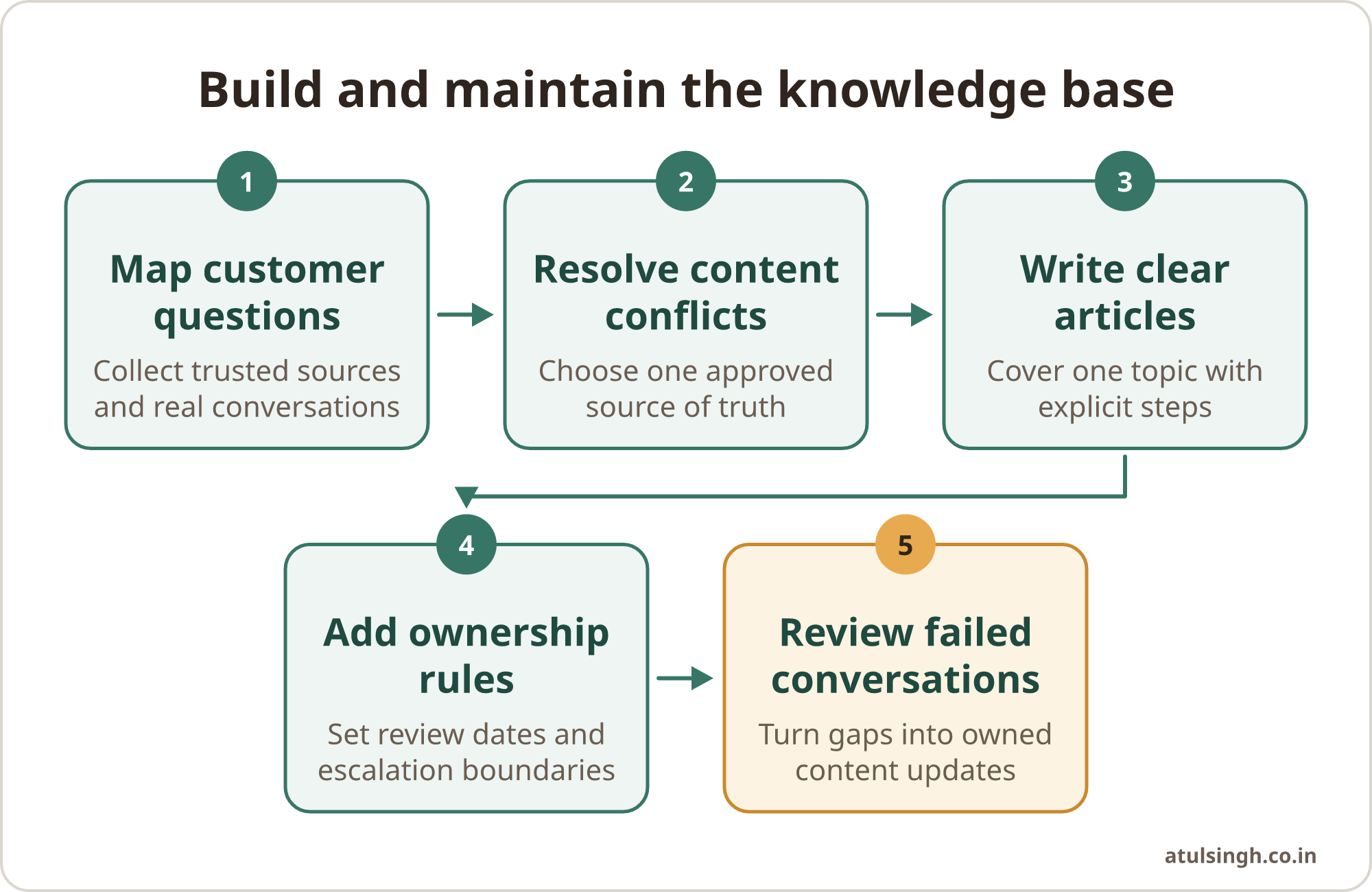
Use the following sequence when preparing a first version:
- Choose a narrow support area. Start with a repeatable topic such as delivery status, password resets or appointment changes.
- Collect trusted sources. Include approved documents and resolved conversations, while excluding uncertain drafts.
- Resolve contradictions. Ask the accountable owner which answer applies and retire alternatives.
- Rewrite the articles. Use one question, one answer, clear conditions and explicit steps per article.
- Add boundaries. State what the assistant can answer and when it must hand over.
- Test real wording. Use short, incomplete and informal customer questions, not only carefully written test prompts.
- Launch with monitoring. Review escalations, corrections and repeated questions from the beginning.
- Maintain the queue. Turn confirmed gaps into owned articles with a review date.
Say a ten-person agency is preparing a bot for client onboarding. Its first content area could cover access invitations, required assets, approval stages and meeting changes. The agency can keep campaign strategy, contract interpretation and difficult client complaints with a person, while the bot handles routine process questions from approved articles.
The same approach works in other teams. A sales team might document qualification rules, meeting preparation and handoff conditions. A marketing team might create approved answers about campaign offers and delivery timelines. A support team might focus on troubleshooting, returns and account access. Each group needs its own source of truth and a clear owner.
For email and WhatsApp, organise the content and handoff before connecting the channels. The guide to an email and WhatsApp assistant covers that order of work and the testing needed before launch.
Common mistakes and limits
Uploading everything: A large document collection can contain duplicated, retired or contradictory instructions. Curate the first release and expand it through evidence from real questions.
Writing for the internal team only: Internal shorthand may be familiar to staff but unclear to customers and retrieval systems. Use customer language, define specialist terms and explain the action in full.
Hiding critical steps in media: Put troubleshooting instructions in text even when an image or video provides useful support. The written article should stand on its own.
Treating launch as the finish line: Thin or outdated content can lead to confident but incorrect answers, while a one-off setup tends to plateau as products and policies change. Set the feedback loop and review ownership before launch.
Skipping compliance review: Personal data, health information, financial details and regulated processes need careful handling. Review what the bot can access, what it may repeat and which conversations must go directly to a trained person.
Creating a human handoff without context: A button labelled “contact support” is only part of the workflow. Transfer the conversation and collected details so the customer does not have to start again.
Building too much too soon: A small, owned knowledge base is easier for a mid-sized business to test and improve. Expand after the team can maintain the first workflow reliably.
Where to start on Monday
Choose one support topic with frequent, low-risk questions. Ask the responsible team to gather the current answers, select the approved source, and identify the exceptions that need human judgement.
Create a short set of self-contained articles, test them against real questions and record every failure. Assign one owner to approve changes and one routine for reviewing failed conversations. The quality of the first content set matters, but the operating rhythm matters just as much.
If you want the content structure, bot workflow, guardrails and handoff built together, AI chatbot development is the matching done-for-you system build. The finished system should be documented and handed over so your team can run and improve it.