
Support conversations can reveal renewal risk weeks or months before a customer says they may leave. Look for repeated unresolved issues, reopened tickets, billing friction, contract language, pricing objections and a worsening tone across several interactions.
Use AI to group these signals and add a simple At-Risk Flag to the customer record. Then ask a customer success lead or senior support person to review the history, confirm the underlying issue and choose the right response before anyone contacts the customer.
The short answer: flag patterns, then review them
A single frustrated sentence rarely proves that an account will churn. A pattern across tickets is more useful. For example, a customer may mention the same integration error three times, reopen a ticket after a promised fix, ask about contract terms and become increasingly brief in their replies.
An AI workflow can detect these patterns without asking support agents to read every conversation again. It can classify the issue, assess the tone, compare recent tickets with earlier ones and update a risk field in the CRM or helpdesk. The output should be a review queue, rather than an automatic cancellation prediction or an automated warning email.
A useful first version has three risk levels:
- Watch: one meaningful signal, such as a new billing concern or an unusually negative message.
- Review: several related signals across recent tickets, or a repeated failure that remains unresolved.
- Escalate: a serious unresolved issue combined with contract, pricing or cancellation language.
The team should define what each level means operationally. A Watch account might be checked during the next health review. A Review account could go to a customer success lead within one working day. An Escalate account may need coordinated action from support, customer success, billing or product.
Why support conversations matter before renewal
Customers often communicate dissatisfaction indirectly. Zendesk’s analysis of 165 million support tickets found that 85 percent of customer experience leaders confirmed customers leave brands that fail to resolve issues on first contact. Repeated billing discrepancies, integration bugs and other unresolved failure patterns can therefore act as early indicators of account churn (Zendesk, 2026).
The risk can remain hidden when teams review tickets one at a time. A support agent may resolve each conversation in isolation while the account is accumulating friction across several weeks. The customer success team may only see the effect when usage drops, an invoice is challenged or the renewal email receives no response.
Zendesk’s benchmark research reports that 73 percent of consumers switch to a competitor after multiple poor experiences, while more than 50 percent leave after a single negative interaction. The same research says 56 percent of customers never voice dissatisfaction directly, so a quiet account should not automatically be treated as a healthy one (Zendesk, 2026).
Service teams also have limited time for manual investigation. Salesforce reports that service agents spend 46 percent of their work time directly engaging with customers, while administrative overhead and disconnected workflows consume the rest. The same source reports that 82 percent of service professionals see customer expectations rising (Salesforce, 2026).
This makes prioritisation important. The aim is to help a small team find the accounts that need judgement, while routine ticket classification and evidence gathering happen in the background.
The signals to extract from tickets
Start with signals your team already understands. Avoid building a complicated score before you know which patterns lead to useful action.
Repeated failure signals include reopened tickets, repeated contacts about the same issue, unresolved bugs, failed integrations, missed fixes and a customer asking for an update more than once. These signals become stronger when they involve a core workflow or have remained open across multiple support interactions.
Commercial signals include questions about cancellation, contract terms, renewal dates, refunds, pricing, unused seats, downgrading or moving to another provider. These phrases require context. A procurement contact asking about notice periods may be completing a routine review, while the same question after several unresolved incidents deserves closer attention.
Tone signals include increasing frustration, disappointment, distrust, urgency or resignation. Sentiment analysis can help find changes over time, but it should be treated as supporting evidence. Sarcasm, short technical replies and language differences can lead to incorrect classifications.
Silence signals are harder to interpret. A customer who stops replying after an unresolved issue may be at risk, but the silence could also reflect leave, internal changes or a change in responsibility. Combine silence with ticket status, account activity and the last confirmed outcome before escalating it.
A useful AI instruction is: “Review the recent support history. Identify repeated failures, commercial risk language, changes in tone and unresolved actions. Quote the relevant ticket references, explain the confidence level and recommend whether a human should review the account.” The system should show evidence, not only a label.
For ticket-level classification and routing, a ticket triage workflow can help establish trusted tags, confidence thresholds and reassignment checks before renewal risk is added to the process.
A practical workflow for Monday
The following process works with a helpdesk, CRM and a simple automation tool. It can begin with a daily batch rather than a real-time system.
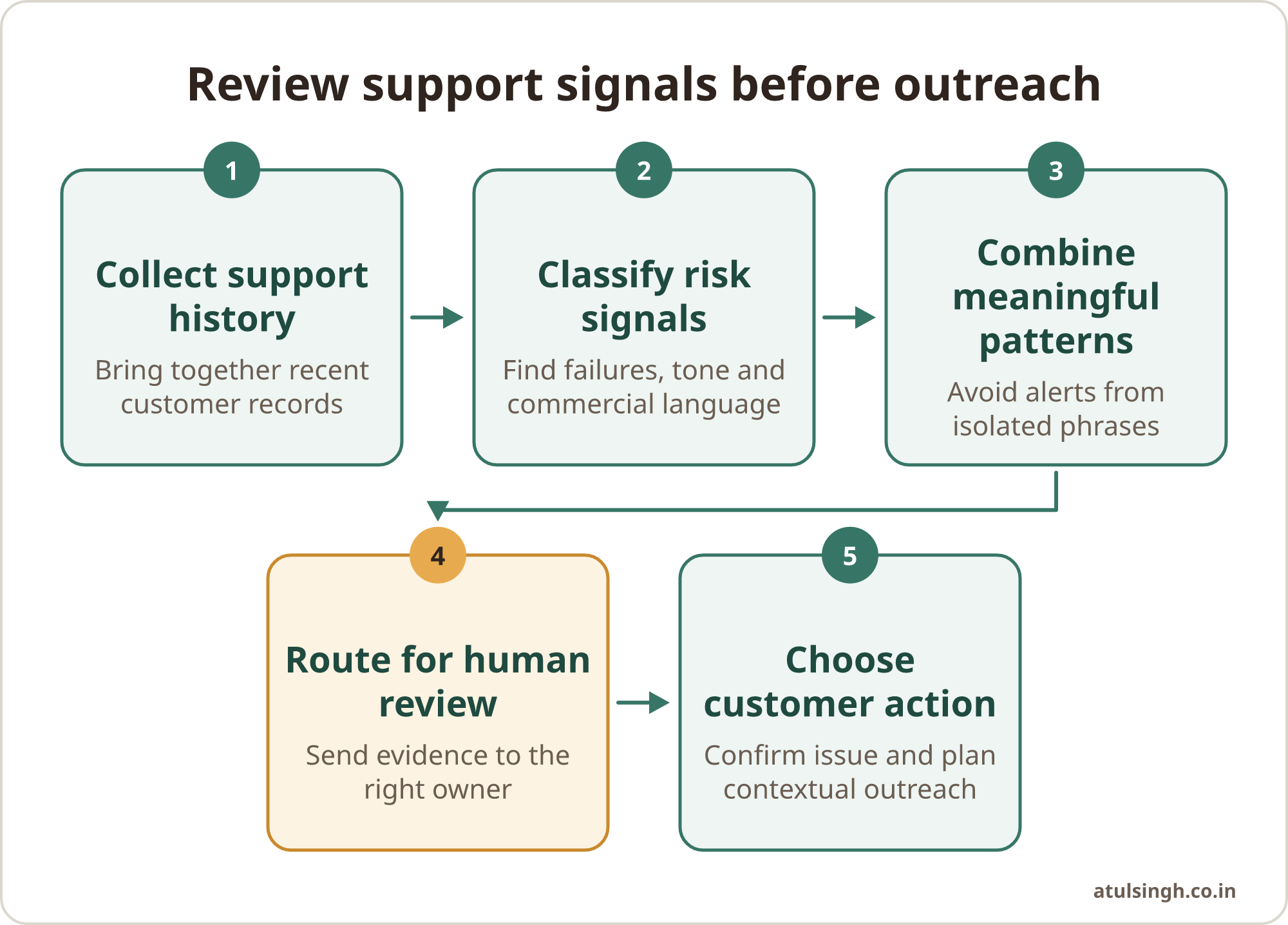
1. Collect the right records. Bring together recent tickets, ticket status, reopen history, issue category, account owner, renewal date and any known escalation. Keep the data limited to what the team needs for the decision.
2. Clean the inputs. Remove duplicated messages, internal notes that should not be sent to an external model and irrelevant automated notifications. Preserve ticket IDs and timestamps so a reviewer can check the original record.
3. Classify the conversation. Ask the model to identify issue type, severity, unresolved actions, commercial language and tone direction. “Tone direction” means whether the recent conversation is improving, stable or worsening compared with earlier interactions.
4. Combine signals. Add a flag when several meaningful signals appear together. A simple rule could require one unresolved high-impact issue plus one worsening tone signal, or repeated contact about the same failure plus renewal or pricing language.
5. Route for human review. Send the flagged account to the correct customer success lead or senior support queue. Include the evidence, confidence level, open ticket links and a suggested review deadline.
6. Record the decision. The reviewer should mark the flag as confirmed, false positive, already handled or requiring more information. This feedback can improve the rules and expose categories that need product or billing attention.
7. Close the loop. Share recurring root causes with product, engineering, billing and account management. A support signal has more value when it leads to a fix, a clear customer update or a better renewal plan.
This process can sit alongside a broader customer retention workflow that connects support, billing, CRM and communication tools while keeping each action reviewable.
The human check before outreach
An AI flag does not explain the relationship. The reviewer needs to establish what happened, whether the issue is resolved and what the customer has already been told.
Use a short review checklist:
| Review question | What to check |
|---|---|
| What failed? | Product, billing, onboarding, integration or service issue |
| Is it resolved? | Confirm the latest technical or account status |
| How has the tone changed? | Compare recent messages with earlier conversations |
| What does the customer need? | Fix, explanation, credit review, training or senior contact |
| Who should respond? | Support lead, customer success, billing, product or account owner |
| What should be recorded? | Decision, owner, next action and follow-up date |
The first outreach should acknowledge the actual situation. If a billing correction is still being investigated, a generic “we noticed you may be unhappy” message will probably create more friction. A better approach is to confirm ownership, explain the next action and give the customer a clear route to a person who can help.
Human access matters when AI is involved in service. Gartner reports that 87 percent of customers say companies using generative AI for customer service should provide access to a human agent (Gartner, 2026). Keep the person responsible for interpreting the account and handling sensitive conversations.
A renewal-risk account workflow can help turn the review into a repeatable process, especially when support issues, usage changes and renewal dates sit in different systems.
What a simple risk flag should contain
A risk flag should be easy to read and easy to challenge. A useful record might contain the account name, risk level, date detected, evidence references, issue category, unresolved action, confidence, reviewer and next review date.
Avoid hiding the reasoning inside a single score. A number can help sort a queue, but the customer success lead still needs to see why the account was flagged. If the evidence is weak or contradictory, the correct action may be to gather more information rather than contact the customer.
A practical format could look like this:
- Risk level: Review
- Main signal: Three contacts about the same integration failure
- Tone direction: Worsening across the latest two replies
- Commercial context: Renewal scheduled within the next review period
- Open action: Engineering fix awaiting confirmation
- Confidence: Medium
- Human decision: Senior support review before outreach
Academic research on churn prediction found that combining structured customer history with sentiment weighting from support text reduced false negatives by 23 percent and reached 89.4 percent predictive accuracy in the reported research setting (International Journal of Advanced Research in Computer Science and Communication Engineering, 2026). These findings support combining ticket language with account history, while the reported results should not be treated as a guarantee for every business or dataset.
Common mistakes and limits
Treating sentiment as intent. Frustration about a resolved inconvenience does not automatically mean a customer will leave. Review the issue, outcome and account context.
Alerting on every negative phrase. Excessively sensitive rules create alert fatigue. Start with a small set of patterns and review false positives each week.
Contacting customers while the issue is open. Outreach should have a purpose. Coordinate with the ticket owner so the customer does not receive conflicting updates.
Using the flag to reduce service. A risk label should help the team provide appropriate attention. It should never become a hidden reason to delay, restrict or downgrade support.
Ignoring privacy and governance. Scanning customer communications requires a defined lawful basis under Article 6 of the GDPR, and organisations should assess legitimate interest, vendor responsibilities and data minimisation before processing ticket content (ISMS.online, 2026). If an AI vendor processes support logs, review the relevant data processing terms and access controls.
Consumer protection also matters. Guidance on AI systems stresses the need for substantiated claims, objective evaluation, data minimisation and safeguards against deceptive automated interactions (OMQ, 2026). Keep an audit trail showing what data was used, what the model suggested and what the human reviewer decided.
Where to start with a small team
Choose one renewal segment, one support system and two or three risk patterns. A sensible pilot might focus on repeated integration failures, unresolved billing problems and contract or cancellation language. Review the flagged accounts manually for several weeks before changing thresholds or adding more categories.
Measure whether the workflow helps people act earlier and with better context. Useful checks include the proportion of flags confirmed by reviewers, the number of unresolved issues found before renewal review, the time taken to investigate each account and the root causes shared with product or billing.
The system should become part of an existing meeting or queue. A customer success lead can review new flags alongside account health. A support manager can discuss recurring categories with product. An operations owner can inspect whether the automation is creating duplicates or sending evidence to the wrong place.
For many small businesses, this is enough: collect the conversations, detect meaningful patterns, show the evidence, ask a human to judge the situation and record the next action. If you want help designing and connecting that workflow, the done-for-you AI workflow review is a practical place to discuss the process and decide what should be automated.