
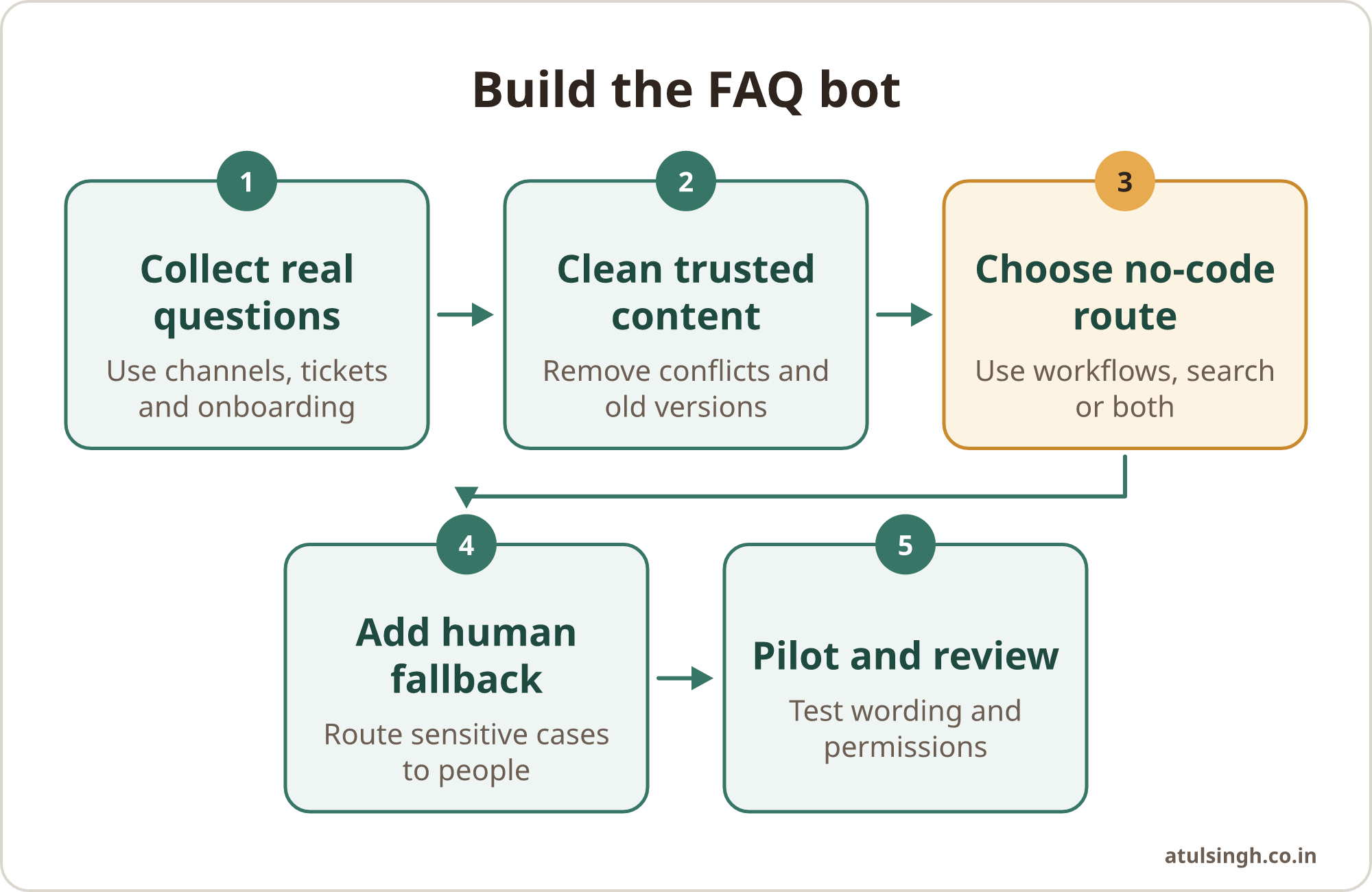
Start with the questions your team already asks, then choose a no-code tool that can return approved answers from your existing documents. You can build a useful internal FAQ bot without engineering by combining a simple intake workflow, a small knowledge base, clear ownership and a human fallback.
Keep the first version narrow. Let the bot handle routine questions about processes, systems, documents and recurring support issues. Route sensitive, ambiguous or high-impact cases to a person who can use judgement.
The short answer
An internal FAQ bot has four parts: a source of real questions, a trusted set of answers, a no-code delivery method and an owner who keeps the content current. The technology matters, but the workflow around it determines whether people trust and use the bot.
Begin by reviewing questions from Slack, Teams, email, support tickets, onboarding conversations and sales handovers. Group them into themes, remove duplicates and identify which answers are stable enough to publish. Do not start by uploading every document the business owns.
For a small team, there are two practical routes. A structured workflow can return fixed answers when a person selects a topic or uses a known trigger. A conversational agent can search approved documents and produce a plain-language response. Many teams will benefit from using both: fixed answers for important policies and document search for lower-risk operational questions.
If the wider goal is to make an assistant work reliably inside the tools your team already uses, the overview of in-platform AI assistants gives useful context on how the workflow and adoption pieces fit together.
Start with the questions people actually ask
Collect real questions. Ask team members to paste the last few questions they had to answer for someone else. Search shared channels and ticket records for repeated wording. Review onboarding queries, customer objections and internal requests for access, approvals or process explanations.
A question is a good candidate when it is repeated, has a clear answer and does not require private judgement. Examples include:
- Where is the latest proposal template?
- How do I request access to the reporting dashboard?
- What information belongs in a new customer handover?
- Which channel should receive an urgent support escalation?
- What is the standard process for booking annual leave?
A question needs human handling when the answer depends on a personal situation, a negotiation, a complaint, a legal interpretation or an exception to policy. The bot can explain the standard process and collect the relevant details, but a named person should make the decision.
Create a question register. Use a simple spreadsheet with columns for the question, category, approved answer, source document, owner, review date and escalation route. Add a status such as draft, approved, needs review or retired.
This register gives you a useful test set before any bot is built. It also shows where the business has a knowledge gap. If several people ask about a process but nobody can identify an owner or current document, the answer is an operational decision still waiting to be made.
For marketing and customer support teams, a question register can include recurring product comments and community questions. A workflow that turns those questions into an organised FAQ thread can help a team review objections before a launch, especially when questions are spread across several posts and comments. See the community question FAQ workflow for that use case.
Choose a no-code route that fits the work
Choose the delivery method after you understand the questions. The right route depends on how much variation there is in the wording, how sensitive the answers are and where the team already works.
Use a structured workflow for fixed answers. Slack Workflow Builder lets members of a paid workspace create automated workflows without programming knowledge. It supports forms, trigger phrases, shortcut links and responses routed to channels or direct messages (Slack, Build a workflow).
This works well for an access request, an onboarding checklist, a support escalation or a form that collects the details needed by an operations team. The workflow can return an approved link or send the submitted information to a private channel for review.
Use a conversational agent for varied questions. Microsoft Copilot Studio can use SharePoint sites, libraries and lists as knowledge sources. It can generate answers from approved documents and pages, which means the team does not need to create a separate dialogue branch for every possible wording (Microsoft Learn, Add SharePoint as a knowledge source).
This route suits questions such as, “What should be included in a customer handover?” or “Which steps apply when a prospect asks for security documentation?” The answer still needs to point back to a trusted source and offer a route to a person when the source does not settle the question.
Use a combined model for important policies. Put exact answers into named topics for matters where wording matters. Use document search as a fallback for broader operational questions. Microsoft documents that topic-specific question-and-answer content can take precedence over broader knowledge searches, allowing teams to define verified responses for selected subjects (Microsoft Learn, Use SharePoint content for generative answers).
| Question type | Better starting point | Human involvement |
|---|---|---|
| Fixed process | Structured workflow | Review exceptions |
| Common document query | Conversational search | Check source quality |
| Sensitive policy | Approved topic answer | Handle personal cases |
| Unclear or unusual request | Triage form | Assign an owner |
Build the knowledge base before the bot
A bot cannot repair unclear or contradictory guidance. Prepare the content first.
Choose a small source set. Start with current process documents, approved policy pages, templates and escalation instructions. Store bot-accessible content in a dedicated folder or library where permissions and ownership are easy to review. Archive old versions instead of leaving several conflicting documents available.
Write for retrieval. Give each document a descriptive title. Put the answer near the relevant question. Use headings such as “Who can request access”, “What to include” and “When to escalate”. Spell out internal abbreviations and include the terms people actually use in conversation.
Separate facts from judgement. A document can state the standard refund process. It should also say when a support lead must review an exception. The bot can explain the standard route, while the lead decides whether an unusual case fits it.
Add answer boundaries. Each important answer should say what it covers, what it does not cover and where to go next. A useful response might include the source link, the last review date and a named team or channel for follow-up.
The AI support knowledge base guide covers article structure, accountability, review routines and human handoffs in more detail.
Set up ownership and permissions
The creator of a Slack workflow becomes its manager by default, but Slack allows additional managers and gives workspace owners and administrators ways to audit active workflows and take over management (Slack, Manage Workflow Builder access and features). Use that capability deliberately.
Assign at least two functional owners. One might be the operations lead and the other a support or department representative. Both should know how to update answers, review failed queries and pause the bot when a source becomes unreliable.
Keep the bot in a shared administrative space rather than in one person’s private account. Record the owner, source location, review date, escalation contact and change history in the question register.
Permissions need the same care as content. Microsoft documents that SharePoint-based answers can use the chatting user’s permissions, excluding content the user cannot read (Microsoft Learn, Use SharePoint content for generative answers). That reduces the risk of serving restricted files, but it does not remove the need to review sharing settings and folder structure.
Create a separate, audit-reviewed knowledge area for bot content. Avoid mixing payroll, personnel records, private customer information or executive material into the same repository. Ask administrators to review connector and external access settings before publishing the agent. Microsoft’s security and governance guidance describes how administrative policies can control maker access, connection endpoints and external triggers (Microsoft Learn, Security and governance).
Design the human fallback
A useful internal bot should make escalation easy. Add a response such as, “I could not confirm that from the approved guidance. Please send this to the operations team,” with a channel, form or named queue.
For a structured workflow, collect the question, team, urgency and relevant record link. Send those details to a private triage channel. For a conversational agent, give the user a clear option to report an unhelpful answer or request a human review.
Tell people that the assistant is automated. Keep the welcome message direct and explain what information should not be entered, particularly personal, financial or sensitive personnel details. If the platform stores diagnostic transcripts, explain who can view them and how they are used for improvement.
Use human review whenever money, customer commitments, employment matters, security or reputation is involved. The bot can organise information and point to the standard policy. A responsible person should make the final call.
Test it with real wording
Testing should use the language people actually use, including short messages, spelling variations, incomplete requests and terms from different departments. A bot that answers only the carefully written version of a question will frustrate the team.
Create a test list with four groups:
- Questions with one approved answer
- Questions with several possible interpretations
- Questions that should trigger a human handoff
- Questions the bot must refuse or redirect
Check whether each answer is accurate, easy to follow and linked to the right source. Confirm that a user without permission cannot retrieve restricted content. Test what happens when a document is moved, renamed, replaced or withdrawn.
For a conversational bot, review the retrieved passages as well as the final wording. A fluent answer can still be unsuitable if it combines two different policies or turns an exception into a general rule. For a fixed workflow, check whether users can find the right trigger and what happens when they use different wording.
Run a short pilot with one team. Ask participants which questions they tried, which answers they trusted and where they still needed help. Add failed questions to the register, then decide whether to improve the source document, add a fixed answer or route the case to a person.
A practical first week plan
Monday: collect repeated questions from three internal sources and group them into themes.
Tuesday: choose the first ten to fifteen questions, identify an owner for each and remove questions that need personal judgement.
Wednesday: clean the source documents, write approved answers and create the escalation routes.
Thursday: build a Slack workflow, Copilot Studio agent or combined version in a shared administrative space. Add the welcome message, source links and human fallback.
Friday: test real wording with a small pilot group, review permissions and record the changes needed before wider release.
Keep the first release focused on one team or one process. Review unanswered questions every week during the pilot, then move to a regular content review once the questions stabilise. Retire old answers instead of allowing them to compete with current guidance.
When a no-code bot needs more help
No-code tools are suitable when the content is reasonably stable, the workflow is bounded and an internal owner can maintain it. More specialised work may be needed when the bot must connect to several business systems, apply complex permissions, update records, or support a large set of sensitive processes.
The decision should follow the workflow rather than the novelty of the tool. If the team cannot agree on the source of truth, assign ownership before adding automation. If the bot receives many questions that require judgement, improve the triage process instead of forcing the bot to answer everything.
A small, owned FAQ system can remove repeated searching and give people a consistent starting point. For a tailored build that connects the knowledge base, workflow and handoff process, you can review the AI chatbot development service or book a focused AI workflow review.