
AI ticket triage works best when it follows a support workflow you already understand. Start with the tags, priority rules and destination queues your team trusts. Let AI recommend classifications first, compare them with human decisions, then automate only the clear cases.
A practical setup uses AI to identify the ticket topic, urgency, sentiment, language and relevant customer details. High-confidence tickets can go to the right queue automatically. Uncertain, sensitive or negative-sentiment tickets should go to a human review queue with the AI’s suggested tag and reasoning attached for checking.
The short answer: start with trusted tags
Begin by reviewing recent closed tickets and selecting three to five tags with clear definitions and enough volume to test. Examples might include “Password Reset”, “Standard Invoicing”, “Order Status” or “Account Access”. Avoid starting with a catch-all tag such as “General Query”, because it gives the model little useful information and makes routing harder to assess.
Write down what each tag means, what it excludes and which team should receive it. Include examples of customer language, including informal wording, spelling variations and common product terms. This small taxonomy becomes the operating brief for the AI and the support team.
Run the system in recommendation or shadow mode first. The AI can suggest a tag, priority and destination while the existing process continues. Compare its recommendations with the decision an experienced agent would have made. This gives you a baseline without allowing an early configuration error to send live tickets to the wrong team.
Once a trusted tag performs consistently, enable automated routing for that tag alone. Expand in small groups and keep a clear record of every rule, confidence threshold and destination. Support managers should be able to explain why a ticket was routed somewhere, and agents should know how to correct the result.
What AI can assess at intake
Ticket triage usually has several separate decisions. A message may be about billing, written in a particular language, contain an unhappy customer and mention an order number. Treating these as separate signals gives the workflow more control than asking one broad question such as “Which team should handle this?”
Useful intake fields include:
- Topic or intent: What does the customer need, such as a refund, password reset or delivery update?
- Priority: Does the message contain a deadline, service impact, account risk or another agreed urgency signal?
- Sentiment: Is the customer calm, frustrated or threatening to leave? Sentiment can help identify cases that need experienced judgement.
- Language: Which team or language queue should receive the ticket?
- Entities: Does the message contain an account ID, order number, product name or contract reference?
- Destination: Which team, skill group or escalation queue has the right ownership?
Zendesk describes intelligent triage across topic, sentiment, language and custom entities, with a separate confidence rating for each dimension (Zendesk Help, 2025). This lets you create more careful conditions. For example, a billing ticket with high topic confidence and negative sentiment might go directly to a billing specialist, while a low-confidence billing ticket goes to human review.
Priority needs its own definition. Do not ask the model to infer urgency from emotion alone. A calm message about a payment failure may deserve prompt attention, while an angry message about a minor formatting issue may not. Build priority from evidence your team can check, such as business impact, a stated deadline, account status or a service outage.
If agents need a compact view before making a decision, a customer support ticket summarizer can turn a long message into a short internal summary. Keep the summary separate from the classification fields so that agents can see both the evidence and the proposed routing.
A practical implementation process
The following sequence keeps the project small enough for a support team to own after launch.
1. Map the current workflow. List every intake channel, existing tag, priority field, queue, escalation rule and notification. Mark where agents manually reassign tickets. This map often reveals that a routing problem begins with unclear ownership or overlapping tags.
2. Clean the taxonomy. Merge tags that mean the same thing, remove retired values and define the difference between similar categories. Review catch-all tags carefully. Historical labels influence future predictions, so inconsistent labelling will create inconsistent recommendations.
3. Prepare the training set. Use closed or resolved tickets with complete conversation threads. Freshworks guidance for similar-ticket functionality describes the value of complete interactions, including a customer reply after an agent response, when preparing classification data (Freshworks Support, 2025). Exclude abandoned, duplicated or unverified records where the final category is unclear.
4. Test in shadow mode. Ask the AI to predict tags, priority and destinations without changing the live assignment. Sample correct, incorrect and uncertain recommendations. Ask agents what evidence they used when correcting a result, because that evidence can improve the field definitions.
5. Set confidence gates. Decide which predictions may trigger an automatic action and which require confirmation. A high-confidence topic may support direct routing, while a medium-confidence topic should present a recommendation to an agent. Salesforce documentation describes separate confidence levels for recommending a value and automating a field update (Salesforce Help, 2025).
6. Launch one route at a time. Start with a clear, high-volume category and a stable destination. Observe reassignment, missed priority cases and agent corrections before adding another route.
7. Review the exceptions weekly. Every manual reassignment is useful evidence. Group the reasons into taxonomy problems, missing customer information, new phrasing, poor confidence thresholds and genuine edge cases. Update the workflow deliberately rather than changing rules after one difficult ticket.
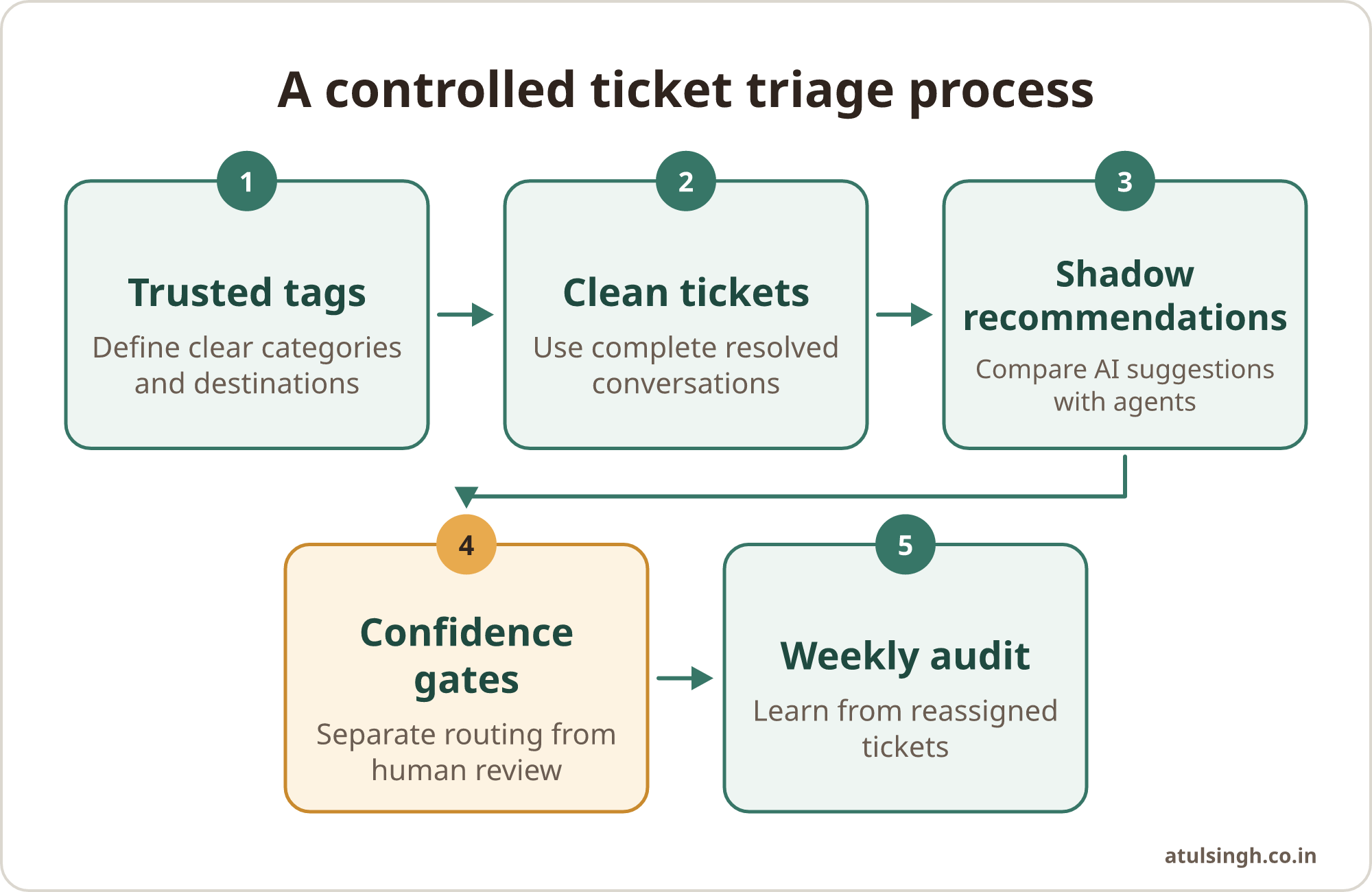
The sequence can be represented as a simple operating process:
- Trusted tags, clear definitions
- Clean historical tickets
- Shadow recommendations
- Confidence-gated routing
- Weekly reassignment review
The routing stage should always have a visible fallback. If the model cannot make a reliable decision, the ticket should arrive in a queue that a named support role checks during the normal operating day.
Build a human queue for uncertainty
A human review queue needs clear ownership. Define who checks it, how often it is checked, which tickets take precedence and what information the reviewer must confirm. Give the reviewer the original message, the proposed tag, the suggested destination, the confidence levels and any extracted account or order details.
Use a high-confidence threshold for automatic routing and a lower-confidence band for recommendations. The exact threshold should come from testing your own tickets. As a reference point, IrisAgent describes effective automated triage setups as targeting 85% to 95% classification accuracy and keeping post-triage reassignment below 10% (IrisAgent, 2026). Treat these as evaluation points rather than promises for every support environment.
Sentiment should also affect the fallback. A high-confidence topic combined with strongly negative sentiment may still need an experienced agent, especially where refunds, service failures, cancellations or reputational concerns are involved. Zendesk recommends confidence-gated actions and human handling for medium- or low-confidence tickets and negative sentiment (Zendesk Help, 2025).
The human queue prevents several common failures. It reduces ticket ping-pong between departments, gives agents a controlled place to correct unclear classifications and protects cases where a literal keyword misses the customer’s real intent. It also provides a useful source of labelled examples for future improvement.
Measure misroutes, not just automation volume
The number of tickets processed by AI tells you how much activity the system handled. It does not tell you whether customers reached the right team. Track the quality of the route and the work created after the route.
| Measure | What to inspect | Useful management question |
|---|---|---|
| Initial classification accuracy | Whether the proposed tag matches the final reviewed tag | Which categories are reliable enough for automation? |
| Reassignment rate | Tickets manually moved after initial routing | Which routes create avoidable handoffs? |
| Human review rate | Tickets sent to the uncertainty queue | Is the threshold too strict or too loose? |
| Priority correction rate | Tickets whose urgency was changed by an agent | Which urgency signals are missing? |
| Time to correct queue | How long uncertain tickets wait for review | Is the fallback queue properly staffed? |
| SLA outcomes | Breaches connected to wrong routing or late review | Where does triage create customer risk? |
Review reassigned tickets every week. Look for repeated patterns such as two tags used for the same issue, an old team name still appearing in historical records, new customer wording or a route that has outgrown its original definition. A reassignment should lead to a taxonomy or workflow decision, not simply a silent correction.
Keep a small sample of tickets for manual quality review even when the metrics look stable. A model can perform well on common requests while missing a less frequent but high-impact issue. Include billing, access, cancellation, security and executive-account cases in the review sample where those topics exist in your support operation.
For major customers, routing data can also support account reviews. A support ticket review workflow helps organise recurring friction points before an executive check-in, using the ticket history as evidence rather than relying on memory.
Common mistakes and important limits
Training on messy labels. AI reflects the quality of its examples. If agents used tags interchangeably, left retired values in old records or applied catch-all labels inconsistently, the model will learn those patterns. Salesforce Trailhead notes that classification models need clean historical data and specifies a minimum of 400 closed cases per field for its documented setup (Salesforce Trailhead, 2025). If your team has less data, start with recommendations and keep the scope narrow.
Routing before classification finishes. Static triggers may fire as soon as a ticket arrives. If they assign the ticket before the AI has completed its classification, the final destination may reflect an old rule rather than the new assessment. Review trigger order, duplicate automations and notification timing before enabling live routing.
Using sentiment as priority. Sentiment can identify cases for care, but it does not establish business impact by itself. Combine it with service status, deadlines, account context and the customer’s requested outcome.
Automating sensitive decisions too early. Tickets containing personal data, health information, payment details or security concerns need appropriate data handling and access controls. Consider whether sensitive fields should be redacted, excluded from analysis or processed within an approved environment. The workflow should also define when a specialist must take over.
Adding deflection before routing is stable. Auto-closing a ticket or sending a help article can be useful for a narrow, well-tested request. Medium-confidence cases should reach an agent, particularly when a wrong answer could cause a reopened ticket, a missed deadline or loss of trust. Clean routing and agent assistance are safer starting points for many small support teams.
A sensible Monday-start plan
Choose one intake channel and one high-volume category. Gather recent closed tickets, remove obvious duplicates, agree on the tag definition and identify the correct destination queue. Then run the AI in recommendation mode for a week or another period that gives the team enough examples to assess.
Create a simple review sheet with the ticket ID, proposed tag, final tag, proposed priority, final priority, proposed destination, reassignment reason and reviewer decision. This makes the first audit concrete and gives the team a shared language for discussing errors.
Before switching on automation, agree on three thresholds: the confidence level for direct routing, the range that requires agent confirmation and the conditions that always go to human review. Include negative sentiment, sensitive subjects and ambiguous multi-intent messages in the exception rules.
Document the process in the support team’s normal workspace. Include who owns the human queue, how to correct a prediction, when to change a tag definition and how weekly reassignment findings are recorded. A system is easier to maintain when the team can operate it without returning to the original builder for every adjustment.
Once the first route is stable, add the next trusted category. Keep the scope narrow until the team can explain the results, correct exceptions and maintain the taxonomy. If the workflow spans several tools or needs careful integration, a done-for-you workflow review can help define the first build and its handover requirements.