
The cost of maintaining a business automation depends on how many systems it touches, how often those systems change and who owns the failures. A stable workflow may need occasional checks and small fixes. A workflow connected to several SaaS tools, APIs and customer communications needs regular monitoring, testing and technical support.
By the second year, maintenance can overtake the original build cost because the workflow lives inside a changing environment. Software interfaces change, credentials expire, data formats drift and business rules move on. Research on software maintenance puts 60% to 80% of total lifecycle cost in the post-launch phase, with the rest spent on initial development (IEEE Xplore, 2025).
The short answer: budget for ownership, not handover
A launch completes the first version of a workflow. It does not remove the need to operate that workflow. Someone still needs to check whether runs completed, investigate exceptions, update connections and confirm that the process continues to produce the right business result.
For a small business, the cost usually appears in four forms:
- Routine oversight: checking logs, failed runs, queues, alerts and usage.
- Corrective maintenance: fixing broken steps, missing records and unexpected data.
- Adaptive maintenance: changing the workflow when a connected tool, API or business rule changes.
- Improvement work: making the process faster, clearer or safer as the team learns.
The original build may be a defined project. Maintenance is an operating responsibility. If nobody has that responsibility in writing, the work usually falls to the person who notices the failure first. That creates delays, inconsistent fixes and dependency on whoever built the workflow.
A useful planning question is, “What will happen when this fails at 9am on a Monday?” The answer should name the alert, the owner, the backup owner, the response time and the manual fallback. If those details are missing, the automation has been launched without an operating model.
Why maintenance overtakes build cost
Most automations depend on more than the platform where they were created. A sales workflow may rely on a form, CRM, enrichment service, email provider, calendar and reporting tool. A support workflow may connect a helpdesk, knowledge base, inbox, customer database and messaging service. Each dependency creates another place where a change can affect the process.
The type of automation also matters. UI-based workflows can break when a page layout changes, a button moves or a screen loads more slowly. API-based workflows can fail when an endpoint is retired, a webhook schema changes, a token expires or an unusual record reaches a step that was never tested. These failures can be invisible if the workflow reports that a request was technically accepted.
The dangerous case is a silent failure. A run can receive a successful status while passing incomplete or corrupted information into the next system. A lead may be routed without a phone number. An invoice may be marked as processed while one line is missing. A customer may remain subscribed to a message sequence after opting out.
The cost then includes investigation, rework and business damage. In customer-facing workflows, it can also include compliance exposure. Marketing and messaging automations need controls for consent, opt-outs and data synchronisation under rules such as TCPA, CAN-SPAM, CASL and GDPR.
Scale adds another layer of difficulty. Deloitte reported that 78% of surveyed organisations had implemented task-level automation, while only 3% had scaled a digital workforce beyond 50 bots. The reported barriers included governance gaps, fragmentation and the growing effort required to maintain disconnected workflows (Deloitte Insights, 2022). A small business does not need 50 bots to experience the same pattern. A collection of undocumented point-to-point automations can create its own maintenance burden.
Before building another workflow, document the current process and its exceptions. A pre-AI workflow audit can help identify where a process is stable enough to automate and where the business rules still need clarification.
What maintenance includes in practice
Maintenance becomes easier to plan when it is divided into regular activities rather than treated as an occasional emergency.
Monitor the workflow. Check successful runs as well as failures. A healthy dashboard should show volume, completion, exceptions, processing time and records sent to manual review. Alerts should go to a monitored channel rather than one employee’s personal inbox.
Validate incoming data. Raw form submissions and webhooks should pass through checks before they update a CRM, accounting system or customer record. Required fields, accepted formats and duplicate rules should be explicit. When a payload fails validation, place it in a review queue instead of allowing bad data to continue through the process.
Separate credentials from people. Integrations should use managed credentials, service accounts or a central secret store where appropriate. The workflow should have a documented token refresh process. This reduces the chance that an employee departure, password change or expired token stops a critical process.
Test the important paths. Maintain test records for normal cases, missing fields, duplicates, refunds, cancellations and other exceptions relevant to the workflow. Run those tests after a connected tool changes and before a major workflow edit reaches production.
Keep a manual fallback. The team should know how to complete the process when the automation is paused. This could be a spreadsheet queue, a saved report, a checklist or a documented handoff. A fallback protects customer service and revenue while the technical issue is being resolved.
Review the business rule. A workflow can run correctly and still become unsuitable. Sales territories change, qualification rules evolve, campaign consent requirements are updated and support categories are reorganised. Schedule a review that asks whether the workflow still reflects the way the business operates.
The maintenance work should also be visible in the workflow documentation. Record the purpose, trigger, systems involved, owner, fallback, alert destination, credentials arrangement, known exceptions and last review date. This makes handover possible and gives a future maintainer enough context to make a safe change.
A practical maintenance system
A workable operating model can be small. The aim is to make responsibility clear without introducing enterprise bureaucracy.
Start with a register of every production automation. Give each one a business owner and a technical owner. The business owner understands the process, priorities and acceptable outcomes. The technical owner understands the integrations, logs, credentials and deployment process.
Set three levels of response:
- Critical: customer communication, payment, order, compliance or revenue impact. Pause the workflow if data integrity is uncertain and use the fallback.
- Important: a department is delayed, but work can continue manually. Investigate within the agreed working period.
- Routine: a reporting issue, minor formatting problem or improvement request. Add it to the maintenance backlog.
A simple weekly review can cover failed runs, manual overrides, unusual volumes, unresolved exceptions and recent changes in connected tools. A monthly review can cover access, documentation, test records, business rules and whether the automation is still worth keeping.
| Ownership question | Clear answer to record |
|---|---|
| Who owns the outcome? | Department lead or process owner |
| Who fixes technical failures? | Internal operator, builder or retained specialist |
| Where do alerts go? | Shared channel or monitored ticket queue |
| What happens during an outage? | Documented manual fallback |
| How are changes approved? | Named reviewer and test process |
| When was it last reviewed? | Date and review notes |
A useful model for a small or mid-sized business is a departmental process owner with retained engineering support. The internal lead handles day-to-day judgement and confirms whether a change matches the process. An external specialist or managed service provider monitors technical behaviour and handles more complex integration work.
This division keeps ownership close to the people doing the work while giving the business access to technical depth when an API changes or a production issue needs investigation. It also avoids making every department wait for a central technical team to understand a local business rule.
Deloitte reported that organisations with formal operating models and dedicated monitoring achieved payback in under 12 months and average operational cost reductions of 31% to 32% in its survey findings (Deloitte New Zealand, 2022). The practical lesson is to design monitoring and ownership alongside the workflow, rather than adding them after repeated failures.
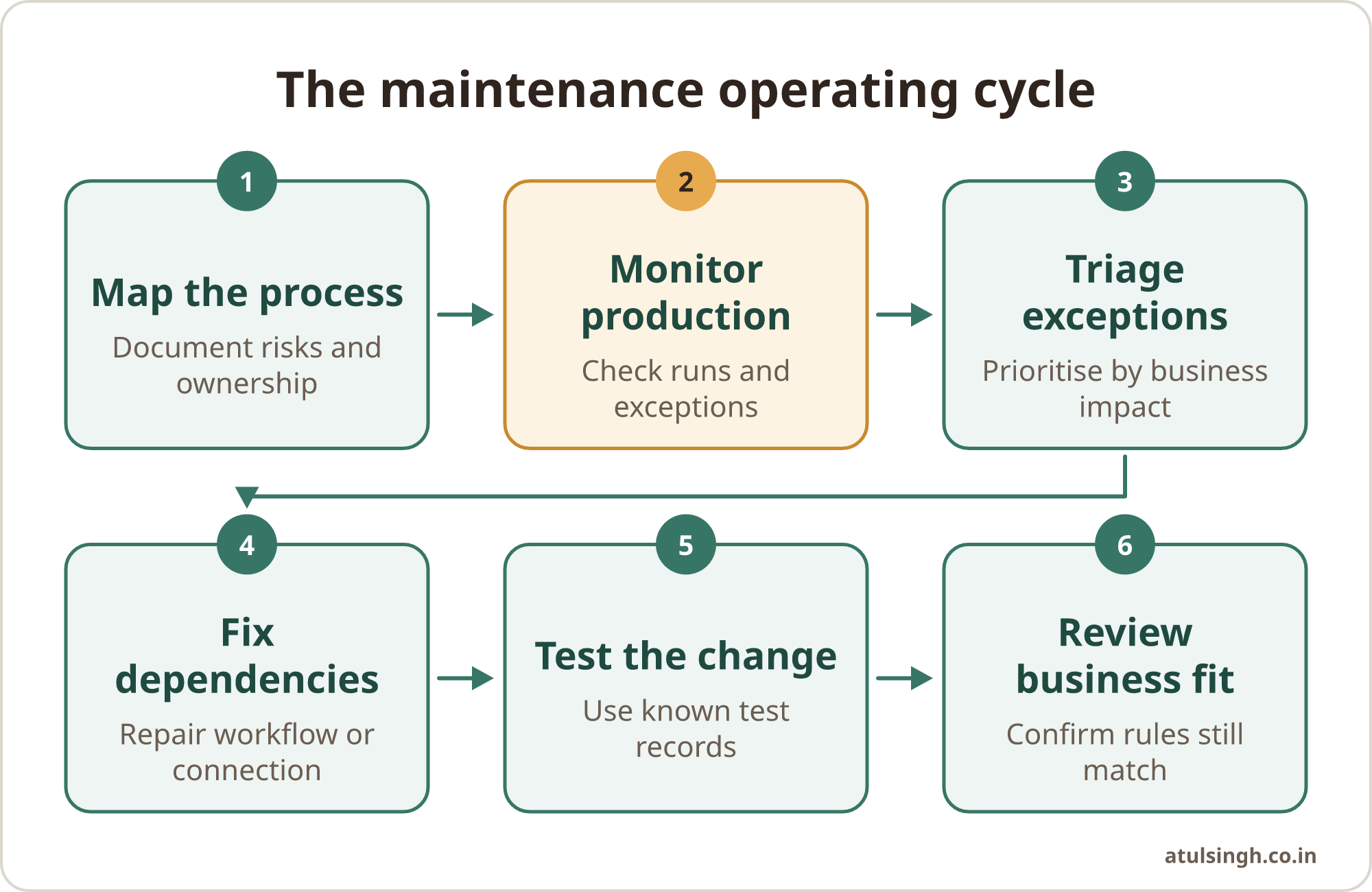
The operating cycle can be kept simple:
- Map the process and its risks.
- Monitor production runs.
- Triage exceptions by impact.
- Fix the workflow or dependency.
- Test the change against known cases.
- Review ownership and business fit.
The platform choice affects how easy this cycle is to run. Compare small business automation platforms against the people, skills and support available to you, rather than choosing only by the number of features.
Examples from sales, marketing and support
Sales: Say a ten-person agency uses a form to capture enquiries, enriches each record, assigns an owner and sends a follow-up email. Maintenance includes checking that every enquiry receives an owner, confirming enrichment fields still arrive in the expected format and reviewing whether the assignment rules match current territories. A missing phone number should create a review task instead of producing a low-quality call list.
Marketing: Say a small software company connects lead forms to a nurture sequence and advertising audience. The owner needs to check consent fields, suppression lists and unsubscribe synchronisation. If the CRM and messaging platform disagree about consent, the workflow should stop the message step and send the record for review.
Customer support: Say a retailer uses automation to classify incoming tickets, look up order information and suggest a reply. The support lead still needs to review uncertain classifications, watch for changes to order-status data and keep a human route for complaints, refunds and sensitive cases. The system can reduce routine sorting while people retain judgement over customer outcomes.
These examples have different tools and risks, but the ownership questions are similar. What must be true before the automation acts? What evidence shows that it acted correctly? Which cases need a person? How will the team know when a dependency changes?
A repeatable AI workflow should make those answers visible through inputs, rules, review points, tests and logs. The more important the outcome, the stronger the review and fallback should be.
Common ownership mistakes
Treating handover as documentation only. A folder containing screenshots does not create operational ownership. The receiving team needs access, test records, alert instructions, a fallback process and permission to make approved changes.
Using personal accounts. If a workflow depends on one employee’s login, the business has a hidden single point of failure. Move integrations to appropriate shared credentials or managed authentication and review access when roles change.
Connecting systems directly without validation. Point-to-point connections are quick to create, but they can pass malformed data forward. Add validation, exception handling and a queue for records that need human attention.
Letting every person build without guardrails. Low-code tools can help teams solve local problems quickly. Unmanaged development can also create shadow workflows, duplicated logic, weak access controls and undocumented dependencies. Set lightweight rules for naming, ownership, credentials, production access and change review.
Measuring only time saved. Time saved matters, but reliability and quality matter as well. Track missed records, duplicate records, manual overrides, customer complaints, exception volume and the time required to recover from failure.
Automating sensitive judgement. A workflow can prepare information, suggest a response or route a case. Decisions involving money, customers, legal exposure or reputation should have a clear human review point.
Where to start before the next build
Choose one live automation and create a one-page ownership record. Write down its purpose, trigger, systems, owner, technical contact, critical failure modes, manual fallback and last test date. Then watch it through a normal working period and record every exception, including those that someone fixed without opening a formal ticket.
Use that record to estimate the real maintenance requirement. A simple workflow with one stable integration may need periodic review. A workflow with several external services, customer messaging and changing business rules needs more frequent monitoring and a clear technical support arrangement.
If the workflow is already failing, stabilise it before adding features. Check data validation, credentials, alerts, logs and fallback steps. If the workflow has never been mapped properly, start with the process and its desired outcome. The automation approach decision guide can help you choose the simplest approach for the task.
A well-maintained automation should be understandable to the team that relies on it. It should have a named owner, visible health signals, safe handling for exceptions and a realistic way to change when the business changes. If you need help designing and handing over a system with those controls in place, a free workflow review call is a calm place to assess one process and decide what support it needs.