
An SMB workflow audit before AI automation can show whether a disorganised process is ready to speed up.
That is the central risk facing small and medium-sized businesses adopting AI. A team sees a repetitive task, buys a tool, connects a few systems and expects time savings. Instead, the automation produces misrouted messages, inconsistent records, unclear ownership and errors that are difficult to detect.
This is chaos acceleration: using technology to increase the speed of a process that was never clearly defined.
The practical alternative is a workflow audit before automation. The goal is not to find an excuse to avoid AI. It is to identify the narrow, frequent and recoverable tasks where AI can produce measurable value without creating a new layer of operational risk.
Why AI amplifies bad processes without a workflow audit
Most business processes contain more variation than their owners realise. “Respond to customer enquiries” may sound like one task, but it could involve checking the sender, identifying the product, judging urgency, searching previous conversations, consulting a pricing document and deciding whether the enquiry belongs with sales, support or accounts.
If those decisions are undocumented, an AI system has no reliable operating boundary. It will still produce an answer or take an action, but the output may depend on incomplete context, ambiguous instructions or inconsistent historical data.
Consider a shared customer-support inbox. A business might automate email classification immediately:
- complaints are sent to support;
- sales enquiries are sent to business development;
- billing questions are sent to accounts.
That sounds straightforward until the system receives an email from an unhappy customer asking for a refund and mentioning a new purchase. Without explicit rules, the message may be routed to the wrong team. If no one reviews the decision, the customer waits. If the system does not record why it made the decision, the team cannot diagnose the failure later.
The problem is not necessarily the classification model. The problem is that the underlying workflow has no agreed definition of urgency, ownership, exceptions or escalation.
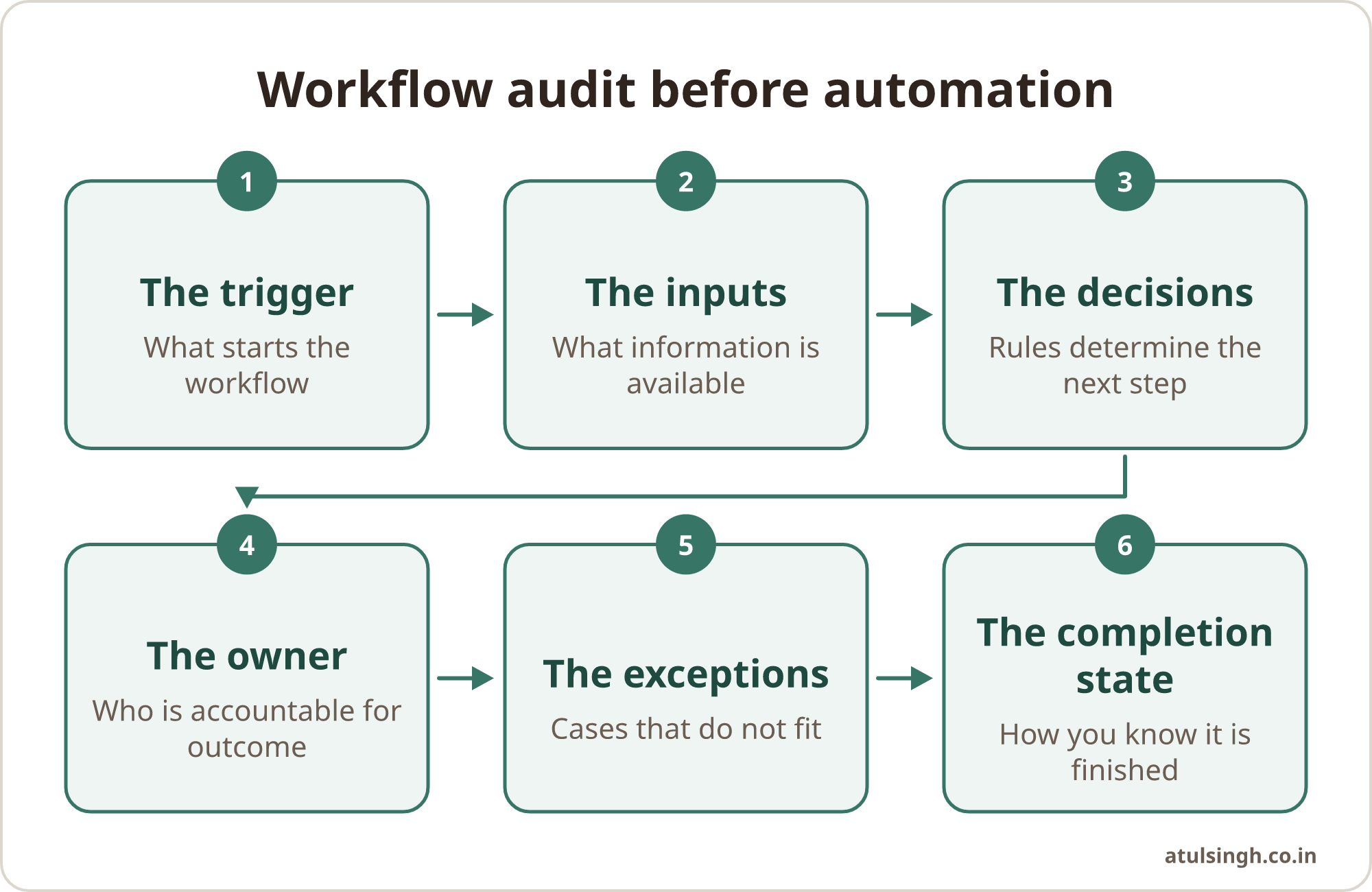
Before automating, write down:
- The trigger: What starts the workflow?
- The inputs: What information is available at that point?
- The decisions: What rules determine the next step?
- The owner: Who is accountable for the outcome?
- The exceptions: Which cases do not fit the normal path?
- The completion state: How do you know the task is finished?
If two experienced employees describe the process differently, it is not ready for broad automation. Stabilise the process first, even if that means using a simple checklist or form for a few weeks.
A workflow-first method for finding worthwhile opportunities
Start a workflow audit with work the business already performs, not with a list of AI features.
Ask each team to list its five most frequent operational tasks. These might include preparing proposal drafts, copying enquiry details into a CRM, summarising meeting notes, checking order information or producing a recurring internal report.
For each task, record:
| Audit question | What to document |
|---|---|
| How often does it happen? | Daily, weekly or occasional volume |
| How long does one instance take? | Average time, including handoffs |
| What inputs are required? | Emails, forms, documents, records or messages |
| Are the rules explicit? | The conditions that determine the next action |
| How variable is the work? | Standard cases versus unusual cases |
| What happens when it goes wrong? | Detection, correction and customer impact |
| Who approves the result? | Named person or role |
| What evidence is retained? | Logs, records, timestamps or source documents |
The best early AI automation candidates usually have four characteristics:
- they occur frequently;
- they are based on clear rules;
- they involve text or structured data;
- mistakes can be spotted and corrected before causing serious harm.
A useful provisional filter is the 20-times rule: examine tasks that occur around 20 times a day or more before considering less frequent work. This is a decision heuristic, not a universal industry benchmark. Its purpose is to force an ROI conversation. If a task happens only twice a month, even a large percentage reduction in handling time may not justify integration, testing, monitoring and maintenance.
For example, a team that manually transfers information from web enquiries into a CRM may have a promising candidate. The inputs are structured, the activity is frequent, and a person can review the record before it triggers follow-up. A similar pilot is the incoming lead form review workflow, which shows how structured inputs can support a bounded qualification decision.
By contrast, automating a one-off annual report may create more overhead than value. The format may change before the next cycle, the source data may be inconsistent and nobody may remember how the automation works when it fails.
How to estimate AI automation ROI before buying a tool
Do not begin with “How much time can AI save?” Begin with the full cost of the workflow.
A simple estimate is:
Annual manual cost = instances per period × minutes per instance × loaded hourly cost
Then compare that figure with the total cost of automation, including:
- setup and integration;
- process documentation;
- testing and exception handling;
- human review;
- monitoring;
- maintenance when systems or rules change;
- correction of automated errors.
Suppose a team processes 100 standard enquiries each week and spends four minutes entering each one into a CRM. That is more than six hours of manual entry per week. An automation that extracts the fields, creates a draft record and sends it for review may be worthwhile.
But the calculation changes if half the enquiries require unusual handling, the CRM fields are poorly defined or the automation needs frequent intervention. The real opportunity may be to redesign the enquiry form and standardise the required fields before introducing AI.
This is an important distinction: automation ROI is determined by the whole workflow, not by the apparent speed of one task.
Build guardrails before deployment
Judge an automated workflow by more than whether it completes its intended action. It must also be possible to inspect, approve and recover from that action.
At minimum, include three safeguards.
1. A human approval gate
Use human review where the outcome could affect a customer, financial record, legal commitment, employment decision or business reputation.
For instance, an AI system may draft a response to a customer complaint, but a support lead should approve the message before it is sent. The goal is not to review every low-risk formatting change forever. The goal is to keep a qualified person between the system and consequential decisions until performance is demonstrated. For the response itself, the complaint de-escalation response script can produce a draft that a support lead reviews before sending.
2. An append-only audit trail
Record what the workflow received, what the system produced, what action was taken, when it happened and who approved it. Do not rely on a changing spreadsheet or an inbox search as the only record.
A useful audit entry might include:
- source record ID;
- input timestamp;
- automation version or rule set;
- extracted fields;
- confidence or exception status;
- reviewer decision;
- final action and timestamp.
This makes errors visible and gives the team a way to compare expected outcomes with actual outcomes.
3. A recovery plan
Decide in advance what happens when the system is unavailable, produces an uncertain result or makes a wrong classification. Can the task return to a manual queue? Can a record be restored? Can a message be recalled? Who is notified?
A workflow without a recovery plan is not fully automated; it is simply dependent on an untested failure mode.
Callout: Start with forgiving workflows
Early AI deployments should focus on work where a person can easily catch and correct an error. Drafting, summarising, extracting information into a review queue and suggesting classifications are usually safer starting points than sending commitments, changing financial records or making irreversible decisions automatically.
How to audit a workflow before AI automation
Use this sequence before selecting a tool.
Step 1: Choose one workflow, not a department
Avoid goals such as “automate marketing” or “deploy AI across customer service.” Select a bounded process with a clear beginning and end, such as converting a website enquiry into a draft CRM record.
Step 2: Observe the current process
Follow several real examples from trigger to completion. Note every handoff, duplicate entry, exception and informal workaround. Employees often maintain undocumented steps because the official process does not match reality.
Step 3: Write the normal path and exception paths
Document the standard rules, then list the cases that require a different response. If the exception list is longer than the normal path, the workflow may not yet be a suitable automation candidate.
Step 4: Define the control points
Specify where data is validated, where a person approves the result, what gets logged and how the workflow is paused. Assign one owner who can make decisions when the process changes.
Step 5: Run a limited pilot with a baseline
Measure the current process before changing it. Track volume, handling time, rework, error rate and escalation frequency. Pilot the automation on a narrow slice of work, compare results with the baseline and review failures weekly.
Do not expand because the demonstration looked impressive. Expand when the workflow is stable, the review burden is understood and the business outcome is better than the manual alternative.
What can go wrong even after a careful audit?
A workflow audit reduces risk; it does not remove it.
Rules can become outdated. A pricing policy, routing rule or compliance requirement may change. Assign an owner and schedule a review whenever the surrounding process changes.
Errors can become invisible. If nobody samples outputs or checks downstream results, a workflow may appear efficient while quietly creating bad records. Monitor outcomes, not only successful task completions.
Maintenance can exceed savings. Low-volume tasks, temporary campaigns and processes with frequent system changes can require more attention than they save. Recalculate the business case after the pilot.
Human review can become a bottleneck. An approval gate is useful only if reviewers have enough context and time. If every output needs extensive rewriting, the workflow may need better inputs, narrower scope or a return to manual handling.
The 20-times heuristic can mislead. A rare task may still be worth automating if it carries high risk, consumes specialist time or supports a critical customer journey. Conversely, a frequent task may be a poor candidate if errors are costly or rules are unclear. Frequency is a filter, not the final decision.
The useful question is not whether a task can be automated. It is whether the business can define, measure, supervise and recover the automated workflow at a cost that makes sense.
AI is a force multiplier. That makes process quality a prerequisite, not a finishing touch. Before buying another tool, audit the top five tasks your team performs every day. If a task is undocumented, unstable or difficult to check, improve the process manually first. Then automate the narrowest version that has clear rules, visible controls and a credible path back to human work.