The right choice between Zapier, Make and n8n for a small business depends on the workflow you need to run and who will maintain it. Zapier suits teams that want a managed cloud service and a quick start. Make suits teams that need more visual control over multi-step processes. n8n suits businesses that want deeper control of workflow definitions, data location and hosting, provided someone can maintain the system.
Look beyond the monthly subscription. Over three years, maintenance, troubleshooting, data retention, security, staff time and the ability to move your workflows can matter more than the first plan you select. Start with one important process, define the controls it needs, then choose the simplest platform your team can own.
If your starting point is customer retention, this customer retention workflow guide helps identify the signals, systems and actions involved before you choose a tool.
When AI is part of the process, a repeatable AI workflow model can help you separate instructions, checks, approvals and hand-offs.
For a narrow sales use case, proposal follow-up automation shows how to test a workflow without trying to automate an entire function.
The short answer: choose by ownership
A useful decision rule is straightforward. Choose Zapier when the business values managed infrastructure, a broad app ecosystem and low technical overhead. Choose Make when the team needs a visual builder for more involved branching, transformations or multi-step scenarios. Choose n8n when data control, custom logic and ownership of workflow definitions justify technical responsibility.
That does not make one platform universally better. A small sales team may benefit from a hosted tool that a non-technical owner can inspect. A support team handling sensitive records may need stronger control over where data is processed. A technical operator may prefer n8n because self-hosting gives the business more control, while another business may reasonably decide that server maintenance costs too much attention.
The workflow should lead the decision. Write down the trigger, the systems involved, the data being moved, the decisions that need approval, the failure cases and the person responsible for checking it. Only then compare platforms.
Why the three-year view changes the decision
Subscription fees are easy to compare. Ownership costs are harder because they appear as staff time, incidents, security work and delayed fixes. A hosted platform can shift infrastructure maintenance, monitoring and parts of the retry process to the vendor. Self-hosting can reduce software fees while adding responsibility for servers, databases, updates, backups and monitoring.
Data location also changes the conversation. Zapier says it stores and processes user data, including data handled during workflow executions, on Amazon Web Services servers located exclusively in the United States (Zapier, 2026). That may be acceptable for some businesses, but it needs checking against your contracts, customer commitments and regulatory obligations.
Retention deserves a specific review. Zapier retains Zap content and execution history in user accounts for 29 to 69 days, with backups retained for up to four months. Shorter custom retention periods require Company or Enterprise plans (Zapier, 2026). If an automation handles support conversations, lead details or payment-related information, the log itself may need to be included in your data review.
The financial model also affects design. Zapier's paid plans begin at $19.99 per month when billed annually for 750 tasks, and usage can continue beyond the plan limit under its pay-per-task model before workflows pause (Zapier, 2026). The important planning question is how your workflow counts activity, what happens when volume rises and who receives the warning.
Make uses a credit-based model that counts activity across modules, while n8n Cloud bases billing on workflow executions rather than individual steps. n8n lists cloud plans of €20 per month billed annually for 2,500 executions and €50 for 10,000 executions (n8n, 2026). Model a normal run, a busy month and a failure-retry case before committing to a plan.
Compare the platforms by practical fit
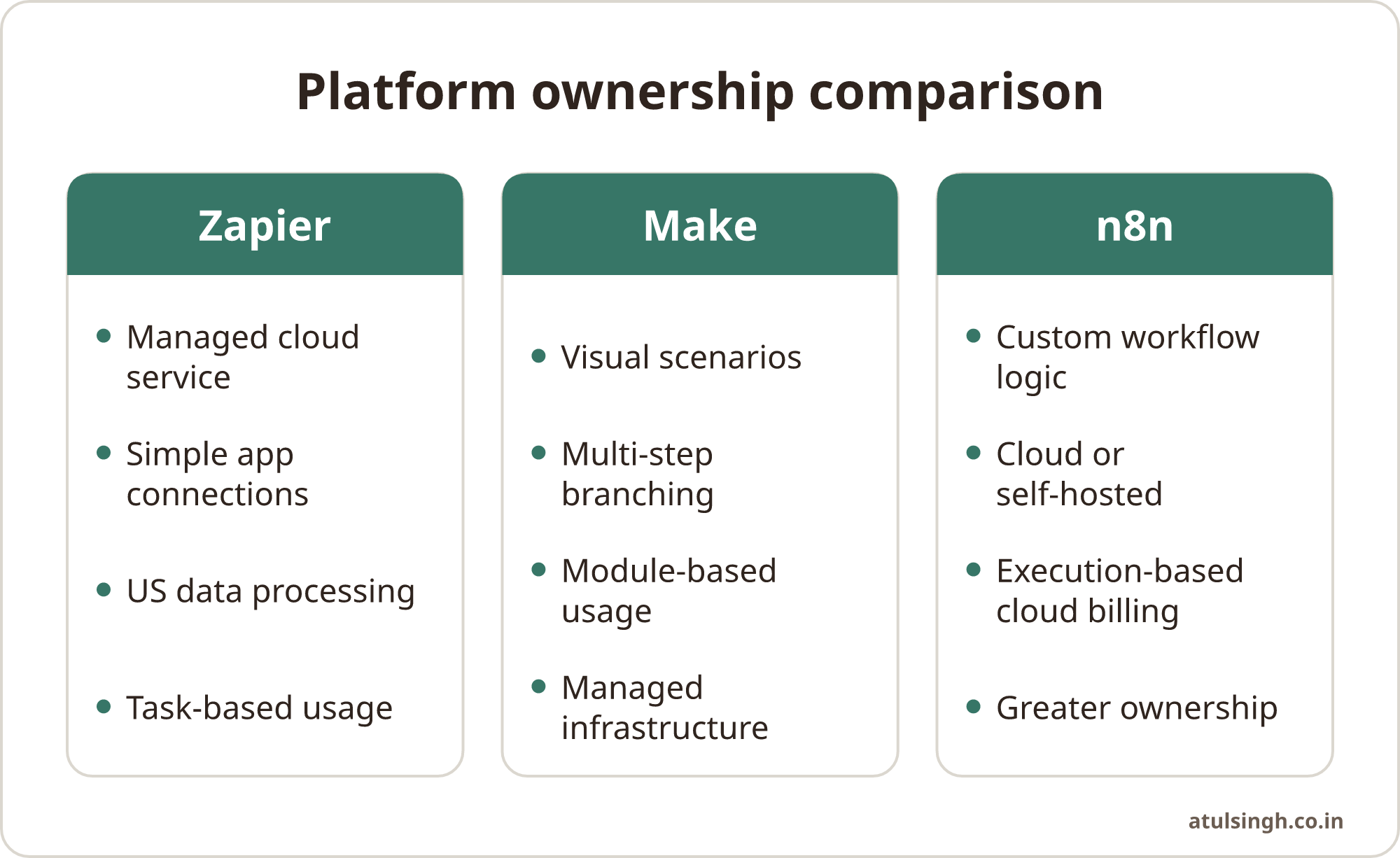
The table below is a starting point, not a substitute for testing your actual workflow.
| Decision area | Zapier | Make | n8n |
|---|---|---|---|
| Best fit | Managed, straightforward automations | Visual, multi-step scenarios | Custom logic and greater ownership |
| Main operating choice | Vendor-managed cloud | Vendor-managed cloud | Cloud or self-hosted |
| Cost question | Tasks and overage behaviour | Credits used by modules | Executions, or hosting costs |
| Data question | US processing and retention | Check hosting and processing terms | Choose infrastructure and controls |
| Maintenance question | Mostly delegated | Mostly delegated | Shared with or owned by your team |
| Portability question | Platform-specific workflow | Platform-specific workflow | Workflow definitions and code are more portable |
Zapier works well when simplicity matters. A small marketing team might send a form submission to a CRM, notify an owner and create a follow-up task. The value comes from quick implementation and a service that the team can operate without managing servers. Review task volume, sensitive fields, retention and what happens when an app connection fails.
Make fits processes with visible branching. Say a ten-person agency receives a new enquiry, checks the service requested, routes it to a specialist, formats a notification and records the outcome. A visual scenario can make each branch easier to inspect, especially when the workflow contains filters, loops and transformations. The team still needs conventions for naming modules, handling errors and documenting changes.
n8n fits businesses that want more control. A support operation might receive a ticket, look up account information, classify the request, send routine cases to a queue and hold sensitive or unusual cases for a person. n8n can run in its cloud service or be self-hosted. Its hosting documentation describes deployment on local infrastructure or private clouds, including Docker, with the Community edition or paid licences (n8n, 2026).
Start with one workflow, then test the ownership model
A platform decision becomes clearer when it is tested against a real process. Pick one workflow that is repetitive, measurable and important enough to expose weak design. Good candidates include incoming lead routing, proposal follow-up, customer renewal reminders or support ticket triage.
1. Map the current process. Record the trigger, each system, every hand-off and the information required at each stage. Mark where a person currently makes a judgement. Sales may need to review a prospect before a message is sent. Support may need to approve any response involving refunds, complaints or personal information.
2. Separate routine actions from judgement. Automate tasks such as copying a record, creating a reminder, checking a field or sending an internal notification. Keep human approval for money, customer commitments, sensitive cases and messages that could affect reputation. A workflow that pauses for review can be more useful than one that acts quickly without adequate control.
3. Estimate three types of cost. Count platform usage, implementation time and ongoing ownership. For a hosted service, include plan changes, overage exposure and the cost of troubleshooting. For self-hosted n8n, include infrastructure, backups, updates, access control, database administration and monitoring.
4. Test ordinary and awkward cases. Run a clean example, a missing field, a duplicate record, an API failure, a delayed response and a high-volume batch. Check whether the workflow retries safely, records enough information to diagnose a problem and avoids sending duplicate messages.
5. Give the workflow an owner. The owner does not need to be the person who built it. They do need to know what the automation does, where it can fail, how to pause it and who can change it. A workflow that only one person understands becomes a business risk when that person is unavailable.
If your process involves customer retention signals across billing, support and communication tools, think through the events, hand-offs and review points before selecting a platform.
Practical examples for sales, marketing and support
Sales: A new enquiry arrives through a website form. The automation checks whether the required fields are present, creates or updates the CRM record, assigns an owner and creates a task. A person reviews the context before any sensitive or highly personalised message is sent. For a workflow like this, ease of maintenance may matter more than advanced hosting control.
Marketing: A campaign asset moves through drafting, approval, publication and reporting. The platform can create tasks, update a content calendar and collect performance data. Keep approval outside the automation when brand, legal or customer claims need judgement. A repeatable AI workflow can help separate instructions, checks, approvals and hand-offs if AI is part of the process.
Customer support: A new ticket is categorised and routed to the right queue. Routine account questions can receive a suggested response for review, while complaints, billing disputes and unusual requests remain with a trained support person. Customer retention work often needs connections between CRM, billing and support, so document exactly which data is copied and why.
Founder-led follow-up: A proposal remains without a reply. The workflow checks the last interaction, creates a reminder and prepares a low-pressure draft for review. This narrow use case is easier to test than a broad promise to automate sales.
These examples also show why the platform should follow the process. If the workflow is simple, a managed service may be sensible. If it contains many branches or data transformations, visual control may help. If it requires custom code, private infrastructure or deeper ownership, n8n may be worth the additional operating work.
Where Make, Zapier and n8n can fall short
Every platform creates a different type of dependency. Proprietary cloud workflows generally depend on the platform's connectors, interface and execution model. Exporting a design may not produce something that can run elsewhere without rebuilding parts of it. Record the business rules separately from the platform configuration so the process remains understandable if you change tools.
Self-hosting changes the responsibility rather than removing it. With n8n, the business can control the hosting environment and workflow definitions, but someone still needs to apply security patches, protect credentials, manage backups, monitor failures and plan recovery. A free or lower-fee software option can become expensive when technical work is left without an owner.
Privacy needs a workflow-level review. Identify personal data, credentials, destinations, log contents, retention periods and access permissions. Where personal data moves between third-party services, check consent requirements and data processing agreements that apply to your situation. Ask the platform vendor and your legal adviser for the details that your business requires.
Avoid using automation for decisions that need context. A lead score can help prioritise work, but it should not silently decide how a person is treated when the underlying data may be incomplete. A support classification can route a ticket, but the customer should have a clear path to human help.
A decision checklist for Monday
Use this checklist with the person who will run the workflow after launch.
- Can we describe the workflow in one page?
- Which steps are routine, and which require human judgement?
- What personal, confidential or commercially sensitive data moves through it?
- Where is that data processed and how long are logs retained?
- What happens when a connection, field or API fails?
- How will we estimate normal, busy and retry-related usage?
- Who can pause, edit and restore the workflow?
- Can another team member understand it without the original builder?
- What would it take to rebuild the process on another platform?
- Does self-hosting add technical work that the business cannot reliably cover?
For a small business, a good answer is usually a modest system with clear ownership. Keep the first workflow narrow, document the decisions, measure whether it reduces avoidable manual work and review it after real use. Expand only when the team can explain how the current version behaves.
If you want an outside review of one workflow before choosing a platform, you can book a workflow review call. The useful outcome should be a clearer process, a realistic ownership plan and a platform choice that fits the people who will run it.