
Most small teams that want to "use AI" for a piece of work end up asking the wrong question first. They ask which agent to buy, or whether they should build one, before anyone has looked closely at the task itself.
The task decides the answer. Some work needs nothing more than a fixed rule that runs the same way every time. Some needs an AI step that reads, sorts or drafts, inside a sequence you control. Only a small share of work needs an agent that decides its own next step. Choosing the lightest option that does the job keeps costs down, keeps mistakes visible and gives the work an owner who can fix it when it breaks.
This guide explains the three options in plain terms, gives you four questions to ask about any task, and walks through examples from sales, marketing and customer support.
Why this choice matters now
"Agent" has become the word every software vendor wants on its homepage. Gartner calls this "agent washing": existing chatbots, assistants and automation tools rebranded as agents without the capabilities to match. It estimates that only about 130 of the thousands of vendors selling agentic AI offer the real thing, and it predicts that over 40% of agentic AI projects will be cancelled by the end of 2027 because of rising costs, unclear business value or weak risk controls (Gartner, 2025).
For a small business the risk is simpler. You pay for more complexity than the task needs, the system becomes hard to check, and when something goes wrong nobody can tell which step failed. The same Gartner guidance points the other way: use automation for routine work, simple assistants for looking things up, and agents only where real decisions are needed.
I see the same pattern in my training sessions and in conversations with team leaders. The assumption is that the most powerful or most expensive option must be the right one, whether that is the biggest AI model or the most autonomous tool. Size and price get treated as proof that something will solve the problem. In my experience it works the other way round. Start by understanding the problem, then pick the option that suits it. More often than not, the right answer is smaller, cheaper and easier to run than what the team first had in mind.
The three options in plain words
Rule-based automation follows fixed instructions. When X happens, do Y. A new form submission creates a CRM contact and sends a confirmation email. There is no judgement involved, so the result is predictable and cheap to run. Tools like Zapier, Make and n8n handle this well.
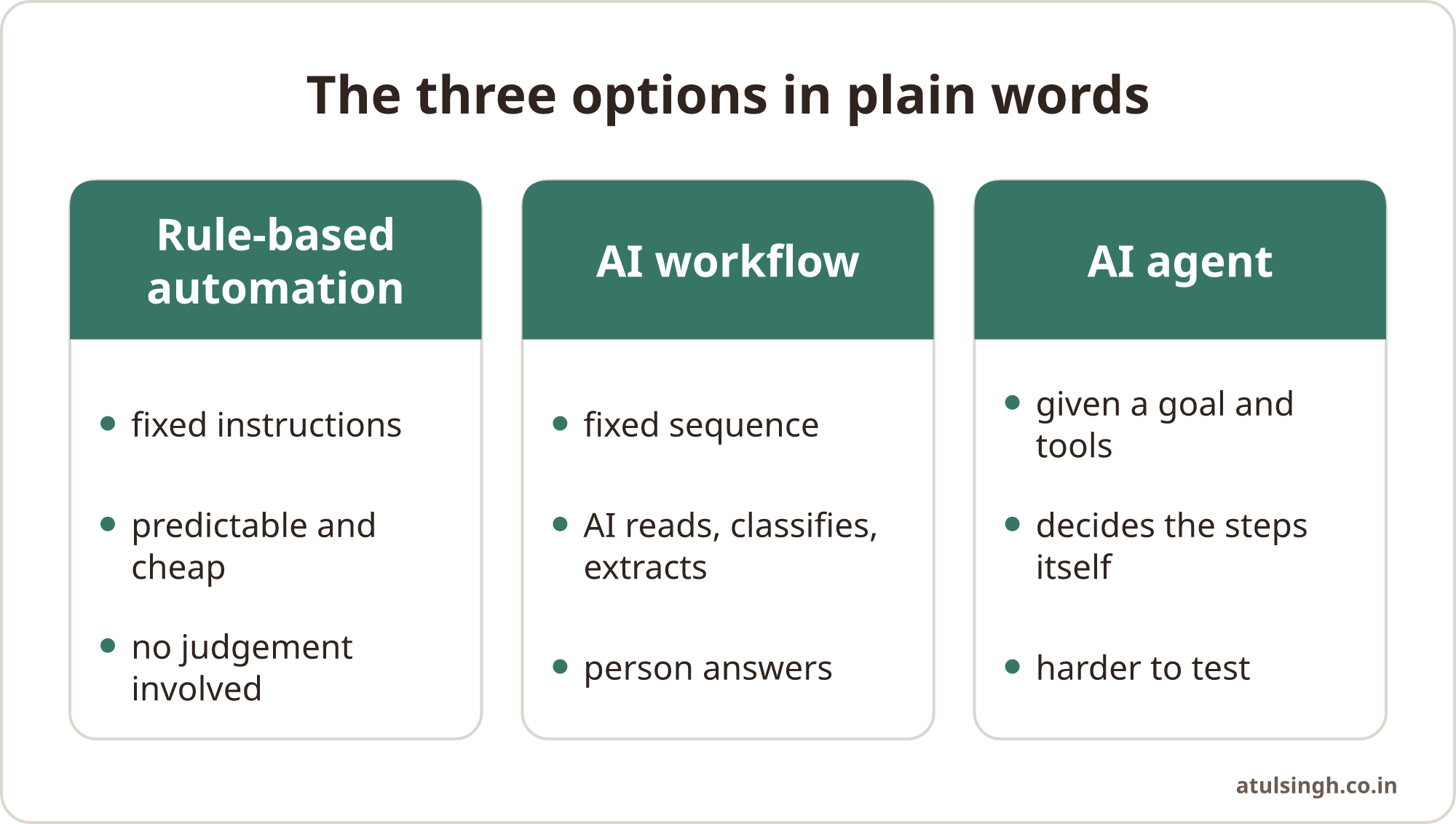
An AI workflow is a fixed sequence where one or more steps use AI to read, classify, extract or draft. The path is still decided by you. For example: a support email arrives, AI tags it by topic and urgency, the ticket is routed to the right queue, and a person answers. Anthropic, which builds Claude, describes workflows as systems where language models and tools are "orchestrated through predefined code paths" (Anthropic).
An AI agent is given a goal and some tools, and it decides the steps itself. It might search for information, call several systems, check its own work and try again. In Anthropic's words, agents "dynamically direct their own processes and tool usage." That flexibility is useful when the path genuinely cannot be written in advance, but it costs more, takes longer and is harder to test.
Anthropic's own advice to developers is to "find the simplest solution possible" and add complexity only when it is needed. That advice holds just as well for a five-person sales team as for an engineering team.
Four questions to ask about any task
Before choosing, write down the task in one sentence and answer these four questions.
1. How predictable are the inputs and the steps? If the input always looks the same and the steps never change, a rule is enough. If the input varies (free-text emails, call notes, documents in different formats) but the steps stay the same, an AI workflow fits. If both the inputs and the steps change from case to case, you may need an agent.
2. How costly is a mistake? A wrong tag on an internal note costs little. A wrong refund, a wrong price quoted to a customer or a message sent to the wrong person costs a lot. The higher the cost of a mistake, the more you want fixed steps and a human check before anything leaves the building.
3. How often does it run? A task that runs hundreds of times a week rewards careful design, because small costs and small error rates add up. A task that runs twice a month may not be worth automating at all. A clear checklist might be the better answer.
4. Who will own it? Every automation needs someone who understands it, watches the results and fixes it when a tool changes. If nobody on the team can own an agent, you will not be able to trust it. A simpler workflow that someone understands beats a clever one that nobody does.
Examples from sales, marketing and support
New lead follow-up (sales). A form arrives with a name, company and message. Creating the CRM record and alerting the owner is a rule. Reading the message to judge fit and draft a first reply is an AI step. Together they make an AI workflow, with a person approving the reply for leads that look serious. An agent adds little here, because the steps are known. The workflow for checking which new leads are waiting too long shows how the AI steps and the human decisions split in practice.
Sorting replies to outreach (sales). Replies come in every shape: interested, not now, wrong person, unsubscribe. AI classifies them well, and each category triggers a fixed next step. This is a workflow. The one rule worth keeping firm is that warm replies go to a person, never to an automatic answer.
Weekly campaign report (marketing). Pulling numbers from ad platforms and analytics into one sheet is a rule. Writing a short summary of what changed and what to check is an AI step. A person reads it before it goes to leadership. Again a workflow, and a very reliable one.
Answering customer questions (support). Common questions with approved answers can be handled by an assistant that searches your knowledge base. The workflow part is the handover: when the question involves money, a complaint or an account change, the conversation moves to a person with the full context attached. Teams that skip that handover are the ones who end up switching the bot off.
Researching an account before a first meeting (sales). This is one of the few everyday tasks where an agent can earn its place. The research path depends on what it finds: company news leads to a hiring page, which leads to a job description, which suggests a priority. Even here, the output is a brief that the salesperson reads and judges, and the agent does not contact anyone.
The mistakes to avoid
Building an agent for a task a rule could do. It costs more to run, it is slower, and it can fail in ways that are hard to see.
Automating a process nobody has written down. If the team does the task five different ways today, automation will copy the confusion faster. Map the process first, and a pre-AI workflow audit is a practical way to do that before spending on tools.
No named owner. When the person who set it up leaves, the automation quietly breaks. Write down who owns each workflow and what they check each week.
No human checkpoint where it matters. AI steps are good at drafts and sorting. Decisions that affect money, customers or reputation still need a person. Put the checkpoint at the point of consequence, not everywhere, or reviewers start approving without reading.
A simple decision table
| What the task looks like | Best fit | Example |
|---|---|---|
| Same input, same steps, low risk | Rule-based automation | Form to CRM record and confirmation email |
| Varied input, same steps | AI workflow | Tagging and routing support emails |
| Varied input, same steps, high risk | AI workflow with a human check | Drafting replies to new leads or complaints |
| Varied input, steps depend on what is found | AI agent with limits and review | Researching an account before a meeting |
| Rare task, low volume | A checklist, not automation | Annual supplier review |
If you are unsure between two rows, choose the simpler one. It is much easier to add an AI step to a working rule, or turn a workflow into an agent later, than to untangle an agent that was never needed. The guide to repeatable AI workflows covers how to set up the middle option properly, with triggers, context, review points and logs.
Where agents do make sense
Agents are worth considering when three things are true: the steps genuinely cannot be written in advance, the task is valuable enough to justify the extra cost and testing, and the damage from a mistake is limited or caught by a review step. Research, investigation and multi-source summaries often meet those conditions. Anything that sends messages, moves money or changes customer records usually does not, at least not without tight limits.
When a team does move to agents, the operating work matters as much as the model: clear permissions, logs of every action, a person who reviews exceptions and a way to stop it quickly. The article on why AI agent projects fail in production goes into those controls in more detail.
Where to start
Pick one task that takes real time every week. Write it down in one sentence, answer the four questions, and place it in the table. Then build the lightest version that works, run it for two weeks with a person watching the results, and only add complexity if the simple version falls short.
For most small teams, the bulk of everyday work usually sits in the first three rows of the table. That is good news: rules and AI workflows are cheaper, faster to build and easier to trust than agents, and they deliver most of the time savings.
If you want a second opinion on a specific task, the free 30-minute workflow review is set up for exactly this: we look at one process together and decide what, if anything, should be automated.