
Yes, ChatGPT or Claude can be used at work with customer data, but only within clear boundaries. The safest approach is to use an approved business workspace, understand its data settings, remove identifying details where possible and keep a person responsible for the final decision.
A personal consumer account is a poor place for customer records, confidential contracts, support exports or internal intellectual property. Before anyone pastes work data, confirm which plan the business has, who administers it, what happens to prompts and whether the team has a simple rule for sensitive information.
Why the account matters
The same AI tool can have different privacy terms depending on the account type. OpenAI says data submitted through ChatGPT Business, Enterprise, Edu and the API is not used to train or improve models by default. Consumer tiers have different controls, and users may need to change account settings if they do not want submitted content used for model improvement (OpenAI, 2025).
Anthropic says commercial offerings such as Claude for Work, Team, Enterprise and its API exclude workspace data from model training by default. That setting still requires careful administration. For example, Anthropic documentation says that using an in-product feedback button can submit the related conversation for research and model training, so administrators should check whether feedback features can be disabled for the organisation (Anthropic Privacy Center, 2025).
The practical lesson is simple. A business account gives the organisation a place to set policy, manage access and review configuration. It does not grant permission to paste every record into a prompt.
Personal accounts create a second problem: they sit outside your identity, access and offboarding controls. Cyberhaven reported that 73.8% of workplace ChatGPT usage in its study took place through non-corporate personal accounts (Cyberhaven, 2024). A team policy that says “do not use AI” can push useful work into these unmonitored channels. An approved workspace, with clear limits, gives people a safer route.
What you should never paste
Start with categories rather than trying to remember every possible field. Customer data should be treated according to its sensitivity, purpose and contractual restrictions.
Keep these items out of general-purpose AI chats unless your organisation has specifically approved the workflow and controls:
- Passwords, API keys, access tokens and security questions.
- Full payment card details, bank details and identity documents.
- National identifiers, personal addresses and private phone numbers.
- Unredacted health, employment or disciplinary records.
- Confidential contracts, non-disclosure information and restricted pricing terms.
- Private support transcripts containing several identifying details together.
- Proprietary source code, credentials, unreleased product plans and sensitive financial records.
- Customer lists or exports that are unnecessary for the task.
Be careful with combinations of details. A name may be removed while a rare location, exact timestamp, transaction value and unusual complaint still point to the same person. Basic pseudonymisation does not remove compliance responsibilities when someone could reasonably be re-identified.
A useful test is purpose. If the task is to improve a reply, the model usually needs the issue, relevant product context, tone and desired outcome. It rarely needs the customer’s real name, full email address, account number or entire conversation history.
For a case study, public post or sales reference, check consent and confidentiality before sharing details externally. A short confidential account check can prevent a publication decision from becoming a privacy incident.
A Monday workflow for safe prompting
A safe process should be easy enough to follow during a busy support queue or sales meeting. Use the following sequence before a prompt leaves your organisation.
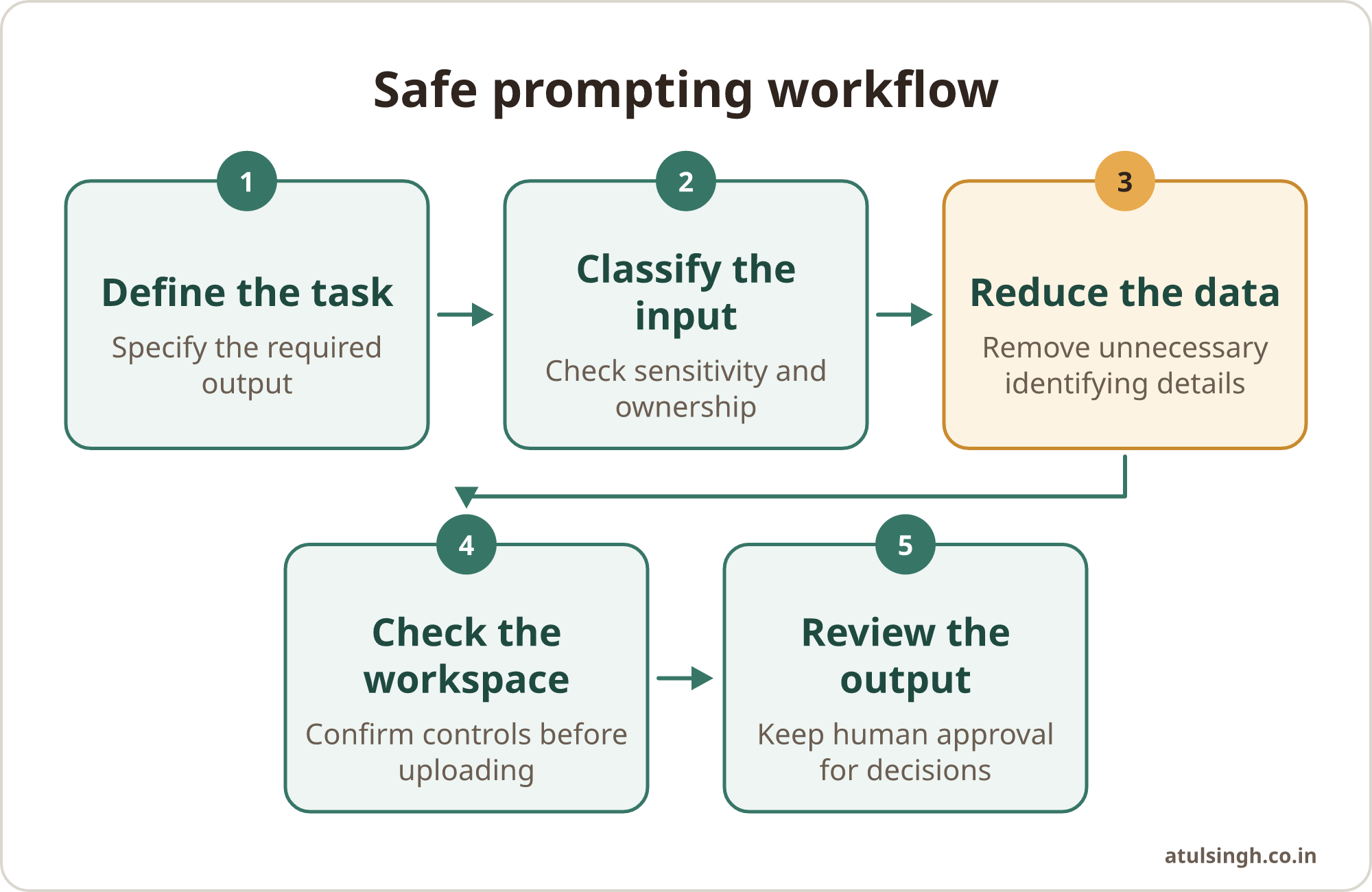
1. Define the task. Write down what the model must produce. “Draft a polite reply explaining the delivery delay” is a workable task. “Review this entire customer export” is a warning sign because the input is broader than the outcome.
2. Classify the input. Decide whether the material is public, internal, confidential or personal. If the classification is unclear, pause and ask the data owner or privacy lead.
3. Reduce the data. Remove fields that do not affect the answer. Replace names, addresses, contract references, phone numbers and identifiers with markers such as [Client Alpha], [Order A] and [Product B].
4. Check the workspace. Use the organisation’s approved ChatGPT or Claude workspace. Confirm that sharing, feedback, retention and administrator controls match the team policy before uploading anything sensitive.
5. Review the output. Check for invented details, accidental disclosure, unfair assumptions and instructions that could cause harm. A person should approve customer-facing messages, account changes, refunds, contractual statements and sensitive escalations.
This sequence also creates a useful audit trail. It records why the data was used, what was removed and who approved the result. NIST identifies sensitive information disclosure and intellectual property leakage as significant generative AI risks, and recommends access boundaries, role-based controls, monitoring and clear handling rules (NIST, 2024).
Redaction habits that preserve useful context
Redaction works best when it removes identity while retaining the facts needed for reasoning. Replace “Priya Shah at priya.shah@example.com complained from 14 High Street on 12 March” with “[Customer A] reported a delivery problem from [Region B] during [Month C].” Keep the product, issue, sequence of events and requested resolution if those details are relevant.
Use consistent markers throughout one conversation. If one paragraph calls someone [Customer A] and another calls the same person [Customer C], the model may produce a muddled answer. A small internal template can help staff remove the same fields every time.
For sales teams, remove the contact’s name, direct email address, phone number, private budget and exact procurement terms. Ask the model to turn a redacted discovery summary into qualification questions, objection-handling options or a follow-up draft. The salesperson still checks whether the proposed language matches the actual relationship.
For marketing teams, remove unpublished customer names, contract restrictions, campaign performance data and personally identifiable audience records. A redacted brief can still contain the audience, offer, channel, tone and approval constraints needed for headline ideas or an editorial outline.
For customer support teams, remove account numbers, addresses, authentication details and full transcripts where they are unnecessary. Keep the product version, reported symptom, troubleshooting already attempted and desired resolution. The agent verifies the answer against approved support material before sending it.
Avoid placing real secrets in a prompt to test whether the tool will protect them. Use synthetic examples instead. A fictional order number and a made-up customer name can test a workflow without creating a live disclosure.
If your team regularly handles large exports, manual redaction becomes fragile. Build a repeatable workflow that selects only required fields, masks identifiers and routes higher-risk cases to a human reviewer. Repeatable AI workflows are easier to test and maintain than a collection of informal prompts.
Workspace settings that deserve attention
Assign one owner for each AI workspace. That person should review membership, remove access when someone leaves, confirm administrator roles and keep a record of approved use cases. A small business does not need a large governance department, but it does need clear ownership.
Check these settings with the current vendor documentation:
| Area | What to check | Why it matters |
|---|---|---|
| Account type | Business, Team, Enterprise or approved API access | Consumer and commercial terms can differ |
| Training use | Whether inputs and outputs are excluded by default | Reduces the chance of data entering model improvement processes |
| Sharing | Shared links and external conversation access | Prevents accidental access outside the intended group |
| Feedback | Rating buttons and conversation feedback | Feedback can transmit related conversation content |
| Retention | History, deletion and available retention controls | Limits how long sensitive material remains available |
| Access | SSO, administrator roles and offboarding | Keeps access connected to the organisation |
| Integrations | Connected drives, apps and browser extensions | Expands the places where data may flow |
OpenAI’s Business privacy documentation describes controls for data use, access and security, while its ChatGPT Business guidance covers data sharing and workspace privacy settings (OpenAI, Business data privacy; OpenAI Help Center, 2025). Treat vendor settings as part of your workflow design, rather than as a one-time setup task.
Retention deserves particular attention. Some OpenAI Enterprise and API arrangements support configured retention schedules or Zero Data Retention options, subject to the applicable service and setup. If your business needs those controls, confirm the exact product, agreement and technical behaviour with the vendor before relying on them.
Shared links are another common failure point. A private conversation can become available to people who were never meant to see it if a team member creates or forwards a sharing link. Disable external sharing where the workspace allows it, and add link sharing to the team’s review checklist.
A short team checklist
Put this checklist inside the team’s AI policy and in the workspace onboarding material. The aim is to make the safe action obvious when someone is under time pressure.
- Use the company workspace, never a personal account, for work information.
- Check the data classification before copying anything into a prompt.
- Use the minimum information needed for the task.
- Remove direct identifiers, credentials and unnecessary customer history.
- Replace names and references with consistent synthetic markers.
- Confirm training, sharing, feedback and retention settings.
- Do not create or forward shared conversation links without approval.
- Keep customer-facing, financial, legal and security decisions with a person.
- Check every output for accuracy, confidentiality and inappropriate assumptions.
- Report suspected leakage quickly to the workspace owner or security lead.
Owners should also decide which tasks are approved, restricted or prohibited. A one-page small-team AI use policy can cover approved tools, data boundaries, human review, disclosure and escalation without creating enterprise-style paperwork.
Where the limits still matter
A business workspace reduces several risks, but it does not remove your organisation’s responsibilities. Customer information can still be disclosed to a third-party processor, retained according to the product configuration or exposed through a poorly designed integration. Your privacy, security and legal leads should confirm that the proposed use fits your contracts and applicable obligations.
Redaction also has limits. People miss fields, indirect identifiers can remain, and a model may infer more from a combination of harmless-looking details than from any single field. Use synthetic data for testing, reduce the input before every prompt and escalate cases where re-identification would cause harm.
Human review matters most where money, customers or reputation are involved. AI can draft a response, classify a ticket or suggest questions. It should not silently approve a refund, promise a contractual outcome, change account permissions or decide how a vulnerable customer is treated.
Keep the first approved workflow narrow. For example, a support team might start with redacted ticket summaries and draft replies, while a sales team might use anonymised call notes to prepare follow-up questions. Measure whether the process is accurate, useful and easy to operate before adding more data or automation.
For larger revenue workflows, document where information enters, which model sees it, what output is stored and who approves the next action. AI workflow architecture is useful when several tools, hand-offs and automations are involved.
Where to start this week
Choose one recurring task with a clear owner and a low-risk input. Write its purpose, list the fields it needs, remove everything else, configure the approved workspace and test the process with synthetic examples.
Then ask three practical questions: Can a new team member follow this without guessing? Can an owner see where the data went? Can a person stop the process before a customer or business decision is made? If any answer is unclear, simplify the workflow before expanding it.
The goal is a small, owned system that people can run consistently. For teams that need hands-on help setting safe habits around real sales and marketing workflows, AI Accelerator live training provides a structured route to practise the process with appropriate review and governance.