
When someone submits a paid ad form, send the lead into a webhook or integration, clean the data, check for an existing contact, enrich the record, assign an owner and notify that person immediately. The workflow should create one clear CRM record, one accountable owner and one next action.
The practical sequence is simple: capture the submission, validate it, deduplicate it, match any existing account owner, enrich a new contact, route it using agreed rules, notify the owner and monitor whether contact happened. Keep a human responsible for the conversation, especially where consent, pricing, customer history or reputation is involved.
Why speed and ownership matter
Paid ad leads often arrive when nobody is watching the advertising platform. A download, spreadsheet or shared inbox creates a gap between the form submission and the first useful response. During that gap, the lead may be contacted by several people, forgotten entirely or routed to someone without the right territory or context.
The case for reducing that gap is strong. In an analysis of 2,241 US companies and 1.25 million sales leads, companies that tried to contact prospects within one hour were nearly seven times more likely to qualify a lead than companies waiting an hour longer. They were more than 60 times as likely to qualify the lead as companies waiting 24 hours or more. The average response time in the dataset was 42 hours (Harvard Business Review, 2011).
Speed alone will not fix poor routing. A fast notification sent to several salespeople can create a poor customer experience, while a perfectly deduplicated record that sits unassigned still fails commercially. The workflow needs both low latency and clear ownership.
Define what counts as a successful hand-off before building anything. The lead should have a source, campaign, consent status, CRM record, owner, notification, response task and contact outcome. These fields make it possible to find the point where the process failed.
If response time is a wider issue across forms, email, WhatsApp and calls, use a defined speed to lead response system rather than treating each channel as a separate project.
Build the route before choosing tools
Describe the process in plain language before selecting an automation platform. A small business may use a CRM, a webhook connector and a team messaging tool. A larger setup may need middleware, a database constraint and a monitoring layer. The logic matters more than the brand names.
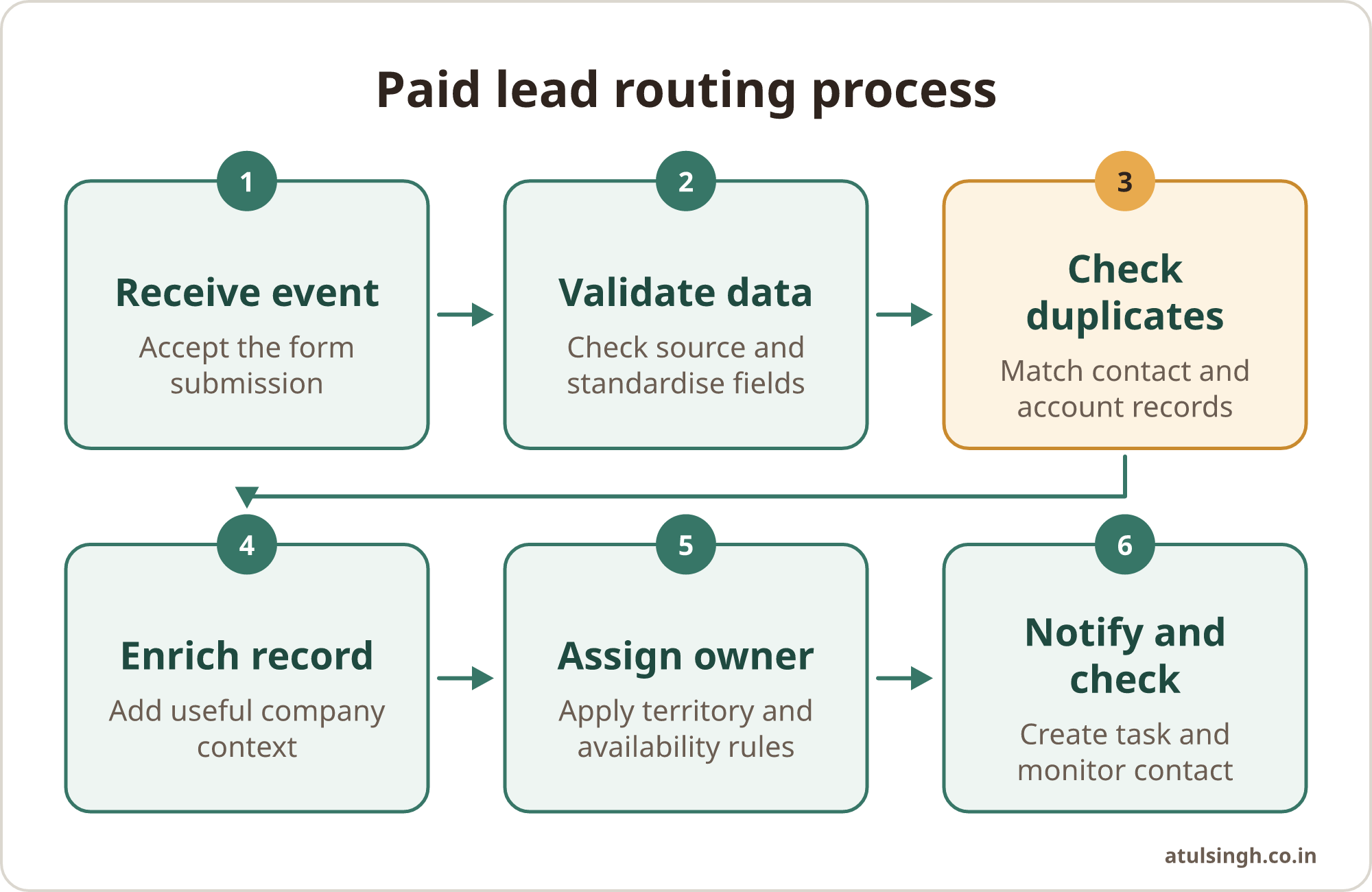
A useful route has these stages:
- Receive the event. The ad platform sends a submission event to a secure webhook or integration endpoint.
- Validate the source. Check the authentication key, signature or platform identifier before accepting the payload.
- Standardise the data. Lowercase email addresses, remove accidental spaces and format phone numbers consistently.
- Find a match. Search for the person, company, active opportunity and existing account owner before creating a new lead.
- Enrich when needed. Add company information only after deciding that the record is genuinely new.
- Assign and notify. Apply territory, segment, availability and workload rules, then create the task and alert the owner.
- Check the outcome. Record whether the owner accepted, contacted or escalated the lead.
Google Ads lead form assets can send submissions directly to a CRM through an HTTP POST request using a configured webhook URL and authentication key (Google for Developers, 2025). This removes the need for a person to check the advertising platform and export a file each morning.
Google states that submitted leads remain available in the platform interface for 60 days, while manual CSV exports cover a maximum of 30 days (Google for Developers, 2025). Store the lead and its source in your own CRM or database as soon as it arrives. That gives marketing and sales a durable record for attribution, follow-up and audits.
The system should tolerate retries. If the platform sends the same event twice, the second request should update the existing record rather than create another task. Use the platform submission ID as an idempotency key, supported by an atomic upsert or a database uniqueness constraint.
Deduplicate before assigning anyone
Deduplication belongs before sales assignment. A batch cleanup later in the day leaves a period in which two representatives can claim or contact the same person. Matching rules should use normalised email, phone number, company domain and, where available, the ad platform submission ID (Salesforce Deduplication Tools, 2026).
Keep two ideas separate: contact identity and enquiry event. A person who submits another form may already be a known contact, customer or opportunity. The new submission should usually become an activity, enquiry or campaign response attached to the existing record. It should retain the new campaign, form, timestamp and answers without erasing the previous sales history.
A practical matching order is:
- Match the exact submission ID first.
- Match a normalised email address.
- Match a normalised phone number where consent and data quality allow it.
- Match the company domain alongside a person or account signal.
- Check for an open opportunity or assigned account owner.
- Send uncertain matches to a review queue instead of guessing.
If an active opportunity or account owner exists, notify that owner and attach the enquiry to the existing record. If the match is a previous contact with no active owner, apply your agreed reactivation or inbound ownership rule. Only send a genuinely new record into the general routing queue.
Race conditions need explicit testing. Two form submissions can arrive at almost the same moment, and webhook services may retry a request after a timeout. A sequential “search, then create” action can allow both requests through. An atomic upsert, unique constraint or platform-native deduplication rule closes that gap more reliably.
Use a lead capture form check before launching a campaign. Test hidden fields, source values, consent fields and the destination record with real submissions, including a repeat submission from an existing contact.
Enrich only after the match decision
Form friction affects completion, but sales still needs enough context to decide where a lead belongs. Ask for basic identifiers that are necessary for the conversation, then use enrichment for suitable business records. Avoid paying for enrichment when the person already has a known account owner.
Clearbit documents enrichment that can resolve corporate email domains into more than 100 firmographic and technographic attributes in under 200 milliseconds (Clearbit, 2026). Useful fields may include company size, industry and location. These fields can support territory, segment and service-line routing without making the ad form carry every qualification question.
Treat enrichment as helpful context rather than ground truth. A personal email, holding company or shared office can produce an incomplete or misleading match. Preserve the original form answers, show which fields came from enrichment and give the sales owner a way to correct them.
Set a fallback route for enrichment failures. A provider timeout should not hold a qualified enquiry in limbo. Send the lead to a safe default owner or review queue, mark the enrichment status as incomplete and allow the team to correct the record later.
For example, say a ten-person agency runs separate campaigns for ecommerce, professional services and local retailers. A new lead submits an email and job role. The system can use the domain and enriched industry to choose the relevant queue, while a lead with an uncertain industry goes to an inbound manager for review.
Route with shared ownership rules
Write routing rules in the order the team should apply them. Account ownership usually comes before territory, territory before segment, and segment before round-robin. Availability and capacity then determine whether the chosen person can accept the task.
| Decision | If true | If false |
|---|---|---|
| Existing account owner? | Attach enquiry and notify owner | Check territory |
| Matching territory? | Use territory queue | Check segment |
| Matching segment? | Use segment queue | Use default inbound queue |
| Available representative? | Assign and notify | Escalate to manager |
| Duplicate submission? | Update existing record | Create new enquiry |
Round-robin works only when every intake path shares the same assignment state. If Meta, Google, website forms and partner referrals each use separate workflows, each workflow may count assignments independently. That can skew distribution and repeatedly favour some representatives (HubSpot Round Robin Workflow and Lead Assignment, 2026).
Use one routing layer where possible. It should hold the shared representative list, working hours, territory rules, capacity and last-assigned state. If the CRM cannot do that reliably, keep the routing decision in middleware and write the result back to the CRM.
Availability needs a clear definition. A representative may be online but at capacity, on leave or already handling a sensitive customer issue. Working hours and calendar status can act as signals, but a manager-owned fallback is still needed for exceptions.
Notify the owner and protect the conversation
The notification should help the owner act without opening several systems. Include the person’s name, contact details, campaign and ad source, consent status, relevant form answers, CRM link, match result and required next action.
Create the CRM task at the same time as the notification. The task should have an owner, due time, contact method and outcome fields. Avoid a vague message such as “new lead received”. The recipient should know whether this is a new prospect, a new enquiry from an existing account or a possible duplicate requiring review.
Use escalation when the task remains untouched. The first escalation may go to a team lead, followed by reassignment to a defined fallback queue. Record each change so marketing can see whether a campaign is generating leads that sales cannot cover.
Keep automated outreach within the consent and brand rules approved for your business. The FCC’s one-to-one consent rule for lead generators was vacated by a court decision and later removed, but prior express written consent remains required under the Telephone Consumer Protection Act for automated calling or SMS outreach by the brand (Federal Communications Commission). State requirements and platform policies may also apply.
A safe default is to automate internal routing and notification first, then let a trained person decide whether to call, text or email. If an automated message is used, store the consent language, timestamp, source and communication preference with the lead.
Test the workflow with failure cases
A route that works once in a clean demonstration is not ready for paid traffic. Test the normal path, then test the cases that create double-contact risk.
- Submit a genuinely new lead from each advertising source.
- Submit the same form twice with the same email.
- Submit a new enquiry from an existing customer.
- Use a personal email and an incomplete phone number.
- Send two submissions at nearly the same time.
- Force a webhook retry or temporary timeout.
- Make enrichment unavailable.
- Test outside working hours.
- Remove the assigned representative from the active rota.
- Check that consent text and source data are retained.
- Confirm that the owner receives only one actionable notification.
- Confirm that a manager can see failures without opening the automation builder.
Measure the process with operational fields rather than only campaign metrics. Useful fields include received timestamp, accepted timestamp, deduplication result, enrichment result, assignment timestamp, notification timestamp, first-contact timestamp, contact outcome and escalation count.
Review a sample of records at first. Compare the advertising platform’s submissions with CRM records, then check whether owners and campaign fields are correct. A quarterly lead quality auditor can help structure this review when lead quality, routing and sales feedback need to be considered together.
Start with one route and one owner
Choose one paid campaign with a clear form and a manageable sales queue. Document the required fields, match rules, owner rules, notification content and escalation path. Build the smallest version that can receive a submission, create or update one CRM record and notify one accountable person.
Run test submissions before connecting the full budget. Watch the logs for duplicate events, failed authentication, missing campaign values, enrichment delays and assignment errors. Ask the sales owner to confirm that the record contains enough context to act without searching through the ad platform.
Once the first route is stable, add other sources one at a time. Keep the same identity, enquiry, routing and notification model across channels. This makes reporting easier and reduces the chance that separate workflows create separate versions of the truth.
The finished system should be understandable to the people who run it. Keep a short document covering the route, field definitions, matching rules, owner rota, fallback queue, consent handling and test procedure. Review it when campaigns, territories or team availability change.
If you want the workflow reviewed together and want to decide what, if anything, to automate, the free 30-minute workflow review call is the relevant next step. The goal is a small, owned process that gets each paid ad lead to the right person quickly while keeping human judgement in the conversation.