
You can fill the sales pipeline without hiring more reps by giving your existing team more time for useful conversations. AI can research accounts, identify possible buying signals, prepare briefing notes, draft relevant follow-ups and keep the CRM current.
The work that creates trust still belongs with people. A founder or salesperson needs to judge whether an account is a good fit, decide what is worth saying, handle uncertainty and understand the commercial context behind a buying decision. The practical model is simple: use AI around the conversation, while keeping people responsible for the conversation itself.
The short answer: remove work around selling
Many small teams assume they need more reps when the real constraint is the amount of time available for selling. Salesforce reported that B2B sales representatives spend roughly 28% to 30% of an average workweek actually selling. The rest goes into administration, account research, CRM updates and preparation (Salesforce, 2024).
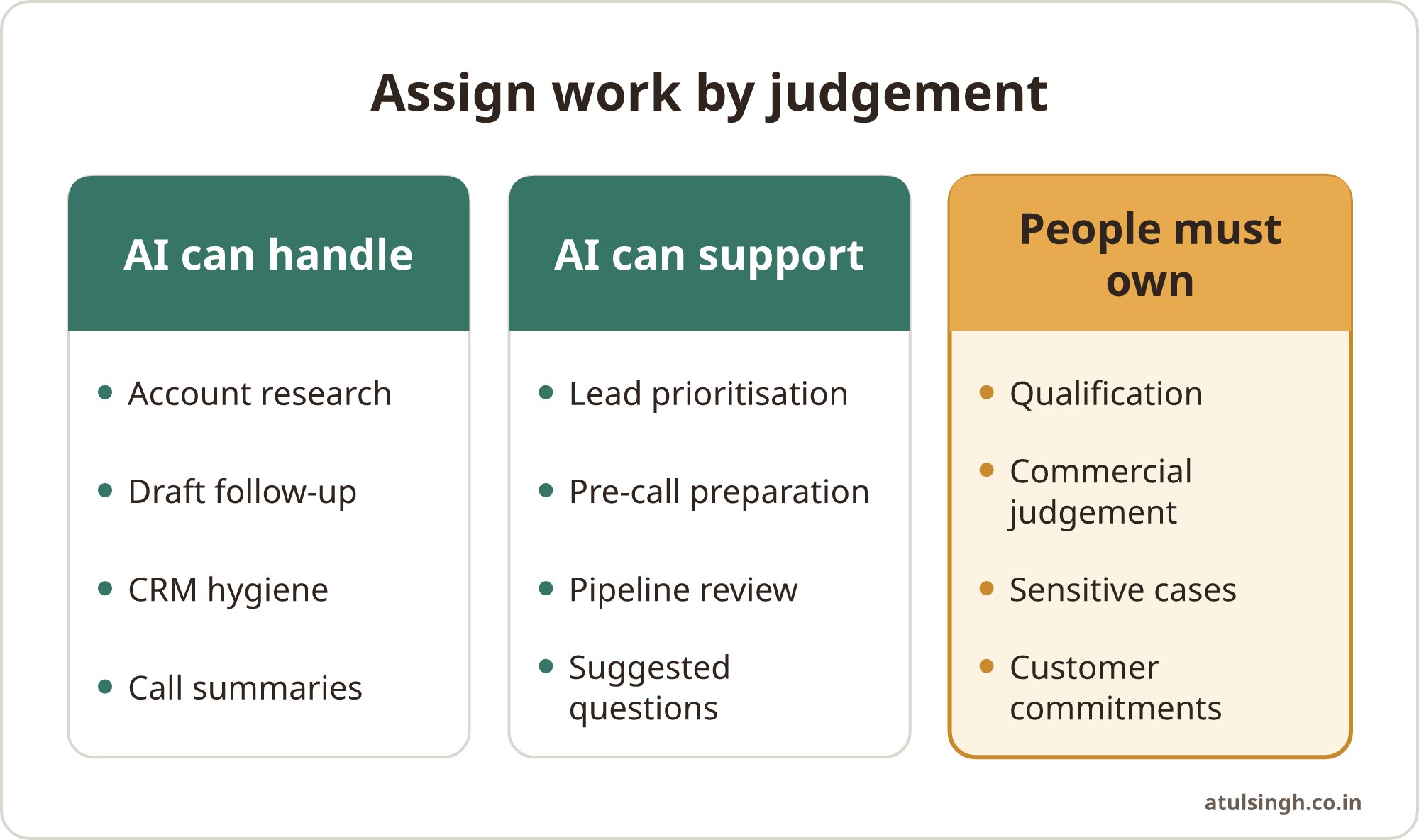
That creates a useful starting point. Before adding headcount, map the tasks that surround each sales conversation. Separate them into three groups:
- Work AI can complete or prepare, such as account summaries, call notes and first drafts.
- Work AI can support, such as prioritising accounts or suggesting questions.
- Work that needs a person, such as qualification, negotiation, judgement and relationship building.
For teams refining account fit and buying signals, the approach described in AI prospecting intelligence provides a useful way to prioritise without simply increasing outreach volume.
This approach can increase pipeline capacity without increasing outbound volume blindly. It also gives a small team an owned system that can be checked, corrected and improved.
A sensible first target is the time between a lead entering the system and a salesperson deciding what to do next. If that process is slow, inconsistent or dependent on one person remembering everything, AI can help create a more reliable flow. When follow-up is the main gap, relevant AI sales follow-up shows how behaviour and context can guide the next message.
Where AI can help a small sales team
Account research. Salesforce recommends giving AI a defined scope and a controlled set of sources (Salesforce, 2024). It can summarise a company’s market, likely priorities, recent public developments, existing CRM history and possible reasons for engaging. The output should be a working dossier, with links or source notes for anything that needs checking.
The useful question is not “What can you find about this company?” A better question is “What do we need to know before deciding whether this account deserves attention?” That could include the company’s fit with your offer, the operational problem you solve, likely stakeholders and a reason for a timely conversation.
Lead prioritisation. AI can compare accounts against criteria that your team has already agreed. For example, a small software company might score accounts against employee range, existing systems, service complexity and a visible change in the business. The score should support a decision rather than create a false sense of precision.
A seller should be able to see why an account was prioritised and challenge the recommendation. If the team cannot explain the criteria, the system will produce activity without creating useful focus.
Preparation. AI can turn a CRM record and previous correspondence into a short pre-call brief. It can list open questions, summarise earlier objections and suggest areas to explore. A salesperson still needs to check the brief, remove irrelevant assumptions and decide which questions fit the person on the call.
Drafting outreach. AI is useful for creating a first draft based on a real trigger, a specific business problem and a clear reason for contacting that person. The seller should add the judgement: why this account, why this issue and why now. A generic paragraph with the prospect’s name inserted is a poor substitute for relevance.
Follow-up. After a meeting, AI can turn a transcript into a draft summary, proposed actions and a follow-up email. The salesperson should check that the summary reflects what was actually agreed. For quieter opportunities, a behaviour-based follow-up is more useful than a fixed sequence.
CRM hygiene. AI can identify missing next steps, stale close dates, incomplete fields and opportunities that have not moved. It can draft updates from call notes and prompt the owner to confirm them. The record should only be changed automatically where the team has agreed that the risk is low and the fields are clear.
Salesforce has reported that AI agents handling background tasks save sellers an average of six hours per week, with 63% of organisations reporting more complete and accurate CRM data (Salesforce, 2026). Treat that as a reason to examine administration, rather than a promise that every team will see the same result.
What still needs a human conversation
AI can produce a plausible answer without understanding the commercial consequences of being wrong. Product specifications can change, customer situations vary and competitive comparisons may contain gaps. Human review is essential before prospect-facing claims are sent.
Qualification needs judgement. A form can collect company size, role and stated interest. A person needs to understand whether the problem is real, whether it has priority, who is affected and what happens if the buyer does nothing. Those answers may appear gradually through conversation.
Context needs interpretation. A prospect may ask for a feature while trying to solve a broader process problem. AI can suggest questions, but the salesperson has to listen for constraints, internal politics, risk and timing. These details shape whether the opportunity belongs in the pipeline at all.
Trust needs consistency. Buyers can accept self-service research for early evaluation, but they still need confidence that a supplier understands their environment. A human should validate assumptions, discuss integration edge cases and explain where the product may not fit.
Commercial decisions need accountability. Pricing exceptions, contract terms, promises about delivery and advice involving sensitive customer information should have a clear human owner. An AI-generated answer can be a draft, never an unowned commitment.
The same principle applies to customer support and marketing. AI can classify an enquiry, find the relevant policy or suggest a campaign segment. A person should handle complaints, unusual cases, sensitive data and messages where tone can affect the relationship.
Build the workflow before choosing the tool
Start with one workflow that happens often and causes visible friction. Do not begin with a broad instruction to “use AI for sales”. Write down the current process from trigger to outcome.
1. Define the trigger. Decide when the workflow starts. It might be a new inbound enquiry, a target account added to the CRM, a completed sales call or an opportunity that has had no activity for a set period.
2. Define the decision. State what the team must decide next. Examples include whether to research an account, whether to contact a lead, whether to escalate a deal or whether a proposal needs a follow-up.
3. Collect the minimum useful context. Use the CRM record, approved product information, previous correspondence and relevant public sources. Avoid giving a model a large unstructured data dump and expecting a reliable answer.
4. Create a review point. Decide what the AI may prepare and what a person must approve. A draft email may need approval. A low-risk internal tag may be automated after testing. A contract promise should remain with an authorised person.
5. Record the outcome. Store the decision, the next action and any correction made by the salesperson. This helps the workflow improve and makes it easier to spot repeated errors.
6. Review the workflow weekly. Look at skipped steps, inaccurate summaries, poor-fit leads and tasks that still take too long. A workflow that the team cannot maintain will gradually become another source of admin.
For a manager, the right measure is useful capacity, not the number of AI outputs. Track whether research is faster, whether follow-up happens with better context, whether CRM records are more reliable and whether sellers spend more time in worthwhile conversations. A sales pipeline review workflow can help turn this into a regular operating habit.
A practical split between AI and people
The table below gives a starting point for assigning responsibility. Each team should adjust it to its risk, industry and sales cycle.
| Sales activity | AI can prepare or automate | Human responsibility |
|---|---|---|
| Account research | Summaries, signals and open questions | Check fit and choose whether to engage |
| Lead prioritisation | Apply agreed criteria and show reasons | Challenge the score and set priorities |
| Outreach | Draft a relevant first version | Add judgement, accuracy and appropriate tone |
| Sales calls | Briefing notes, transcription and actions | Listen, qualify and handle uncertainty |
| CRM updates | Extract fields and flag missing data | Confirm important facts and ownership |
| Pipeline review | Find stale deals and close-date drift | Ask for evidence and agree next actions |
| Customer enquiries | Classify and suggest a response | Handle sensitive, unusual or high-risk cases |
This division also makes training easier. People need to learn how the workflow works, what good output looks like, when to correct it and when to stop using the output. A prompt library alone will not create adoption. Training should connect the tool to the team’s actual process, data and decisions. A planned guide on AI training for sales teams covers that adoption problem in more detail.
Where automation can damage the pipeline
More activity can create less pipeline when the activity is poorly targeted. Salesforce reports that 73% of B2B buyers actively avoid suppliers that send irrelevant or generic outreach (Salesforce, 2026). AI makes it easier to produce messages at scale, so the cost of low-quality targeting can rise quickly.
Email deliverability adds a technical limit. Google and Yahoo require senders to configure authentication such as SPF, DKIM and DMARC, provide one-click unsubscribe options in relevant cases and keep spam complaint rates below 0.3% under their sender requirements (Google, 2024; Yahoo, 2024). A small team should protect its sending domain before increasing any AI-assisted volume.
Cold calling with synthetic or cloned voices carries a separate legal risk in the United States. The Federal Communications Commission classified AI-generated voices as artificial voices under the Telephone Consumer Protection Act, making certain outbound calls subject to prior express written consent requirements (Federal Communications Commission, 2024). Legal requirements vary by location and use case, so voice automation needs specialist review before deployment.
There are also everyday quality risks. AI may confuse two companies with similar names, use an old product detail, mistake a job change for a buying signal or invent a competitor comparison. Keep source links, require review for external claims and make it easy for a seller to reject an output.
An autonomous outbound system is especially risky when it has no clear stop conditions. Define rules for suppression, complaints, lack of fit, sensitive industries, existing relationships and requests not to be contacted. The system should make careful work easier, rather than make poor outreach faster.
Where to start on Monday
Choose one narrow workflow with a clear owner. A useful first project might be preparing an account brief for selected accounts, drafting follow-up notes after sales calls or reviewing the pipeline for missing next steps. Avoid changing prospecting, qualification, proposal writing and forecasting at the same time.
Write the workflow on one page. Include the trigger, inputs, AI output, human checks, CRM action and success measure. If a salesperson cannot explain the process to a colleague, it is too complicated to adopt.
Test it with real but low-risk work. Compare the AI output with the salesperson’s existing process, record corrections and remove fields that nobody uses. Keep the approved instructions and examples in a place the team can access without relying on one technically confident person.
Then decide whether the workflow deserves more automation. Good candidates are repetitive, easy to check and low risk when delayed. Poor candidates involve sensitive information, ambiguous commitments or a high cost of a wrong answer.
The aim is a smaller, better-owned sales system. AI can recover time from research and administration, help a team notice opportunities and make follow-up more consistent. People still decide which relationships deserve attention and what to say when the situation is complex.
If you want to examine one sales workflow and decide what should remain manual, you can book a workflow review call.