16 AI Tools for Small Business That Replace Hours of Manual Work Daily
A practical guide to 16 AI tools for small business, grouped by workflow. Compare costs, free tiers and limitations, then use a two-week pilot to find what actually saves your team time.
If you only adopt one tool this quarter, start here. The full 16-tool comparison table is just below.
Best all-round starting point — ChatGPT ($20/mo, free tier): writing, research and brainstorming for any role.
Best for proposals and long documents — Claude ($20/mo, free tier): keeps your brand voice over long text.
Best for outbound sales — Apollo.io ($49/mo): prospect lists plus personalised email in one place.
Best for meeting notes — Fireflies or Otter ($10/mo, free tier): worth it from about 10 calls a week.
Best for after-hours enquiries — Chatbase or Intercom Fin ($39/mo): pays back on sites with 500+ visits a month.
Budget check: one tool, one workflow, a two-week pilot. Roughly $20–$50 a month is enough to prove value before you add anything else.
Choosing AI tools for small business starts with a clear use case, not another software subscription. If you run a non-tech business, you need a clear use case before adding another software subscription. You do not need an expensive developer, and your team should not spend hours copying generic prompts into ChatGPT.
The practical goal is to reduce repetitive admin work, such as writing outbound emails, following up on after-hours website leads, and transcribing meeting notes.
This guide reviews 16 AI tools for small business by the workflows they replace, their costs, and their limitations.
Last tested: November 2026 · Author: Atul Singh — AI Training & Adoption Partner for non-tech SMBs · Read time: 9 min
Best AI Tools for Small Business: 16 Options Compared
Before the deep dive, here is the shortlist of the best AI tools for small business reviewed in this guide, grouped by the workflow each one replaces. Use this as a quick filter — full pricing and limitations are in each section below.
Tool
Workflow it replaces
Free tier
Paid from
Best for
ChatGPT
Writing, brainstorming, research
Yes
$20/mo
Generalist starting point
Claude
Long-doc analysis, careful writing
Yes
$20/mo
Proposals, contracts, brand voice
Apollo.io
Outbound prospecting & emails
Limited
$49/mo
Lean B2B sales teams
HubSpot AI
CRM + email automation
Yes
$20/mo
Teams already on HubSpot
Canva Magic Studio
Social posts, decks, ads
Yes
$15/mo
Non-designers
Fireflies / Otter
Meeting notes & summaries
Yes
$10/mo
Founders in 10+ calls/week
Intercom Fin / Chatbase
After-hours website support
Trial
$39/mo
Sites with 500+ visits/mo
Notion AI
Internal docs & SOPs
Limited
$10/user/mo
Teams of 3+ on Notion
Verdict at a glance: if you are starting from zero, pick one tool from this table that maps to your single most painful workflow — not all eight.
The 10-20-70 Rule for AI Adoption
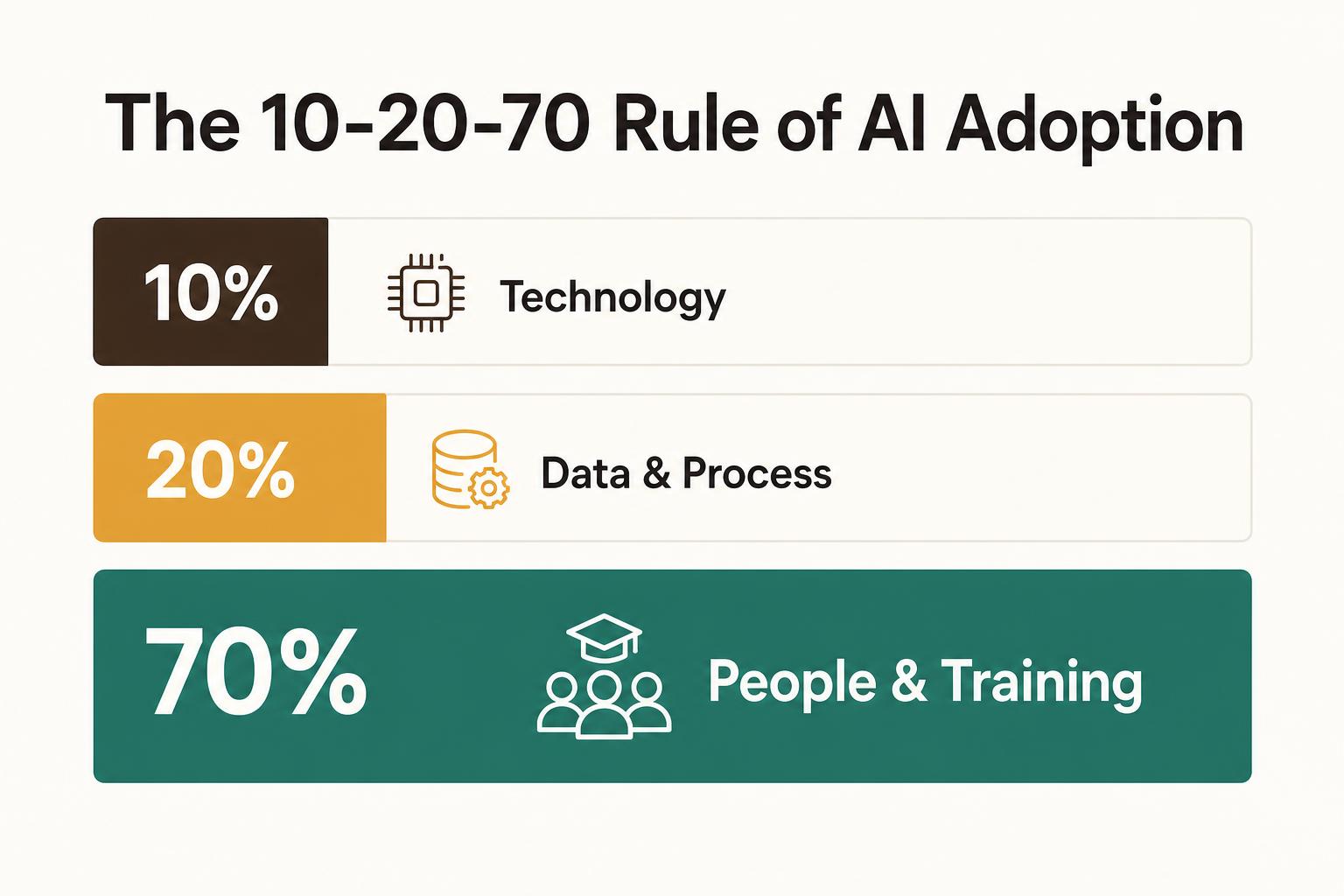
Before you sign up for a single free trial or paid subscription on this list, you need to understand why most software deployments fail. In digital transformation, there is a strict rule of thumb known as the 10-20-70 Rule:
10% of your success comes from the technology itself (the tools on this list).
20% comes from your data and process design (wiring the tools into your existing CRM, email, or website).
70% comes down entirely to people adoption and hands-on training.
Most AI rollouts fail at the 70%, not the 10%.
Many small businesses buy a tool like Claude or Apollo, hand it to a sales or marketing team without a clear process, and find that nobody is using it 30 days later. Software alone will not save you time. A tool is only as fast as the person operating it.
As you read through the 16 tools below, don't ask, "Is this tool cool?" Ask, "Which specific workflow will this take off my team's plate, and who will I train to own it?"
How AI Tools Replace Manual Work in Small Business
AI tools can help small businesses automate tedious tasks, support marketing work, and improve customer service on a limited budget. ChatGPT and Claude draft emails and synthesize notes. Canva handles professional graphic design. The useful measure is how many hours the workflow gives back.
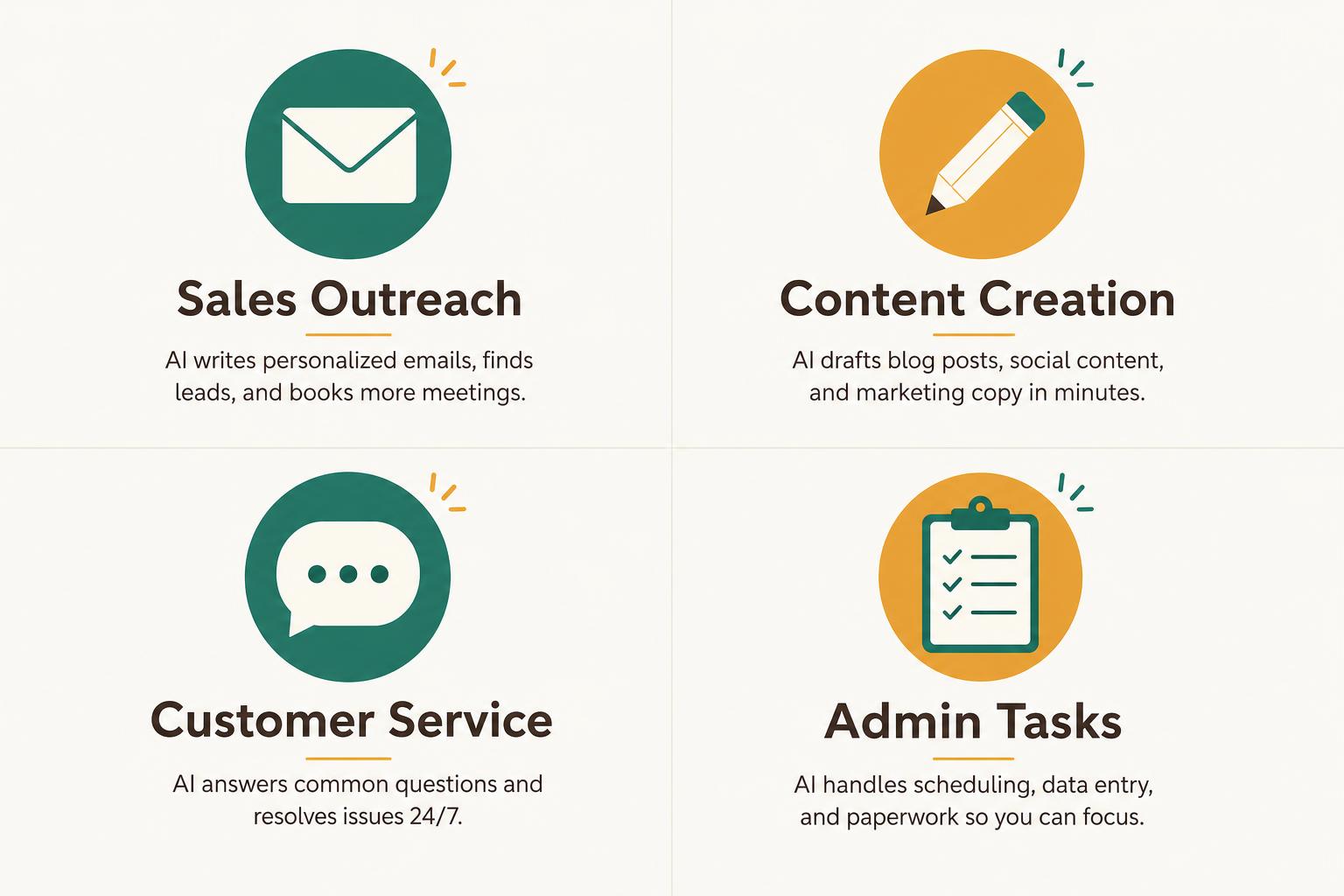
Here's where AI typically takes over manual work:
Sales outreach: Writing personalized emails one by one becomes AI-generated sequences that adapt to each prospect.
Content creation: Drafting social posts from scratch becomes AI-assisted drafts you edit in minutes.
Customer service: Answering the same questions repeatedly becomes a chatbot handling them around the clock.
Admin tasks: Taking meeting notes by hand becomes AI transcription with automatic summaries.
The pattern repeats across every category. AI handles the repetitive, time-consuming parts. You handle the judgment calls and relationship-building.
How to Choose the Right AI Tools for Your Small Business
With so many AI tools available, start by choosing one workflow rather than comparing every tool. Before signing up for anything, a simple decision framework helps you avoid wasted subscriptions and unused software.
1. Map the tool to a specific workflow
AI tools work best when tied to one repeatable task. Writing cold emails. Responding to website visitors. Summarizing meeting notes. If you can't name the exact workflow, you're probably not ready to buy the tool. When the workflow is first-touch outreach, the first-touch outbound email workflow gives reps a repeatable way to research a target and draft relevant opening messages.
2. Check for no-code setup and native integrations
"No-code" means you can set up and use the tool without writing any software code. For small teams, this matters. You also want tools that connect to your existing software — CRM, email, calendar — without needing a developer to wire them together.
3. Confirm data privacy and vendor trust
Before pasting customer information into any AI tool, ask yourself: where does my data go, and who can access it? Check the vendor's privacy policy. Some tools use your inputs to train their models. Others don't.
4. Test on real work before you pay
Most AI tools offer free trials or free tiers. Use them on actual business tasks, not demo data. One week of real use reveals whether the tool fits your workflow better than any feature comparison.
5. Plan for team adoption from day one
Tools fail when teams don't use them. Document the prompts that work. Write simple instructions so anyone on your team can repeat the process without asking you.
All 16 AI Tools for Small Business at a Glance
Here's a side-by-side comparison of every tool covered in this guide. Skip to a category below for the detailed reviews.
Tool
Category
Best For
Free Tier
Starting Cost
Apollo
Sales
Prospecting + sequences
Yes
From $49/mo
Clay
Sales
Data enrichment
Limited
From $149/mo
HubSpot AI
Sales / CRM
CRM-native AI
Free CRM
From $20/mo
Lavender
Sales
Email coaching
Yes
From $29/mo
ChatGPT
Content
General writing + research
Yes
$20/mo Plus
Claude
Content
Long-form, natural tone
Yes
$20/mo Pro
Jasper
Marketing
Brand voice templates
Trial only
From $49/mo
Canva Magic Studio
Marketing
Graphics without a designer
Yes
From $15/mo
Intercom Fin
Customer Service
Knowledge-base chatbot
No
From $39/seat
Tidio
Customer Service
Affordable live + AI chat
Yes
From $29/mo
Chatbase
Customer Service
Custom-trained chatbot
Yes
From $19/mo
Notion AI
Productivity
Docs + summaries
Trial
From $10/mo
Fireflies
Productivity
Meeting transcription
Yes
From $18/mo
Zapier AI
Productivity
Workflow automation
Yes
From $19.99/mo
Perplexity
Research
Sourced AI search
Yes
$20/mo Pro
Gemini for Workspace
Research
Gmail + Docs + Sheets AI
Trial
From $20/seat
Pricing as of publication. Always check the vendor's website for current plans.
AI Tools for Small Business Sales and Outreach
If your sales team spends hours researching prospects and writing personalized emails, the tools in this category help you scale outreach without copy-pasting. (Related reading: why buying outbound software can't replace sales training.)
Apollo
Apollo combines a prospecting database with AI email sequences. You find leads, enrich their data, and automate outbound cadences from one platform. The free tier is generous enough for small teams to test before committing.
Clay
Clay is a data enrichment and workflow automation tool. "Enrichment" means pulling company and contact information from multiple sources automatically — LinkedIn, company websites, news articles — so your reps don't spend their mornings doing it manually.
HubSpot AI
If you already use HubSpot as your CRM, the built-in AI features draft emails, suggest follow-up timing, and summarize pipeline activity. It's not a standalone tool, but it adds real value inside an existing workflow. For a quick test inside that follow-up workflow, the high-impact sales follow-up generator can turn call context into a personalised next email before another subscription is added.
Lavender
Lavender is an AI email coach. It scores your sales emails in real time and suggests rewrites to improve personalization. Reps learn what works without starting from scratch each time.
AI Tools for Small Business Marketing and Content Creation
For small businesses without a marketing team, producing consistent content takes time. The tools here draft copy, generate visuals, and speed up production.
ChatGPT
ChatGPT is a general-purpose AI assistant and the most common entry point for small businesses. Use it for brainstorming, drafting blog posts, writing ad copy, and summarizing research. The free tier handles most basic tasks well.
Claude
Claude is known for natural, human-sounding text. It's particularly strong for longer writing projects and document analysis. If ChatGPT's output feels robotic to you, Claude often produces a different tone worth testing.
Jasper
Jasper is a marketing-focused AI writing tool with brand voice settings and templates for ads, emails, and landing pages. Teams wanting structured marketing templates often prefer it over general-purpose assistants.
Canva Magic Studio
Canva's AI features let non-designers generate graphics, resize images for different platforms, and edit visuals with text prompts. If you're covering visual content without a designer on staff, this fills the gap.
AI Tools for Customer Service and Website Chat
Websites that go silent after hours lose leads. AI chatbots handle FAQs and capture visitor information around the clock.
Intercom Fin
Intercom Fin is an AI chatbot built on your company's knowledge base. It resolves common questions automatically and escalates complex issues to humans. Pricing includes SMB tiers, though the product was originally enterprise-grade.
Tidio
Tidio combines live chat with an AI chatbot. It's affordable for small e-commerce or service businesses and sets up without developers.
Chatbase
Chatbase lets you build a custom chatbot trained on your own documents — PDFs, website content, help articles. If you have a specific knowledge base, Chatbase uses it to answer visitor questions accurately.
AI Tools for Productivity and Daily Operations
Internal operations — meeting notes, task management, workflow automation — consume hours that could go toward revenue work.
Notion AI
Notion AI adds writing and summarization features inside the Notion workspace. Draft docs, summarize meeting notes, and organize internal knowledge without switching tools.
Fireflies
Fireflies records calls, generates transcripts, and creates action items automatically. If you're taking meeting notes manually, Fireflies gives you a searchable archive instead.
Zapier AI
Zapier connects apps and automates workflows using natural language. "Automation" here means one action triggers another without manual steps — like adding a new lead to your CRM when someone fills out a form.
AI Tools for Research and Reporting
The right tools can speed up market research and competitor analysis.
Perplexity
Perplexity is an AI search engine that provides sourced answers. Use it for market research, competitor lookups, and finding current information with citations. It's faster than traditional search for business questions. To help your own business content appear in those responses, AEO for Small Teams explains how to structure pages, clarify entities, and build evidence AI systems can cite.
Gemini for Google Workspace
Gemini works inside Gmail, Docs, and Sheets. It drafts emails, summarizes documents, and analyzes spreadsheet data. If your team lives in Google Workspace, Gemini is the natural AI layer.
Free and Low-Cost AI Tools for Small Business Owners
Price matters, but implementation and team adoption matter just as much. Still, here are tools with free tiers or low entry costs:
ChatGPT: Free tier available, paid plans for advanced features.
Claude: Free tier with usage limits.
Canva: Free plan includes some AI features.
HubSpot CRM: Free CRM, AI features in paid tiers.
Apollo: Free tier for prospecting.
Tidio: Free plan for basic chat.
Risks and Limitations of AI for Small Business
AI tools have real limitations. Understanding them upfront saves you from costly mistakes.
Hallucinations and inaccurate output
"Hallucination" means AI generates confident but wrong information. This happens more often than you'd expect. Always review anything client-facing or factual before sending.
Data privacy and customer information
Avoid pasting sensitive customer data into public AI tools. Check vendor policies on data storage and whether your inputs train their models. The answer varies by tool.
Generic output that weakens your brand
AI without customization produces bland, templated content. Human editing and brand guidelines remain essential. The first draft is rarely the final draft.
Tool sprawl and unused licenses
Buying multiple overlapping tools is common. Start with one, prove value, then expand. Otherwise you end up paying for software nobody uses.
How to Start Using AI in Your Small Business
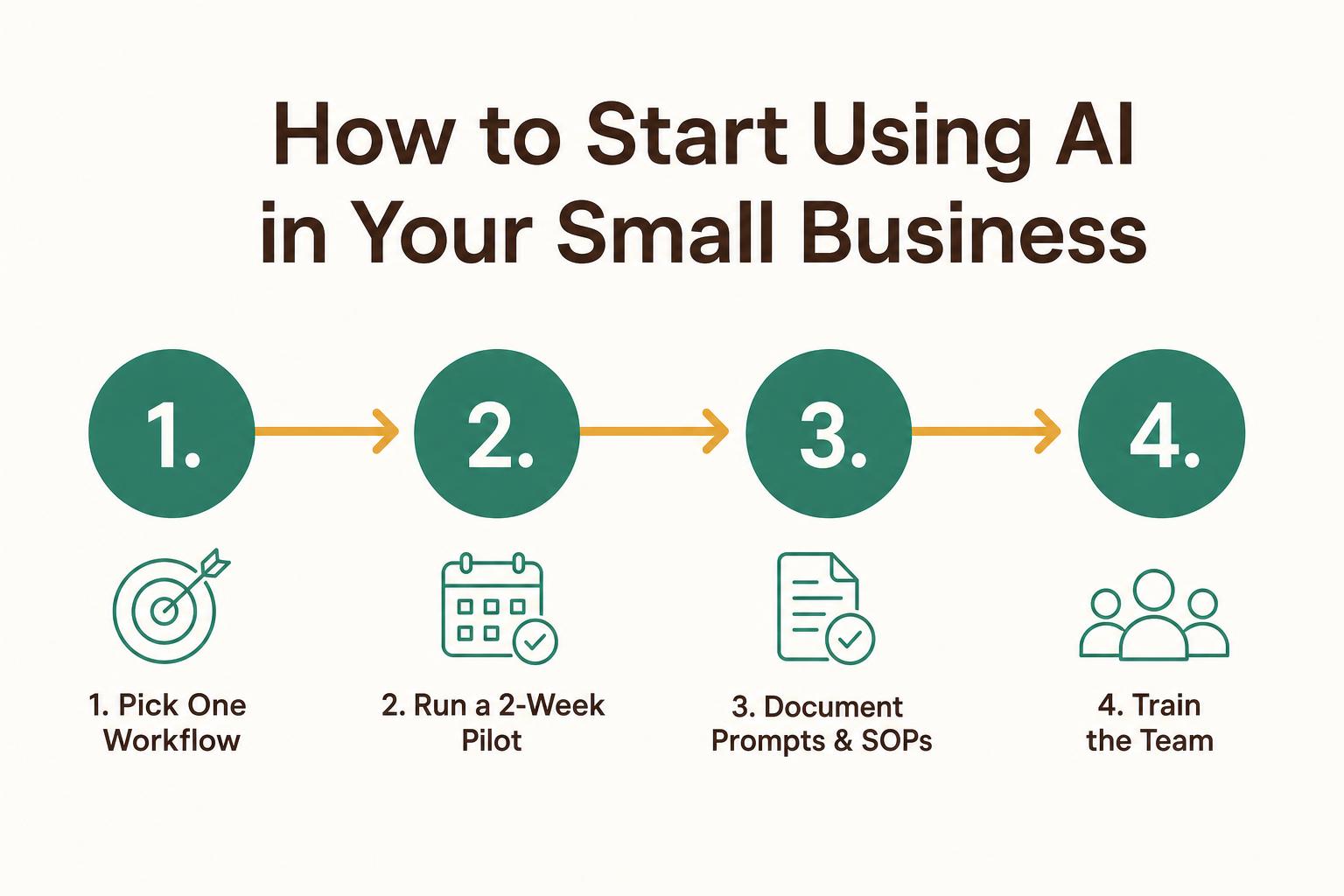
Use this four-step path to start using AI in your small business.
Step 1. Pick one painful manual workflow
Identify the task that consumes the most time or causes the most frustration. Writing outreach emails, answering website questions, and taking meeting notes are common starting points.
Step 2. Run a two-week pilot with one tool
Test one tool on real work for two weeks. Track time saved and output quality before committing to a paid plan. Real data beats assumptions. Alongside time saved and output quality, the AI marketing tool evaluation checks data handling, integrations, total cost and how easily your team can leave.
Step 3. Document the prompts and SOPs
"SOP" stands for standard operating procedure — a simple set of instructions for completing a task. Save the prompts that work and write clear steps so the process is repeatable by anyone on your team.
Step 4. Train the team and hand over ownership
Brief your team on how to use the tool. Knowledge stuck with one person creates a bottleneck. The team owns the system, not just one individual.
"This is the exact 70% part of the 10-20-70 rule where most companies lose momentum. If you don't have the internal bandwidth to run this hands-on training yourself, that is precisely why we run the AI Accelerator."
Is Your Sales Team Ready for AI? Take the Free 2-Minute Assessment
Before choosing a tool, identify the workflow and skill gaps that need attention. The free Sales Skill Gap Analyser below scores your team across 6 dimensions and tells you which AI workflow will actually move the needle for your business.
Interactive · 60 seconds
Sales Skill Gap Analyser
Rate your team honestly on each capability. The readiness score updates live and tells you whether you should train, pilot, or scale.
40
/ 100
Aware · 2/5
Do reps know exactly who they target — industry, size, triggers?
Aware · 2/5
Comfort with sourcing lists and enrichment waterfalls.
Aware · 2/5
Can reps coax usable details from ChatGPT/Claude, not fluff?
Aware · 2/5
Warm-up, SPF/DKIM, bounce-rate discipline.
Aware · 2/5
Building multi-step flows that don't burn the list.
Aware · 2/5
Clean records, status updates, no orphaned replies.
Recommendation
Foundational training needed
Your team will struggle to operate an AI outreach stack today. Start with ICP clarity, CRM hygiene, and prompt-engineering basics before adding tools.
Work With Atul to Get a Working AI System in Weeks
If you'd rather have someone build and hand over a working system, here's what I offer:
AI Chatbots: Delivered in 7 days for websites under 5,000 visitors/month.
AI Sales Outreach: Done-for-you outbound systems delivered in 10 days.
AI Accelerator: 4-week live cohort to make sales and marketing teams AI-fluent.
The process is four steps: a free 20-minute call (no pitch), a scoped proposal, the build/train phase, and a handover where you wholly own the system. Fixed price, fixed timeline, no retainers.
Frequently Asked Questions About AI Tools for Small Business
What is the best AI tool for small businesses?
There's no single best tool — it depends on your workflow. ChatGPT is the most common starting point for writing and brainstorming. HubSpot AI suits teams needing CRM integration.
How can I use AI in my small business?
Start by identifying one repetitive manual task, then test an AI tool on that specific workflow. Common starting points include drafting emails, answering customer questions, and summarizing meeting notes.
What is the 10-20-70 rule for AI?
The 10-20-70 rule suggests AI success depends roughly 10% on technology, 20% on data and process design, and 70% on people adoption. Most failures come from the people and process side, not the tool itself.
What are the top five most popular AI tools?
ChatGPT, Claude, Canva, HubSpot, and Notion AI are widely adopted by small businesses. Each serves a different function — writing assistance, CRM automation, visual design.
FAQs
What is the best AI tool for small businesses?
There is no single best tool; it depends on your workflow. ChatGPT is a common starting point for writing and brainstorming. HubSpot AI suits teams needing CRM integration, while Apollo is stronger for outbound sales. Start with your biggest time drain.
How can I use AI in my small business?
Identify one repetitive task, such as drafting emails, answering customer questions or summarizing meeting notes. Test one AI tool on real work for two weeks, measure time saved, and expand only if the workflow improves.
What is the 10-20-70 rule for AI?
The 10-20-70 rule suggests that AI success depends roughly 10% on technology, 20% on data and process design, and 70% on people adoption and hands-on training. Most failures come from the people and process side.
What are the top five most popular AI tools for small business?
ChatGPT, Claude, Canva, HubSpot and Notion AI are widely adopted by small businesses. They serve different functions, including writing assistance, document analysis, visual design, CRM automation and internal knowledge management.
Are free AI tools enough for a small business?
For early use cases such as drafting copy, summarizing notes and answering FAQs, free tiers of ChatGPT, Claude, Canva and Tidio can be enough to prove value. Upgrade after a two-week pilot shows measurable time savings.
A
Atul Singh
15 years across teaching, sales, and building. Trained 2,500+ students. Six years in corporate sales and social media. Six years building web and AI products for SMBs at Qriyas. Based in Noida, working with sales and marketing professionals across the US, UK, Australia, and English-speaking markets globally.