Your website can capture leads after hours, but it stops helping visitors when your team logs off. That gap is when visitors land, browse, and leave without sharing what they need.
This article explains how after-hours AI chatbots capture and qualify website leads, what makes them useful, and how to send warm leads to your CRM before morning.
01 The after-hours gap
Why SMBs lose website leads after hours
An after-hours AI chatbot can capture and qualify website leads while your team is offline. It can answer FAQs, share ballpark quotes, and book meetings so visitors have a clear next step.
The problem is timing, not a lack of traffic. Most SMB owners assume their website goes quiet after hours. Analytics usually tell a different story. Evening and weekend sessions often account for a significant chunk of total visits, depending on your industry.
of B2B website traffic typically lands outside normal office hours.
Industry benchmark
response window after which lead conversion drops sharply.
Harvard Business Review
typical wait when an after-hours form sits until the next business day.
Reality check
After-hours traffic patterns most owners never see
Your visitors don't follow your office hours. Decision-makers browse from home after dinner. International prospects land on your site during your night. Weekend shoppers compare options when they finally have uninterrupted time.
- Post-work browsing: B2B buyers often research solutions between 7 PM and 10 PM, after their own workday ends.
- Time zone overlap: If you serve clients in the US, UK, or Australia, someone is always awake while you sleep.
- Weekend comparison shopping: Serious buyers use Saturdays to narrow down their shortlist without distractions.
The five-minute response rule for website leads
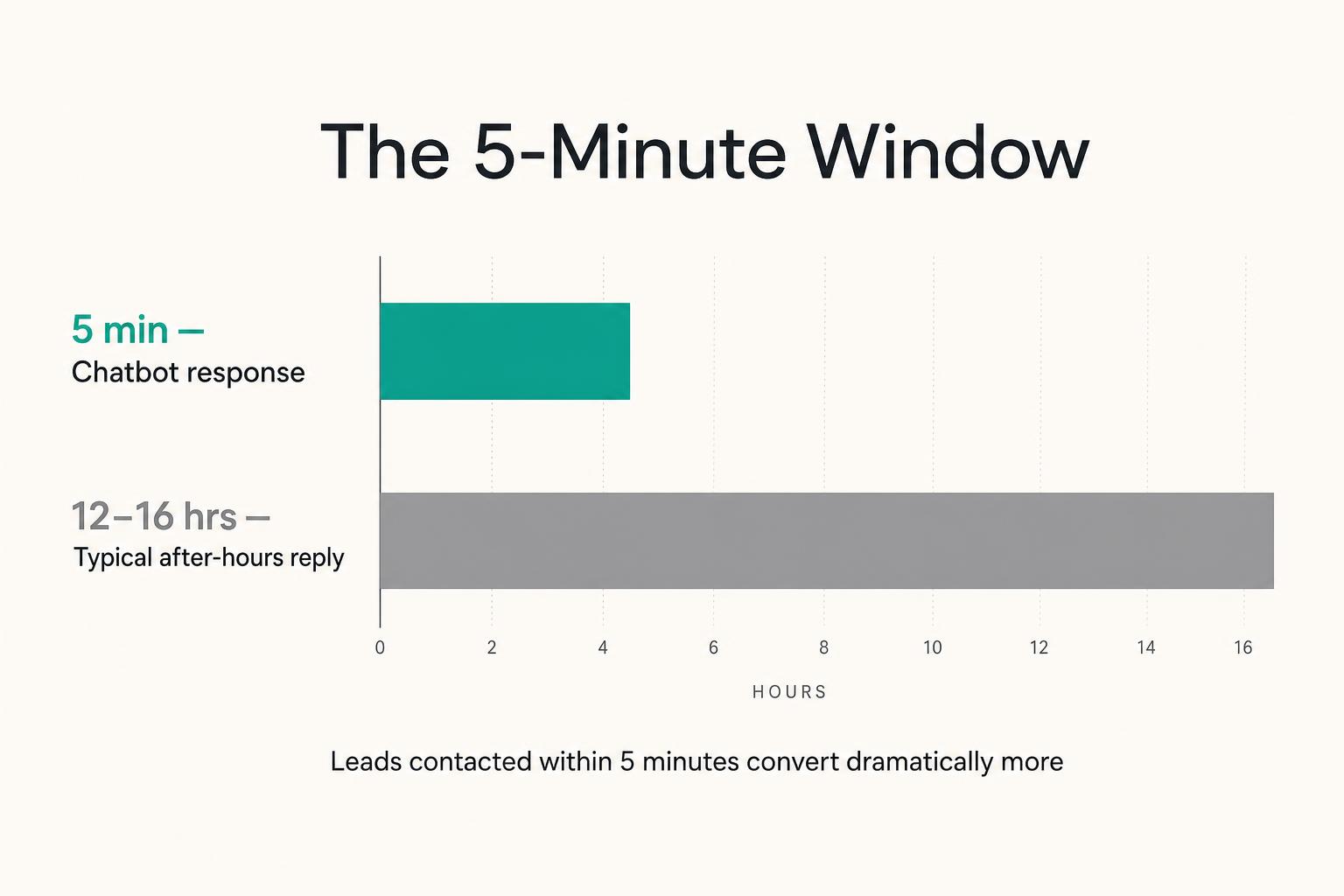
Leads contacted within five minutes are far more likely to convert than leads contacted hours later. After hours, your response time stretches to the next business day — sometimes 12 to 16 hours. By then, the visitor has moved on. They've filled out a competitor's form, booked a call elsewhere, or simply lost the urgency that brought them to your site.
Why contact forms lose after-hours website leads
Contact forms are passive. The visitor fills in their name and email, clicks submit, and waits. No conversation. No immediate value. No confirmation that anyone is listening. Chatbots flip this. They respond instantly, ask clarifying questions, and give the visitor something useful before asking for anything in return.
02 Capture vs collect
What capturing website leads means beyond collecting emails
"Capturing leads" and "collecting emails" sound similar. They're not. Collecting emails means gathering a name and email with no context. You know someone visited, but you don't know what they wanted, whether they're a good fit, or how urgent their situation is. Capturing leads means gathering contact information plus qualifying details — what they're looking for, their budget range, their timeline, and the specific questions they asked. When qualification needs more structure, the high-intent lead magnet architect prompt helps you design an exchange that filters for fit before a human follows up.
Collecting emails
- — Name and email only
- — No conversation context
- — Cold follow-up required
- — High volume, low quality
Capturing leads
- — Name, email, and qualifying details
- — Full conversation transcript
- — Warm handoff to sales
- — Lower volume, higher conversion
The distinction matters because it changes how your team spends their morning. One approach creates busywork. The other creates pipeline. That morning pipeline becomes easier to manage with an inbound lead prioritisation workflow that ranks yesterday's enquiries before the team starts calling.
03 The workflow
How an after-hours AI chatbot captures website leads
Here is the workflow that runs while your team is offline.
-
1
Visitor arrives and the bot opens the conversation.
The chatbot greets the visitor with a contextual prompt based on the page they're viewing. Not "How can I help?" but something specific: "Looking for emergency plumbing?" or "Want to know how our consulting packages work?" Generic openers get ignored. Contextual openers get responses.
-
2
Bot answers product and pricing questions in your voice.
The chatbot is trained on your FAQs, service pages, and pricing. When a visitor asks "Do you offer same-day service?" or "What's your starting price?", the bot responds accurately in your brand tone. A law firm sounds different from a plumbing company — the bot reflects that. To keep those answers accurate as services change, learn how to build an AI support knowledge base with clear ownership and a process for finding unanswered customer questions.
-
3
Bot qualifies the lead with the right questions.
Before capturing contact information, the bot asks qualifying questions. Budget range. Timeline. Specific use case. Location, if relevant. This filtering prevents your sales team from chasing leads that were never going to convert.
-
4
Bot books the meeting or captures the contact.
If the visitor is qualified and ready, the bot books directly into your calendar. If they're not ready to commit, it captures their details along with the full conversation context. Either way, the visitor leaves with a next step — not a vague promise that "someone will get back to you."
-
5
Lead lands in your CRM ready for morning follow-up.
The conversation transcript, contact information, and qualification details push automatically into your CRM or inbox. Your team starts the day with everything they need to continue the conversation. No manual data entry. No lost context.
04 What makes it convert
Four ways an after-hours chatbot can convert website visitors
Not every chatbot converts visitors. The useful ones handle a few basics consistently.
Qualify before it captures
A chatbot that asks for an email before providing any value feels like a trap. One that answers questions first, then asks for contact information, feels like a fair exchange.
Respond in seconds not minutes
A slightly imperfect response in three seconds beats a perfect response in three minutes. The visitor is still on your site, still engaged.
Book directly into your calendar
Calendar integration removes friction. The visitor picks a time, confirms, and receives a calendar invite — all without waiting for a human.
Escalate to a human when the question gets real
Escalation means the bot recognises when it can't answer confidently and routes the conversation appropriately. Maybe it flags the lead as urgent. Maybe it collects details and promises a human follow-up within a specific timeframe. You don't want the bot making promises about pricing or timelines that your team can't deliver.
05 Real conversation
What a real after-hours chatbot conversation looks like
Here's a sample conversation from a home services company at 10:47 PM:
10:47 PM · live chat
The visitor gets immediate value. The company captures a qualified lead with full context.
06 Who benefits most
Service businesses that benefit most from after-hours lead capture
Some industries see disproportionate after-hours traffic.
Law firms & legal practices
People facing accidents, arrests, or family disputes often search late at night. Immediate response builds trust at a vulnerable moment.
Dental & medical clinics
Patients research providers after work. A chatbot that answers insurance questions and books appointments captures leads that would otherwise bounce.
Home services & contractors
Homeowners dealing with emergencies search at odd hours and want fast answers. A chatbot qualifies the job and books a service call.
Consultants & B2B agencies
Buyers compare vendors on evenings and weekends. A chatbot that captures intent and books a discovery call keeps you in the running.
SaaS & fintech SMBs
Global prospects in different time zones expect instant answers about features and pricing. A chatbot handles this 24/7.
Your business?
If more than a third of your traffic lands outside office hours, the answer is almost certainly yes.
07 Guardrails
Guardrails, brand voice, and handoff to your sales team
A chatbot without guardrails is a liability. Guardrails are built-in limits that prevent the bot from answering questions outside its training or making unauthorised commitments. These principles also matter when support continues beyond the website; learn how to set up an email and WhatsApp assistant with reliable answers and defined human handover.
- Guardrails: rules that stop the bot from promising discounts or guaranteeing timelines it wasn't trained on.
- Brand voice training: the bot learns your terminology and approved responses — not generic marketing language.
- Handoff documentation: every conversation is logged so sales knows exactly what was discussed.
The handoff is where many implementations fail. The bot captures the lead, but no one reviews overnight conversations. A clear morning routine — reviewing leads, prioritising by qualification, following up within the first hour — turns captured leads into closed deals. For a deeper look at why bots fall over without ongoing ownership, read Why Most AI Chatbots Stop Working in 90 Days.
08 Mistakes to avoid
Mistakes that make after-hours chatbots annoy visitors instead of convert them
Most chatbot failures aren't technology problems. They're process problems.
Training the bot on marketing copy instead of sales conversations
"We deliver world-class solutions" doesn't answer "How much does this cost?" The bot needs actual customer questions and direct answers.
Letting the bot answer anything without guardrails
A bot with no limits will hallucinate or overpromise. It might quote a price you don't offer. Guardrails prevent this.
Skipping the morning handoff plan
Captured leads are worthless if no one follows up. Define who reviews overnight conversations and how quickly they respond.
Treating the chatbot as a tool instead of a workflow
A chatbot isn't a widget you install and forget. It's a system that requires ownership — someone who monitors performance and updates training data.
09 Deployment
Deployment timeline and ownership of your after-hours chatbot
A realistic implementation follows a predictable path:
- Discovery: understanding your sales process and common questions.
- Data collection: gathering FAQs, pricing, and brand guidelines.
- Build and training: developing the bot on your specific data.
- Testing: running scenarios to ensure accurate responses.
- Launch and handover: going live with documentation and team training.
The process typically takes 7–30 days depending on complexity. At the end, you own the system. No ongoing vendor dependency.
10 Get started
Get your after-hours lead capture system live in 30 days
Capturing after-hours leads is a solvable process problem. Your website already gets traffic when your team is offline. The question is whether that traffic converts or bounces.
Want a chatbot that captures your after-hours leads — without annoying anyone?
See how I build custom, brand-trained chatbots for SMBs in 7–30 days.
More on the chatbot stack and ownership model: browse the AI Chatbots blog →